

YouTube Subscribe Link Generator – Easy Auto-Subscribe URL in 3 Steps
YouTube Subscribe Link Generator
Free YouTube subscribe link generator – turn your standard YouTube channel URL into an "Auto-Subscribe" link. When users click it, a popup will automatically prompt them to subscribe to your channel.
Enter Channel Information
Paste your full YouTube Channel URL, ID, or @handle.
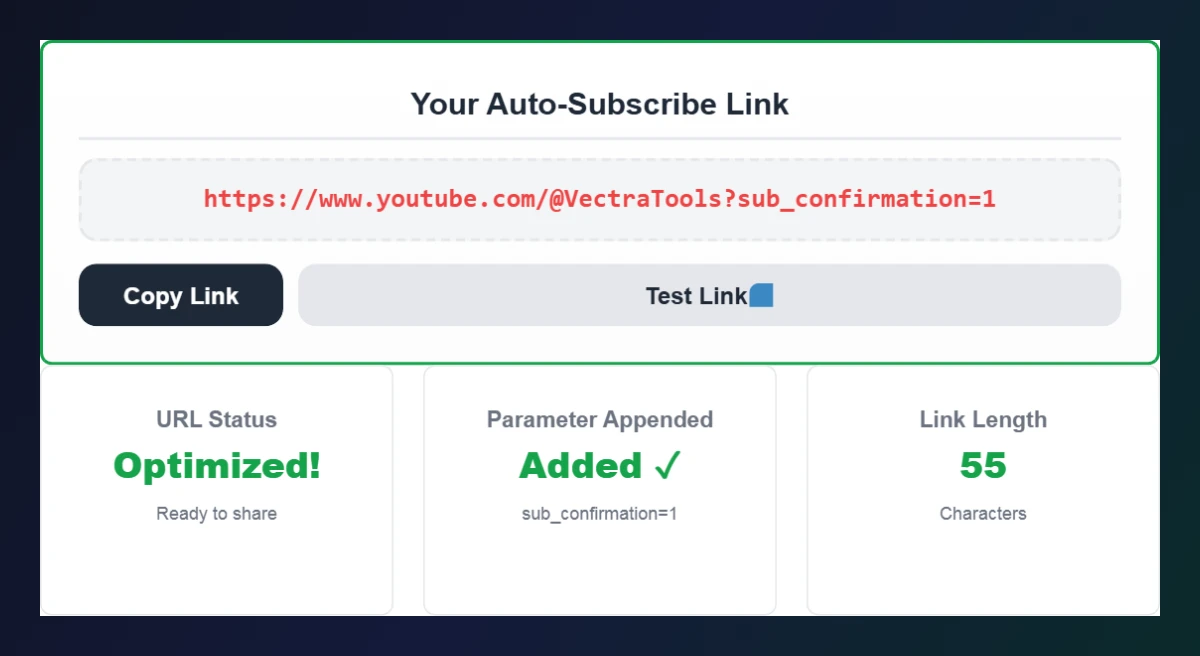
Your Auto-Subscribe Link
URL Status
Awaiting input
Parameter Appended
sub_confirmation=1
Link Length
Characters
Auto-Subscribe Link Rules & Best Practices
How It Works
- The Magic Parameter: This tool safely appends
?sub_confirmation=1to your channel URL. This is an official, safe YouTube parameter. - Desktop vs. Mobile: The popup prompt works flawlessly on desktop browsers. On mobile devices, it will open the YouTube app and take them directly to your channel page (the prompt behavior varies by OS, but the destination is always correct).
Where to Use This Link
- Video Descriptions: Replace your standard "Subscribe" link in your YouTube descriptions with this one to capture more clicks.
- Social Media Bios: Use it in your Instagram, Twitter, or TikTok bio link.
- Email Signatures & Newsletters: A great way to casually convert email readers into YouTube subscribers.
Use this free YouTube subscribe link generator to turn any channel URL or @handle into a link that asks viewers to subscribe.
Quick answer
A YouTube subscribe link is your channel URL with ?sub_confirmation=1 added at the end, for example https://www.youtube.com/@YourChannel?sub_confirmation=1. When someone opens it on desktop, YouTube shows a “Confirm subscription” popup. Paste your channel URL, @handle or channel ID (starting with UC) and the tool builds a clean link for you.
Table of Contents
Every “Subscribe” link in your video descriptions, bio or email signature is a chance to grow your channel – but a normal channel link just drops visitors on your page and hopes they click the red button. An auto-subscribe link goes one step further and asks them straight away.
Our free YouTube subscribe link generator creates that link in one click. It accepts a full channel URL, an @handle or a channel ID, removes extras like /videos or tracking parameters, and adds YouTube’s official sub_confirmation parameter.
YouTube Subscribe Link Formats
| You paste | Generated link |
|---|---|
| @YourChannel | https://www.youtube.com/@YourChannel?sub_confirmation=1 |
| youtube.com/@YourChannel/videos | https://www.youtube.com/@YourChannel?sub_confirmation=1 |
| UCxxxxxxxxxxxxxxxxxxxxxx (channel ID) | https://www.youtube.com/channel/UCxxxx…?sub_confirmation=1 |
| youtube.com/c/OldCustomName | https://www.youtube.com/c/OldCustomName?sub_confirmation=1 |
| A video link (watch, shorts, youtu.be) | Not accepted – the popup only works on channel links |
The parameter sub_confirmation=1 is a standard YouTube URL option. It does not subscribe anyone automatically – the viewer still has to click Subscribe in the popup – so it is safe to use anywhere.
How to find your channel URL or ID
In YouTube, click your profile picture → Your channel and copy the address bar link, or go to Settings → Advanced settings to copy your channel ID (it starts with “UC”). You can also use our YouTube Channel ID Finder.
How to Use the YouTube Subscribe Link Generator
Create your auto-subscribe link in three steps.
Step 1: Paste Your Channel URL, @handle or ID
Paste your full channel link (e.g. https://www.youtube.com/@VectraTools), just the @handle, or your channel ID into Enter Channel Information and click Generate Auto-Subscribe Link.

Step 2: Copy and Test Your Auto-Subscribe Link
Your link appears under Your Auto-Subscribe Link, with the status, the appended parameter (sub_confirmation=1) and the link length. Click Copy Link to copy it, or Test Link to open it and see the subscribe popup.
Step 3: Use It Everywhere You Promote Your Channel
Read the rules and best practices below the tool, then replace your normal channel link in video descriptions, end screens, social bios, emails and websites with the new subscribe link.

Where to Use Your YouTube Subscribe Link
- Video descriptions – put it in the first two lines so it shows above “Show more”.
- Pinned comments on your most-viewed videos.
- Instagram, TikTok and X bios or your link-in-bio page.
- Email newsletters and signatures.
- Your website or blog – as a button in the header, sidebar or under each post.
- QR codes on printed material – create one with our QR Code Generator.
Desktop vs Mobile Behaviour
On desktop browsers, the YouTube subscribe link opens your channel with the confirmation popup. On phones the link usually opens the YouTube app on your channel page; the popup may or may not appear depending on the app version, but viewers still land in the right place.
Tips to Get More Subscribers From the Link
- Give a reason to subscribe: “New tutorials every Tuesday”.
- Use the link in a clear call to action, not just a bare URL.
- Shorten it with a branded link if you share it in print.
- Track clicks with UTM-free short links, because the cleaner URL keeps the popup working.
Frequently Asked Questions
What is a YouTube subscribe link?
It is your channel URL with ?sub_confirmation=1 added. When opened, YouTube asks the viewer to confirm a subscription.
Does the link subscribe people automatically?
No. It only opens a confirmation popup; the viewer must click Subscribe themselves.
Can I use a channel ID instead of a handle?
Yes. Paste the ID that starts with UC and the generator creates a /channel/ link for it.
Why does it not work with a video link?
The subscribe popup only works on channel pages, so paste your channel URL or @handle instead of a watch, Shorts or youtu.be link.
Is sub_confirmation=1 allowed by YouTube?
Yes. It is a standard YouTube URL parameter and is safe to use in descriptions, bios and emails.
Is the YouTube subscribe link generator free?
Yes. It is completely free and works in any browser without sign-up.