

YouTube Hashtag Generator – Clean, Duplicate-Free Hashtags in 3 Easy Steps
YouTube Hashtag Generator & Formatter
Free YouTube hashtag generator – paste your keywords, phrases, or messy tags. We will instantly format them into clean, duplicate-free YouTube hashtags.
Input Keywords or Phrases
Separate keywords by commas or new lines (e.g., seo tutorial, digital marketing, #growth).
Generated Hashtags
Total Hashtags
Max 15 recommended
Total Characters
Fits in description?
Duplicates Removed
Cleaned automatically
YouTube Hashtag Rules & Best Practices
Hashtag Limits
- The 60 Limit: If a video has more than 60 hashtags, YouTube ignores all of them. For best results, use 3–5 focused hashtags and stay under 15.
- Over-stuffing Penalty: Using too many tags looks like spam and can negatively impact your video's visibility.
- Placement: Hashtags can be placed anywhere in the description, but usually sit neatly at the very bottom.
Formatting Standards
- Shown Near the Title: Up to three hashtags that YouTube considers most engaging can appear near your video title, so put your most important ones first.
- No Spaces: Hashtags cannot contain spaces. Our tool automatically removes spaces from multi-word phrases (e.g., "video seo" becomes "#videoseo").
- Relevance: Only use tags directly related to the video content.
Use this free YouTube hashtag generator to turn keywords and messy tags into clean hashtags you can paste straight into your description.
Quick answer
Paste your keywords separated by commas or new lines and click Format Hashtags. This YouTube hashtag generator adds the #, removes spaces and symbols, deletes duplicates (even with different capitals) and counts the result. YouTube ignores all hashtags on a video that has more than 60, and shows up to 3 near the title – so 3–5 focused hashtags usually work best.
Table of Contents
Hashtags help YouTube and viewers understand what a video is about, and clicking one opens a page of related videos. But hashtags only work when they are written correctly: no spaces, no punctuation, no duplicates – and not too many.
Our free YouTube hashtag generator does the cleaning for you. Paste a list of keywords, phrases or tags copied from another tool, and get a tidy set of hashtags plus a count of characters and duplicates removed.
YouTube Hashtag Rules at a Glance
| Rule | Detail |
|---|---|
| Maximum | More than 60 hashtags on a video = YouTube ignores all of them |
| Shown near title | Up to 3 hashtags YouTube considers most engaging |
| Format | No spaces; letters and numbers only – “video seo” becomes #videoseo |
| Where | Title or description (most creators add them at the end of the description) |
| Relevance | Only use hashtags that match the video; misleading tags can break YouTube policies |
How Many Hashtags Should You Use?
Even though the hard limit is 60, most successful channels use 3 to 5 highly relevant hashtags – often one broad topic tag, one specific tag and one branded tag (for example #seo, #youtubeseo and #vectratools). Shorts creators frequently add #shorts as well. Staying under 15 keeps your description clean and avoids looking spammy.
How to Use the YouTube Hashtag Generator
Create clean hashtags in three steps.
Step 1: Enter Your Keywords
Type or paste keywords and phrases into Input Keywords or Phrases, separated by commas or new lines – for example “seo tutorial, digital marketing, #growth”. Tick Lowercase all tags if you prefer #digitalmarketing over #DigitalMarketing.

Step 2: Format and Copy Your Hashtags
Click Format Hashtags. The tool shows your clean hashtags with the Total Hashtags, Total Characters and how many Duplicates Removed. Click Copy All Hashtags and paste them into your description.
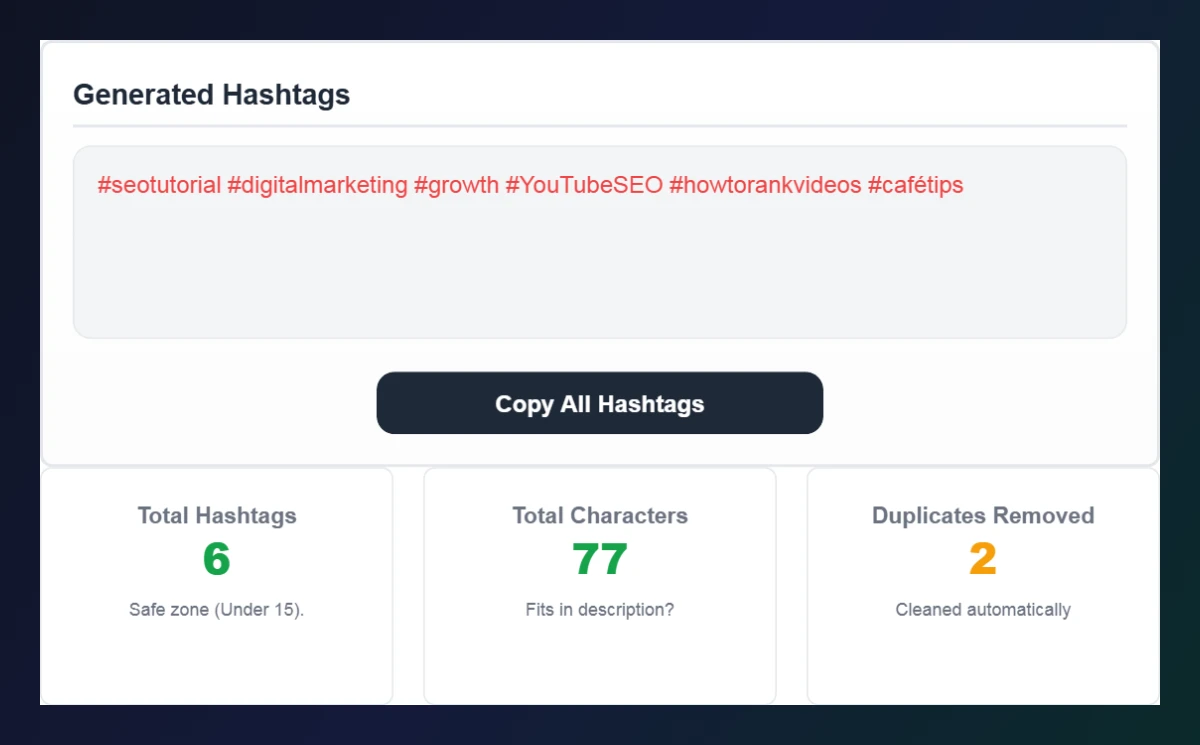
Step 3: Check the Hashtag Rules
Review YouTube Hashtag Rules & Best Practices below the tool – the 60-hashtag limit, which hashtags may appear near the title, and why every tag should be relevant.

Hashtags vs Tags on YouTube
| Hashtags (#) | Tags | |
|---|---|---|
| Where they go | Title or description | Tags field in YouTube Studio |
| Visible to viewers | Yes, clickable | No |
| Main purpose | Discovery pages and context | Mostly to catch misspellings |
| Recommended amount | 3–5 (max 60) | A few relevant tags, up to 500 characters |
YouTube Hashtag Generator Examples by Niche
- Cooking: “easy pasta, dinner ideas, quick recipes” → #easypasta #dinnerideas #quickrecipes
- Tech: “iphone 17, phone review, tech news” → #iphone17 #phonereview #technews
- Fitness: “home workout, beginners, no equipment” → #homeworkout #beginners #noequipment
- Gaming: “minecraft, survival tips, gaming” → #minecraft #survivaltips #gaming
In each case the YouTube hashtag generator removes spaces and keeps the list short, so the hashtags stay readable and relevant. Pick the best three for the top of your description and keep the rest as supporting tags.
Tips for Better YouTube Hashtags
- Search a hashtag on YouTube first to see what kind of videos rank for it.
- Mix broad and specific: #fitness with #homeworkoutforbeginners.
- Create a branded hashtag for your channel and use it on every upload.
- Avoid trending hashtags that have nothing to do with your video.
- Put the most important hashtags first in your description.
Polish the rest of your upload with the YouTube Title Case Converter and the YouTube Description Template Maker.
Frequently Asked Questions
How many hashtags can I use on YouTube?
You can add up to 60. If a video has more than 60 hashtags, YouTube ignores all of them. Most creators use 3–5.
Which hashtags appear above my video title?
Up to three hashtags that YouTube considers most engaging may appear near the title.
Can YouTube hashtags have spaces?
No. Spaces break a hashtag, so the generator joins words together, e.g. #videoseo.
Does the generator remove duplicates?
Yes. Duplicate hashtags are removed even if they use different capital letters.
Should I put hashtags in the title or description?
Both work, but most creators keep the title clean and add hashtags at the end of the description.
Is the YouTube hashtag generator free?
Yes. It is free, runs in your browser and needs no sign-up.