

Typing Speed Test – Check Your WPM and Accuracy Online
Typing Speed Test
Pick a time, start typing and see your live WPM, accuracy and errors.
Speed over time (WPM)
Take this free typing speed test to measure your WPM and accuracy in 15 seconds to 2 minutes – no sign-up needed.
Quick answer
A typing speed test measures how many words per minute (WPM) you can type and how accurately. Choose a time (15 seconds to 2 minutes) and a text type, click the box and start typing. The timer starts on your first key, live stats update as you type, and at the end you see your WPM, accuracy, raw speed, correct and wrong characters and a chart of your speed over time.
Table of Contents
Our free typing speed test was rebuilt for a clean, distraction-free experience. Mistakes are highlighted instantly, missed letters are underlined, and a smooth caret shows exactly where you are. Press Tab or Esc at any time to restart.
Pick from four text types: common words, full sentences, numbers and punctuation for an advanced challenge, or Custom, where you paste your own text, such as notes, code comments or work emails, to practise what you actually type every day.
How WPM and Accuracy Are Calculated
- Word: standard typing tests count every 5 characters (including spaces) as one word.
- WPM (net): correct characters ÷ 5 ÷ minutes. Mistakes you leave in do not count.
- Raw WPM: all typed characters ÷ 5 ÷ minutes, before mistakes are removed.
- Accuracy: correct keystrokes ÷ total keystrokes × 100. Fixing a mistake still counts the original wrong key.
Example: typing 250 correct characters in 60 seconds gives 250 ÷ 5 ÷ 1 = 50 WPM.
What Is a Good Typing Speed?
| WPM | Level | Typical for |
|---|---|---|
| Under 25 | Beginner | New typists using a few fingers |
| 25 to 39 | Average | Most everyday computer users |
| 40 to 59 | Above average | Students and office workers who type daily |
| 60 to 79 | Fast | Writers, programmers and touch typists |
| 80+ | Professional | Transcriptionists and competitive typists |
Typing Speed Test Targets by Job
| Role | Target WPM | Accuracy |
|---|---|---|
| Students | 35–45 WPM | 95%+ |
| Office and admin | 40–50 WPM | 96%+ |
| Data entry / virtual assistant | 50–60+ WPM | 97%+ |
| Content writer | 60–75 WPM | 97%+ |
| Transcriptionist | 70–90+ WPM | 98%+ |
Most people who take a typing speed test score between 30 and 60 WPM. For the research behind these numbers and a 4-week improvement plan, read our guide to the average typing speed.
How to Use the Typing Speed Test
Take the typing speed test in four steps.
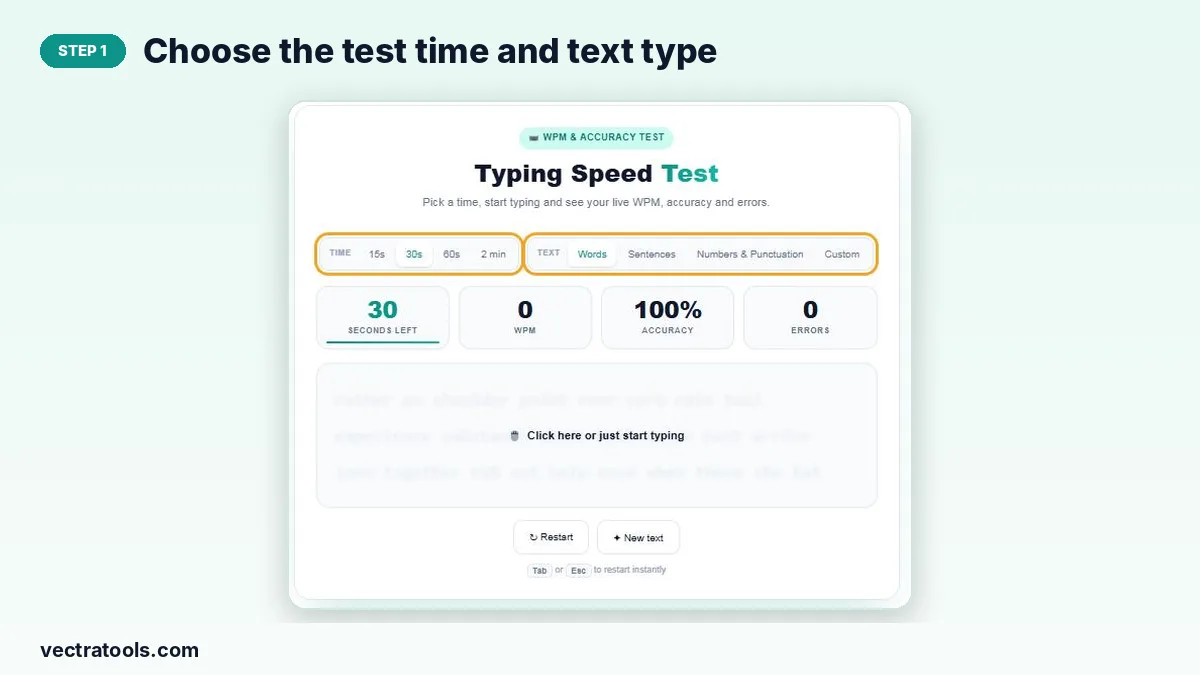
Step 1: Choose the Test Time and Text Type
Select 15s, 30s, 60s or 2 min, then choose Words, Sentences, Numbers & Punctuation or Custom. For Custom, paste your text and click Use this text.
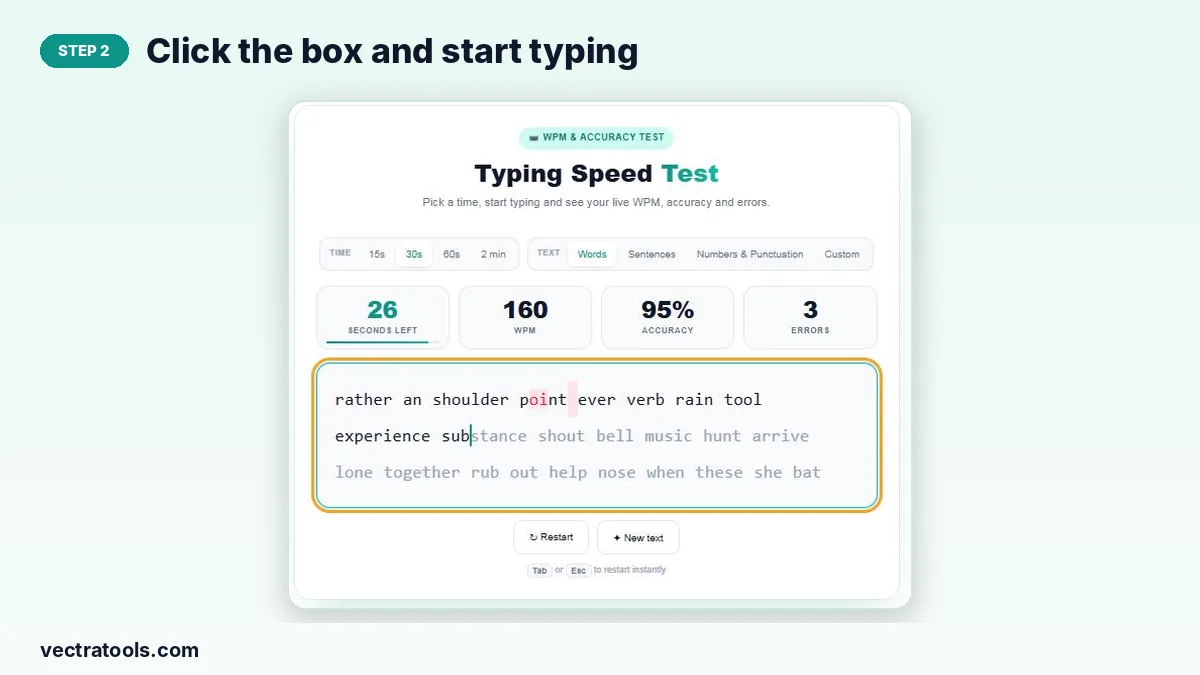
Step 2: Click the Box and Start Typing
Click the text area or simply start typing. The timer begins with your first key. Correct letters turn dark, mistakes turn red and the caret shows your position.
Step 3: Watch Your Live WPM, Accuracy and Errors
The stats bar updates as you type, showing seconds left, current WPM, accuracy and the number of errors.

Step 4: Review Your Result and Speed Chart
When time runs out you get your final WPM, typist level, accuracy, raw WPM, correct and wrong characters, a speed-over-time chart and your personal best. Click Try again to go again.

Tips to Type Faster
- Learn touch typing: keep your fingers on the home row (ASDF and JKL;).
- Look at the screen, not the keyboard.
- Focus on accuracy first; speed follows once mistakes drop.
- Practise 10 to 15 minutes a day rather than one long session a week.
- Use Custom mode with text from your own work to train the words you type most.
- Sit upright with relaxed shoulders and wrists level with the keyboard.
Typing Speed Test Features
| Feature | Benefit |
|---|---|
| 4 time options | Quick 15-second sprints or 2-minute endurance tests |
| 4 text types | Words, sentences, numbers and punctuation, or your own text |
| Live stats | See WPM, accuracy and errors while you type |
| Word-by-word checking | A missed letter only affects one word, not the rest of the line |
| Speed chart | See whether you started fast and slowed down |
| Personal best | Your best score is saved in your browser on this device |
Why Take a Typing Speed Test?
Typing speed affects how quickly you can write assignments, answer emails and code. A regular typing speed test shows where you stand, tracks your progress over weeks and highlights whether you need to work on speed or accuracy. Many jobs, such as data entry and administration, also ask for a minimum WPM.
How Accurate Is This Typing Speed Test?
Every result is calculated from your actual keystrokes, not estimated:
- WPM counts only correct characters, divided by 5 and by the minutes elapsed, so mistakes lower your score fairly.
- Raw speed includes every character you typed, so you can see how much errors cost you.
- Accuracy is correct keystrokes divided by total keystrokes.
- The timer starts on your first key press, so reading the text first does not count against you.
For the most reliable score, take three 60-second typing speed tests and use the average. Short 15-second sprints usually read higher because there is no time for fatigue.
A 10-Minute Daily Typing Practice Routine
- 2 minutes – warm up: one 60-second test on Words at a relaxed pace.
- 4 minutes – accuracy: two tests on Sentences, aiming for 98% accuracy instead of speed.
- 2 minutes – weak keys: one test on Numbers & Punctuation.
- 2 minutes – real text: paste a paragraph you actually write at work using Custom mode.
Track your best and average WPM each week. Steady practice usually adds 5–10 WPM per month. Pair it with our Word Counter when you practise with your own writing.
Frequently Asked Questions
Is this typing speed test free?
Yes. It is free with no sign-up and no limit on tests.
How is WPM calculated?
Correct characters are divided by 5 to get words, then divided by the time in minutes.
What is a good typing speed?
About 40 WPM is a solid everyday speed. 60 WPM and above is fast.
Can I use my own text?
Yes. Choose Custom, paste your text and click Use this text.
How do I restart quickly?
Press Tab or Esc, or click Restart.
Is my score saved?
Your personal best is stored only in your browser on this device.
Does it work on phones?
Yes. Tap the text box to open the keyboard and start typing.
How long should a typing speed test be?
A 60-second test is the standard. 2-minute tests give a steadier result; 15 and 30 seconds are good for quick practice.
Why is my WPM lower than my raw speed?
WPM counts only correct characters, while raw speed counts everything you typed. The gap shows how much errors are costing you.
Does this typing speed test work on mobile?
Yes. It works in any modern browser on phones, tablets and computers, though most people type faster on a physical keyboard.