

Word Counter – Count Words, Characters and Reading Time in 3 Easy Steps
Advanced Word Counter
Real-time word, character, paragraph count, and reading time analyzer.
Quick answer
A word counter counts the words, characters, paragraphs and reading time of any text. Paste or type your text into the box above and the numbers update instantly. Words are counted as groups of characters separated by spaces or line breaks, characters include spaces, and reading time is based on 200 words per minute, rounded up to the next minute.
Our free word counter works live as you type, so you can watch your essay, blog post, caption or cover letter grow toward its target. It shows four numbers at once: words, characters, paragraphs and estimated reading time. There is no sign-up and no upload. Your text is counted in your browser and never leaves your device.
What Is a Word Counter?
A word counter is a tool that measures the length of a piece of writing. Teachers set essays by word count, editors commission articles by word count, and search engines and social networks cut off titles and posts by character count. Counting by hand is slow and easy to get wrong, so a word counter does it for you in real time.
This tool is built for everyday writing. If you need keyword density or want to filter out common words like "the" and "and", use our word counter with stop-words filter instead.
How to Use the Word Counter
The tool is at the top of this page. These three steps take a few seconds.
Step 1: Paste or Type Your Text
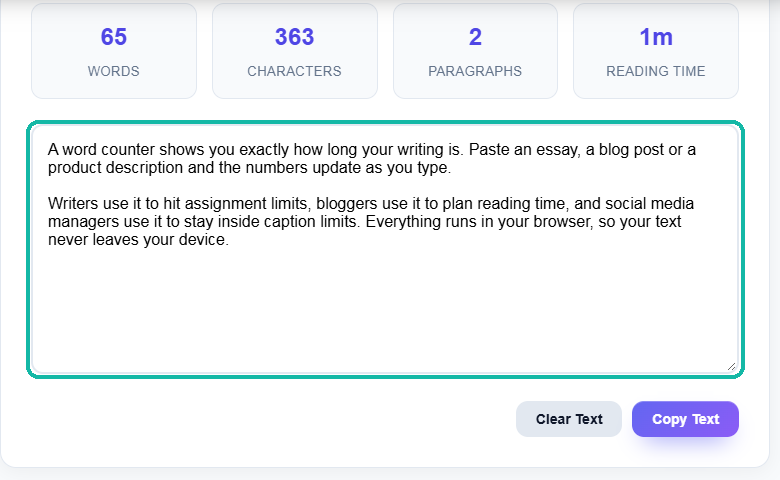
Click inside the box that says Type or paste your content here and paste your text with Ctrl+V (Cmd+V on Mac), or start typing. In our example we pasted two short paragraphs about word counters.
Step 2: Read Your Results
The four cards above the box update on every keystroke. Our example shows 65 words, 363 characters, 2 paragraphs and a reading time of 1m (one minute). Keep editing and the numbers change with you, so you can trim or expand until you hit your target.

Step 3: Copy or Clear the Text
Click Copy Text to copy your edited text to the clipboard and paste it back into your document, email or CMS. Click Clear Text to empty the box and reset every counter to zero before you check the next piece.

How the Word Counter Counts Your Text
Different tools count slightly differently, which is why Word, Google Docs and online counters sometimes disagree by a word or two. Here is exactly how this word counter works:
| Metric | How it is counted |
|---|---|
| Words | Any group of characters separated by a space, tab or line break. "Well-known" is one word, "e-mail" is one word, and a number like "2026" counts as a word. |
| Characters | Every character in the box, including letters, numbers, punctuation, spaces and line breaks. |
| Paragraphs | Blocks of text separated by one or more line breaks. Empty lines are ignored. |
| Reading time | Words divided by 200 (an average adult silent reading speed), rounded up to the next whole minute. |
If you need characters without spaces, or limits for SEO titles and meta descriptions, our character counter breaks those out separately.
Worked Examples
Example 1: A 650-Word College Essay
The Common App personal essay has a 650-word limit. Paste your draft and watch the Words card. If it reads 712, you know you need to cut 62 words. The reading time will show 4m, because 650 ÷ 200 = 3.25 minutes, rounded up.
Example 2: A 1,500-Word Blog Post
1,500 ÷ 200 = 7.5, so the tool shows a reading time of 8m. Many blogs print this as "8 min read" under the title, and you can copy the figure straight from the card.
Example 3: A Short Social Post
Posts on X are limited to 280 characters for standard accounts. Write your post in the box and keep an eye on the Characters card rather than the Words card, since spaces and punctuation count toward the limit.
Common Word and Character Limits
| Type of writing | Typical limit |
|---|---|
| Common App personal essay | 250 to 650 words |
| Standard blog post | 1,000 to 2,000 words |
| Cover letter | 250 to 400 words |
| Abstract for a research paper | 150 to 250 words |
| Post on X (standard account) | 280 characters |
| Instagram caption | 2,200 characters |
| SEO title tag | About 50 to 60 characters |
| Meta description | About 150 to 160 characters |
Always check the exact rule for your school, publisher or platform, since limits change and some count spaces while others do not.
Tips for Getting an Accurate Count
- Paste plain text. Headings, footnotes and captions copied from a document all count. Remove anything your teacher or editor does not include in the limit.
- Watch for double spaces. Extra spaces do not add words, but they do add characters, which matters for tight character limits.
- Keep paragraphs on separate lines. The paragraph count relies on line breaks, so text pasted as one long block will show as one paragraph.
- Use reading time as a guide. 200 words per minute is an average. Technical or dense writing takes longer to read, and a speech is slower still. For speeches, try our reading time calculator.
Who Should Use a Word Counter?
Students checking essays and assignments against a word limit, bloggers and SEO writers planning article length, freelance writers who are paid per word, social media managers working within caption limits, and job seekers keeping cover letters to one page. If you want to see which words you repeat most, try our word frequency counter.
Frequently Asked Questions
How does the word counter count words?
It splits your text at spaces, tabs and line breaks and counts each group of characters as one word. Hyphenated words such as "well-known" count as one word, and numbers count as words.
Does the character count include spaces?
Yes. The Characters card counts every character in the box, including spaces, punctuation and line breaks. For a count without spaces, use our character counter.
How is reading time calculated?
The tool divides your word count by 200, which is an average silent reading speed for adults, and rounds up to the next whole minute. For example, 450 words shows as 3m.
How many pages is 1,000 words?
About 2 pages single-spaced or 4 pages double-spaced, using a 12-point font and standard 1-inch margins. The exact number depends on font, spacing and paragraph breaks.
Why is my count different from Microsoft Word or Google Docs?
Each program treats symbols, dashes, URLs and footnotes a little differently. Small differences of one or two words are normal. If a limit is strict, follow the tool your teacher or publisher uses.
Is my text saved or sent anywhere?
No. The word counter runs entirely in your browser. Nothing is uploaded or stored, and the text is gone when you clear the box or close the page.
Is the word counter free?
Yes. The VectraTools word counter is free, has no word limit for normal use, and needs no sign-up.