

Keyword Grouping Tool – Cluster Keyword Lists by Seed Terms in 2 Easy Steps
LSI Keyword Grouping Tool
Instantly cluster large raw keyword lists based on your specific seed terms to map topical authority.
| Cluster Intent | Example Seed Terms | Execution Strategy |
|---|---|---|
| Commercial / Service | agency, services, company | Map these to your core money pages. Ensure your landing pages clearly define a strict 7-day delivery timeline to build client trust. |
| Informational / Blog | how to, guide, what is | Use these for top-of-funnel content. Interlink them to your commercial service pages using exact-match anchor text. |
| Local SEO | near me, [city name], local | Create dedicated location-based landing pages containing these clustered LSI terms within H2/H3 subheadings. |
Use this free keyword grouping tool to sort hundreds of keywords into topic clusters in seconds, using seed terms you choose.
Quick answer
Keyword grouping (keyword clustering) organises a long keyword list into topics so each group can be targeted by one page. Paste your keywords into Raw Keyword List, add root words such as “grinder”, “espresso” and “cold brew” to Seed Terms, and every keyword containing a seed is labelled with that cluster; the rest are marked UNGROUPED. With Excel/Sheets Format ticked, the result pastes into a spreadsheet as two columns: Keyword and Cluster.
Table of Contents
Keyword exports from Semrush, Ahrefs, Google Keyword Planner or Search Console often contain hundreds or thousands of phrases. Sorting them by hand into pages and topics is the slowest part of planning a content strategy.
This keyword grouping tool clusters by the seed terms you set, so you control the topics. It is ideal for building topical maps, deciding which keywords belong on one page and spotting gaps that need new content.
Example: Clustering a Coffee Keyword List
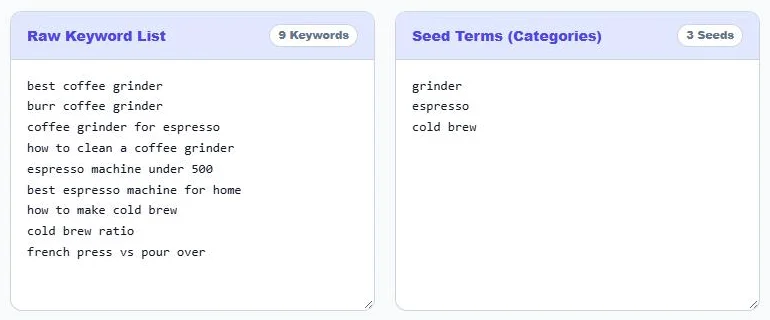
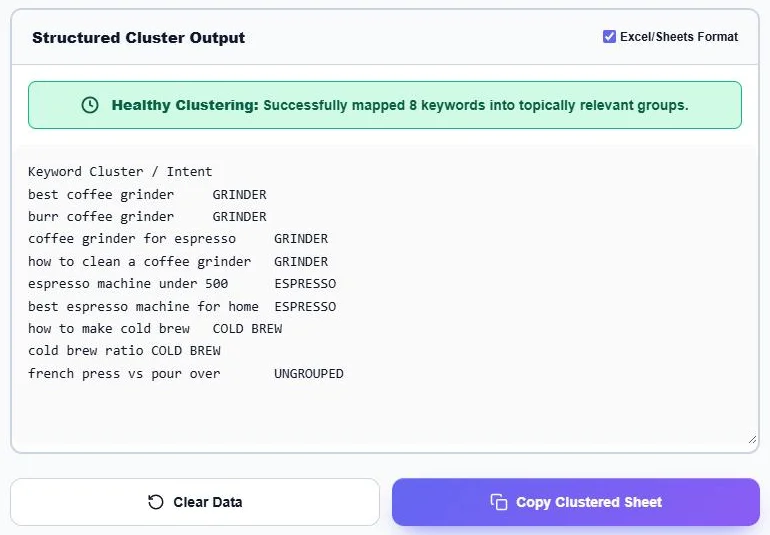
Nine keywords with the seeds grinder, espresso and cold brew give this result, with 8 of 9 keywords grouped:
| Keyword | Cluster |
|---|---|
| best coffee grinder | GRINDER |
| burr coffee grinder | GRINDER |
| coffee grinder for espresso | GRINDER |
| how to clean a coffee grinder | GRINDER |
| espresso machine under 500 | ESPRESSO |
| best espresso machine for home | ESPRESSO |
| how to make cold brew | COLD BREW |
| cold brew ratio | COLD BREW |
| french press vs pour over | UNGROUPED |
“coffee grinder for espresso” contains two seeds and goes to GRINDER because that seed is listed first. Put your most specific or most important seeds at the top of the list to control which cluster wins.
How to Use the Keyword Grouping Tool
Step 1: Paste Keywords and Add Seed Terms
Paste your keyword export into Raw Keyword List, one keyword per line. In Seed Terms (Categories), enter the root words for each topic, one per line. The badges show how many keywords and seeds were read, and the clusters update as you type.
Step 2: Review and Copy the Clusters
The Structured Cluster Output lists each keyword with its cluster, and the status bar shows how many keywords were grouped. Keep Excel/Sheets Format ticked for a two-column sheet, or untick it for a grouped text list. Click Copy Clustered Sheet and paste it into your spreadsheet.
Choosing Good Seed Terms
- Use product or topic roots: “grinder”, “espresso”, “refinance”, “keto”.
- Add intent seeds: “how to”, “best”, “vs”, “near me” or “price” separate informational, commercial and local searches.
- Order matters: a keyword joins the first matching seed, so place narrow seeds above broad ones.
- Review UNGROUPED: it often reveals a topic you forgot, so add a new seed and run it again.
From Clusters to a Content Plan
- Give each main cluster one pillar or category page.
- Split large clusters by intent: guides for “how to”, comparison posts for “vs”, buying guides for “best”.
- Use the other keywords in a cluster as H2s, H3s and FAQs on that page instead of separate thin posts.
- Link cluster pages to each other and to the pillar page to build topical authority.
Seed Clustering vs SERP Clustering
| Method | How it groups | Best for |
|---|---|---|
| Seed-based (this tool) | Keywords that contain the same root word | Fast topical maps and site structure |
| SERP-based | Keywords whose Google results share the same URLs | Deciding exactly which keywords share one page |
Seed grouping is quick and free; for close calls, search the two keywords and check whether Google shows the same pages before merging them. “LSI keywords” is a common SEO name for related terms; Google does not use latent semantic indexing, but grouping related phrases still helps you cover a topic fully.
Privacy
Your keyword lists are processed in your browser and never uploaded, which keeps client research private.
Frequently Asked Questions
What is a keyword grouping tool?
It sorts a list of keywords into clusters, or topic groups, so you can plan which page should target which keywords.
How does this tool decide the groups?
Each keyword is matched to the first seed term it contains. Keywords with no seed are marked UNGROUPED.
Can I paste keywords from Semrush or Ahrefs?
Yes. Copy the keyword column from any export and paste it with one keyword per line.
How do I get the result into Google Sheets?
Keep Excel/Sheets Format ticked, click Copy Clustered Sheet and paste into cell A1. Keywords and clusters land in two columns.
What are LSI keywords?
In SEO, it is a popular name for related terms and variations of a main keyword. Covering them helps a page answer a topic completely.
Is the keyword grouping tool free?
Yes. It is free, runs in your browser and needs no sign-up.