

Meta Tag Generator – Create SEO Meta Tags with Google Preview
Meta Tag Generator
Create SEO meta tags for any page, check title and description length and preview how it looks in Google
Google search preview
Checks

Quick answer
A meta tag generator writes the HTML tags that tell search engines and browsers what a page is about. Enter your page title, meta description and canonical URL, choose robots settings and copy the tags into the <head> of your page. The live Google preview and length checks show how your result will look before you publish.
Our free meta tag generator creates the title tag, meta description, robots, canonical, viewport, charset, author and theme colour tags in one block. It counts characters as you type, warns when a title or description is too long and flags risky settings such as noindex. Everything happens in your browser.
Which Meta Tags Matter for SEO?
| Tag | What it does | Ideal length |
|---|---|---|
| <title> | The clickable headline in Google and the browser tab | 30 to 60 characters |
| meta description | The summary under the title in search results | 70 to 160 characters |
| meta robots | Tells search engines whether to index the page and follow links | index, follow for normal pages |
| link rel=canonical | Names the main URL when the same content has several addresses | Full https URL |
| meta viewport | Makes the page display correctly on phones | width=device-width, initial-scale=1 |
What the Meta Tag Generator Checks
- Title length, so the title is not cut off in search results.
- Description length, so the summary is long enough to be useful but not truncated.
- Whether the canonical URL is a full absolute address.
- A warning when noindex would hide the page from Google.
- A live Google preview with your URL, title and description.
How to Use the Meta Tag Generator
Step 1: Pick a Page Type Preset
Click Blog post, Product page or Thank-you page to load an example with sensible settings, or start typing your own details.

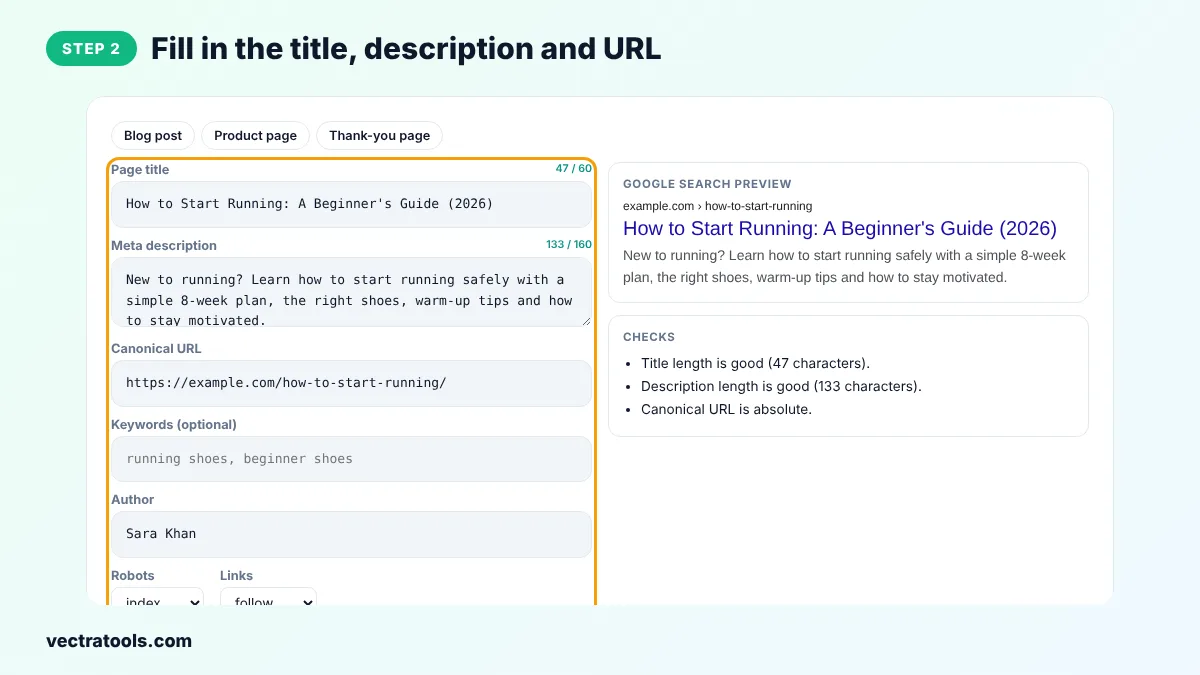
Step 2: Fill in the Title, Description and URL
Type your page title and meta description and watch the counters. Add the canonical URL, author and keywords if you need them, and choose index or noindex and follow or nofollow.
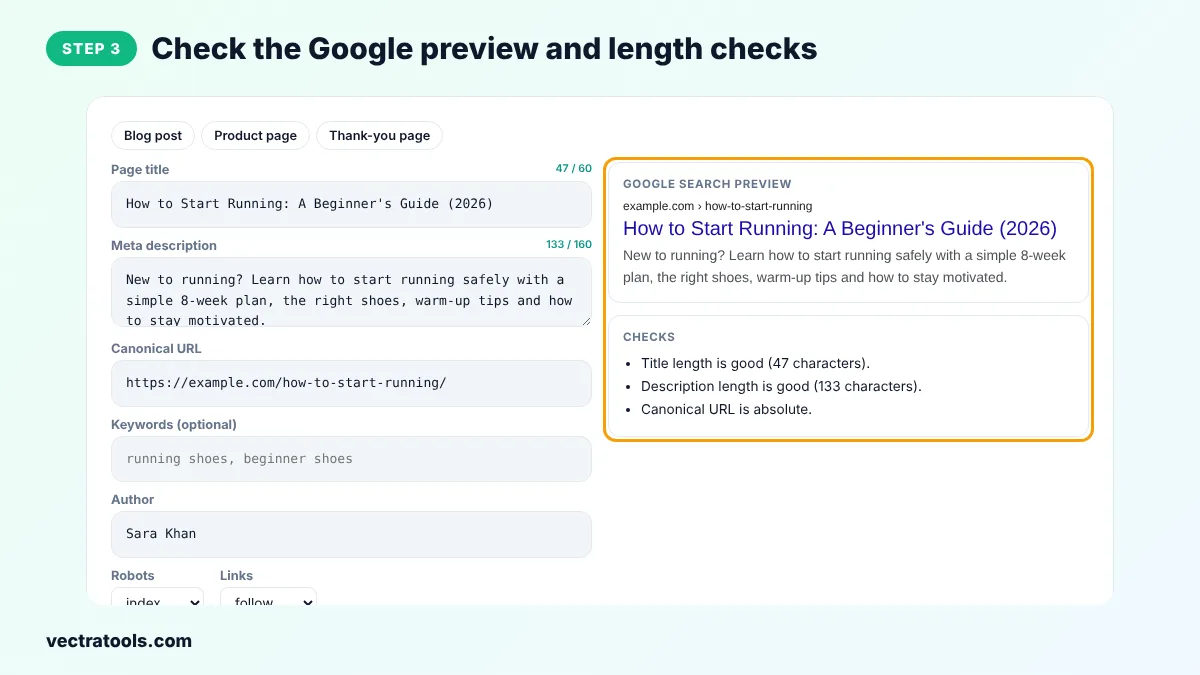
Step 3: Check the Google Preview and Length Checks
The Google search preview shows how the page may appear in results. The Checks box tells you if the title or description is too long or if a setting needs attention.
Step 4: Copy the Meta Tags into Your Head
Click Copy meta tags and paste the code inside the <head> section of your HTML. In WordPress, use the title and description fields of your SEO plugin instead.

How to Write a Good Title and Description
- Put the main keyword near the start of the title, then add a benefit or a year.
- Write each title and description for one page only. Duplicate titles confuse search engines.
- Describe what the reader gets and end the description with a reason to click.
- Avoid stuffing keywords. Write for people first.
Google sometimes rewrites titles and descriptions, but a clear, accurate title and description written with a meta tag generator are used far more often than vague ones.
Do Meta Keywords Still Matter?
No. Google has ignored the meta keywords tag for ranking for many years. The meta tag generator still offers the field because some internal site search tools and a few smaller engines read it, but you can leave it empty.
Meta Tag Generator Tips
- Use noindex for thank-you pages, internal search results and staging copies of your site.
- Keep the canonical URL consistent with or without the trailing slash, matching your real URLs.
- Add Open Graph tags as well, so links look good when shared on social media.
- Check each important page with the meta tag generator after you change its content.
Frequently Asked Questions
What is a meta tag generator?
A meta tag generator is a tool that writes HTML meta tags, such as the title, description and robots tags, from details you type in. You copy the code into the head of your page.
How long should a meta description be?
Aim for 70 to 160 characters. Shorter descriptions may not explain the page well and longer ones are usually cut off in Google.
How long should a title tag be?
Keep it between 30 and 60 characters so it fits on one line in search results without being cut off.
Where do I put meta tags?
Inside the <head> section of your HTML, before the closing </head> tag. Content management systems and SEO plugins usually add them for you.
What does noindex, nofollow mean?
noindex tells search engines not to show the page in results and nofollow tells them not to follow its links. Use it only for pages you want to keep out of search.
Does Google use the meta description for ranking?
Not directly, but a good description can raise your click-through rate, which brings more visitors from the same ranking.
Is this meta tag generator free?
Yes. It is free, needs no sign-up and runs in your browser.