

CSS Minifier Online – Compress and Minify CSS Free
CSS Minifier
Compress CSS by removing comments, whitespace and redundant characters, and see how much you save
Quick answer
A CSS minifier makes a stylesheet smaller by removing comments, spaces, line breaks and other characters the browser does not need. Paste your CSS, click Minify CSS and copy the result. Smaller CSS downloads faster, which helps page speed and Core Web Vitals.
Our free CSS minifier online compresses any stylesheet in one click and shows exactly how many bytes you save. It can also shorten hex colours, drop units from zero values and keep license comments, and it can beautify minified CSS back into readable code. Everything runs in your browser.
What the CSS Minifier Removes
- Comments, except /*! license */ comments when that option is ticked.
- Line breaks, tabs and indentation between rules and declarations.
- Spaces around braces, colons, semicolons, commas and the > and ~ selectors.
- The last semicolon before a closing brace, which CSS does not need.
- Extra characters in values, such as #ffffff to #fff and 0px to 0, when those options are on.
Text inside quotes, such as font names and content values, is never changed, and a space before a colon in a selector like div :hover is kept because it changes what the selector matches.
| Before | After |
|---|---|
body { | body{margin:0;color:#333} |
/* Header */ | removed |
@media (max-width: 600px) { ... } | @media (max-width:600px){...} |
How to Use the CSS Minifier
Step 1: Paste Your CSS into the Input Box
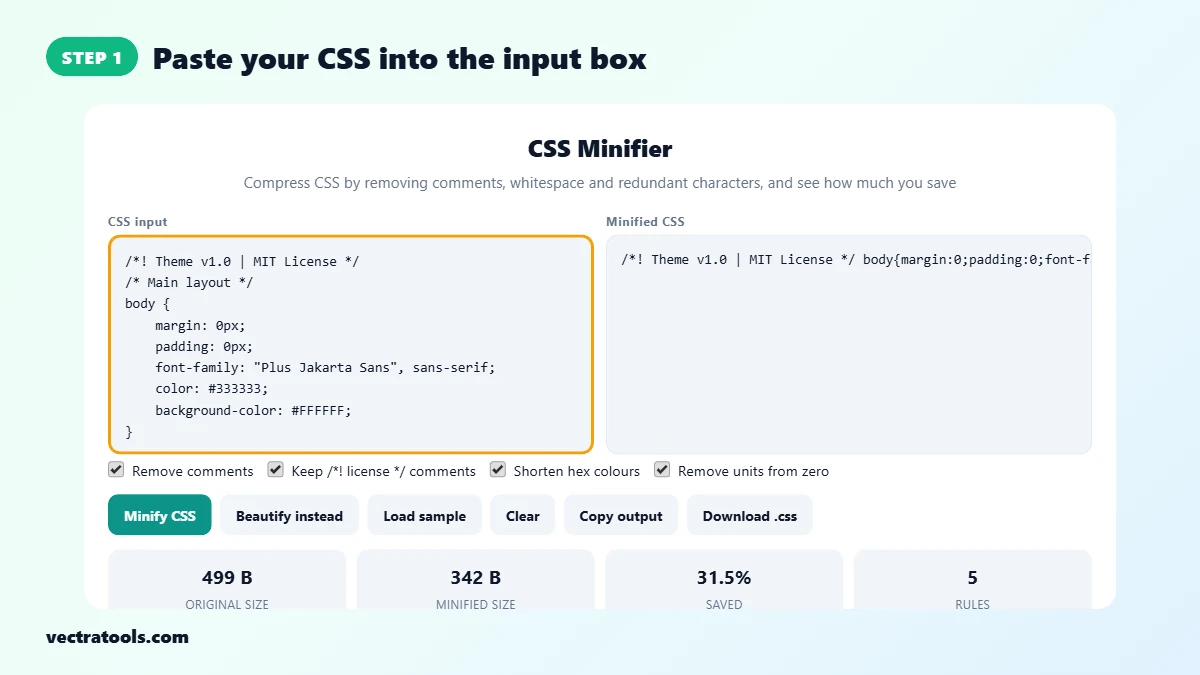
Open the CSS minifier and paste your stylesheet into CSS input, or click Load sample to try it first. You can paste a whole file or a single rule. The tool minifies as you type.
Step 2: Choose What to Remove or Shorten
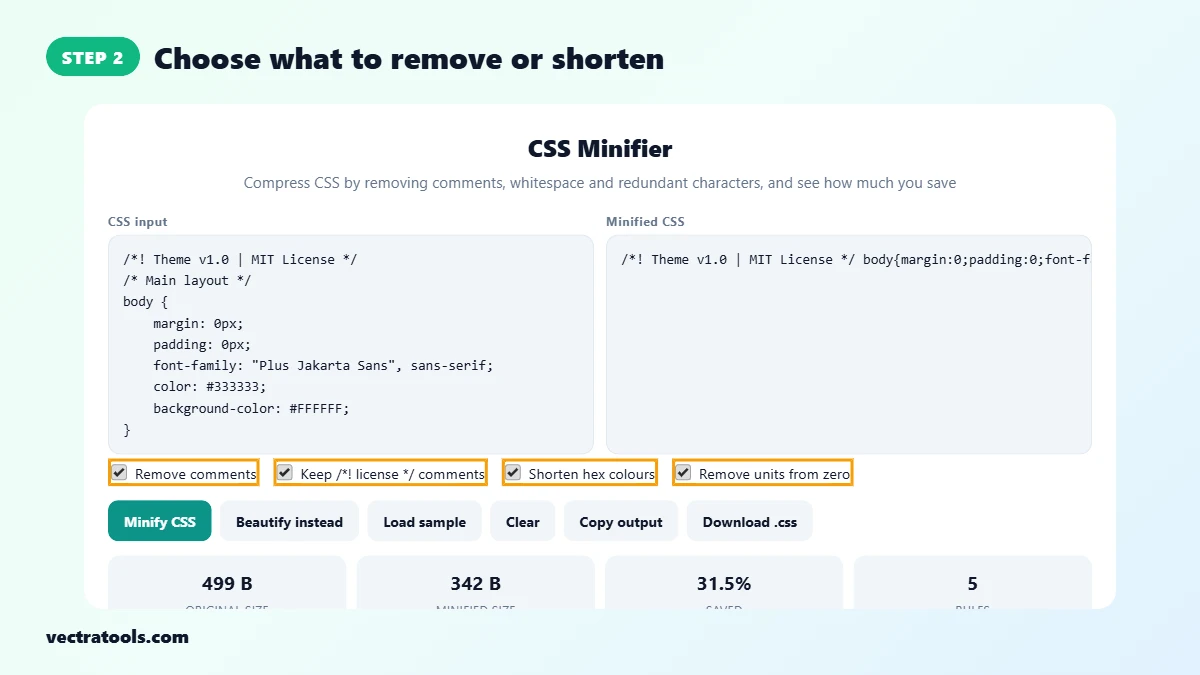
Tick the options you want. Remove comments strips normal comments, Keep /*! license */ comments keeps copyright notices, Shorten hex colours turns #ffffff into #fff, and Remove units from zero turns 0px into 0.
Step 3: Click Minify CSS and Check the Savings
Click Minify CSS. The minified CSS appears on the right, and the cards below show the original size, the minified size, the percentage saved and the number of rules.

Step 4: Copy, Download or Beautify Instead
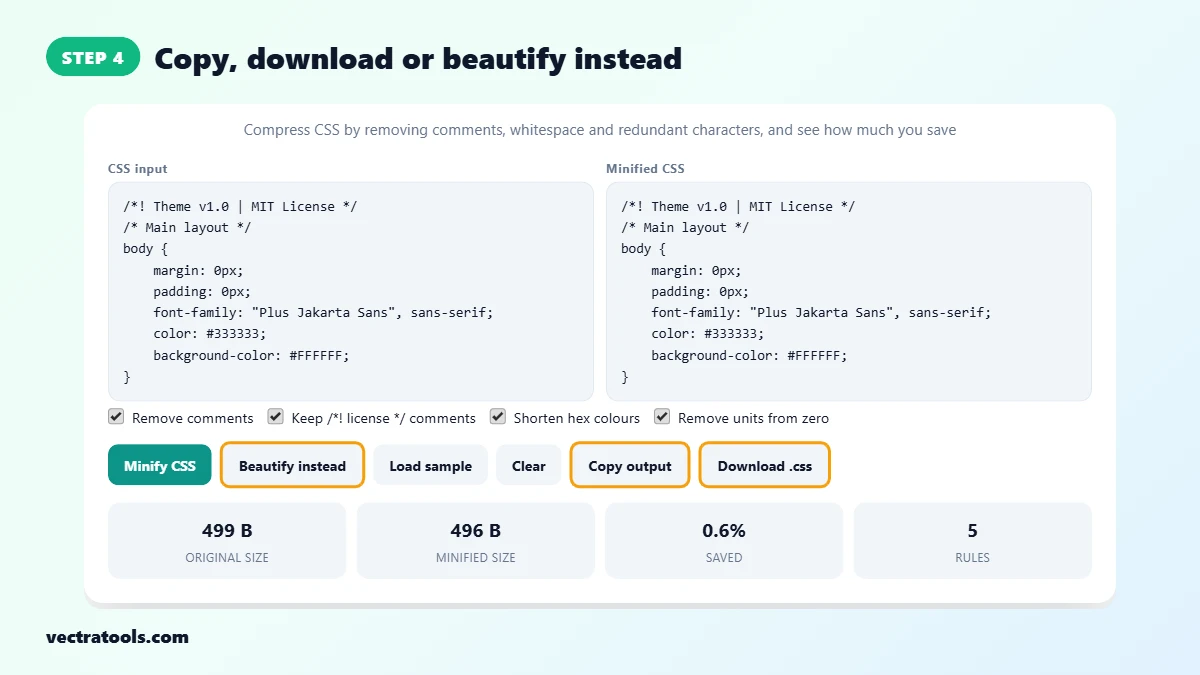
Click Copy output to copy the result, or Download .css to save it as a file. If you need readable code instead, click Beautify instead to format the CSS with 4 space indentation.
Why Minify CSS?
- Faster pages: fewer bytes means the stylesheet downloads and parses sooner, so the page renders faster.
- Better Core Web Vitals: CSS blocks rendering, so a smaller file can improve First Contentful Paint and Largest Contentful Paint.
- Lower bandwidth: every visitor downloads less data, which matters on mobile networks.
- Cleaner production files: internal notes and comments are not shipped to the public.
CSS Minifier Tips
- Always keep the original, readable CSS file. Edit that file and minify a fresh copy each time you deploy.
- If the tool warns that opening and closing braces do not match, fix the missing bracket before you use the output.
- Minifying works best together with gzip or Brotli compression on your server. The two savings add up.
- Name the minified file style.min.css so you and your team can tell the two versions apart.
Frequently Asked Questions
What does a CSS minifier do?
A CSS minifier removes characters the browser does not need, such as comments, line breaks, indentation and the last semicolon in each rule. The styles work exactly the same but the file is smaller.
Is minified CSS safe to use on a live website?
Yes. Minified CSS is valid CSS. Keep the original readable file for editing and upload the minified copy to your server.
How much smaller will my CSS file be?
Most hand-written stylesheets shrink by 20 to 40 percent. Files with many comments and deep indentation save more. The Saved card shows the exact figure for your code.
Why keep /*! license */ comments?
Comments that start with /*! usually hold a copyright or license notice that the license asks you to keep. With this option on, those comments stay while normal comments are removed.
Will shortening hex colours change my colours?
No. #ffffff and #fff are the same colour in CSS. The tool only shortens a six-digit code when each pair of digits repeats, such as #33cc99 to #3c9.
Can I un-minify CSS?
Yes. Paste minified CSS and click Beautify instead. The tool puts each declaration on its own line with 4 space indentation. Removed comments cannot be brought back.
Is my CSS uploaded to a server?
No. The CSS minifier runs entirely in your browser, so your code never leaves your device.