

SQL Formatter Online – Format and Beautify SQL Queries Free
SQL Formatter
Format messy SQL into clean, indented queries with uppercase keywords, or minify it into one line

Quick answer
An SQL formatter turns a long, messy query into clean, readable SQL by putting each clause on its own line, indenting columns and conditions and writing keywords in uppercase. Paste your query, pick an indent and click Format SQL. You can also minify SQL into a single line.
Our free SQL formatter online is built for developers, analysts and students who read queries copied from logs, ORMs, dashboards or old code. It formats SELECT, INSERT, UPDATE and DELETE statements, joins and subqueries in one click and counts statements, keywords and lines for you. Everything runs in your browser.
What the SQL Formatter Does
- Starts each main clause, such as SELECT, FROM, WHERE, GROUP BY, HAVING, ORDER BY and LIMIT, on a new line.
- Puts each selected column on its own line and indents it under SELECT.
- Moves JOIN to a new line and indents ON, AND and OR conditions under it.
- Indents subqueries inside brackets one level deeper than the outer query.
- Writes keywords in uppercase or lowercase, and keeps strings, comments and identifiers unchanged.
| Before | After |
|---|---|
select id, name from users where active = 1 order by name | SELECT |
left join orders o on o.user_id = u.id and o.status = 'paid' | LEFT JOIN orders o |
How to Use the SQL Formatter
Step 1: Paste Your SQL into the Input Box
Open the SQL formatter and paste your query into SQL input, or click Load sample. One long line, copied log output or several statements separated by semicolons all work.

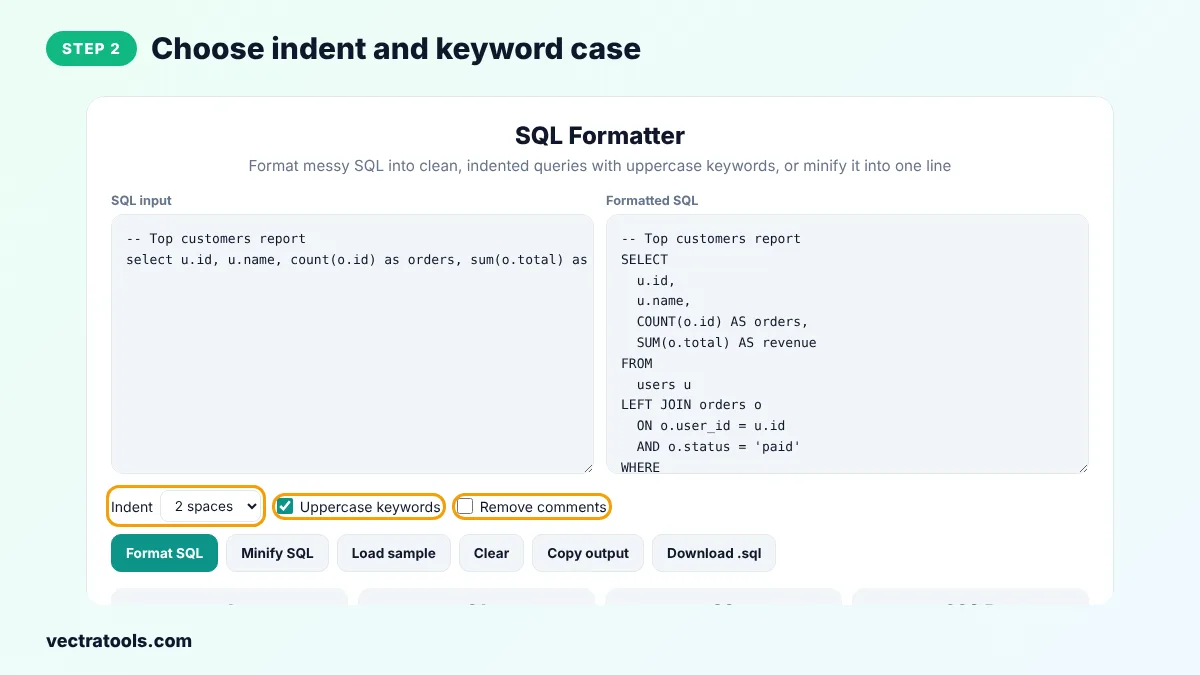
Step 2: Choose Indent and Keyword Case
Pick 2 spaces, 4 spaces or Tab for the indent. Keep Uppercase keywords ticked to write SELECT, FROM and WHERE in capitals, and tick Remove comments to strip -- and /* */ comments.
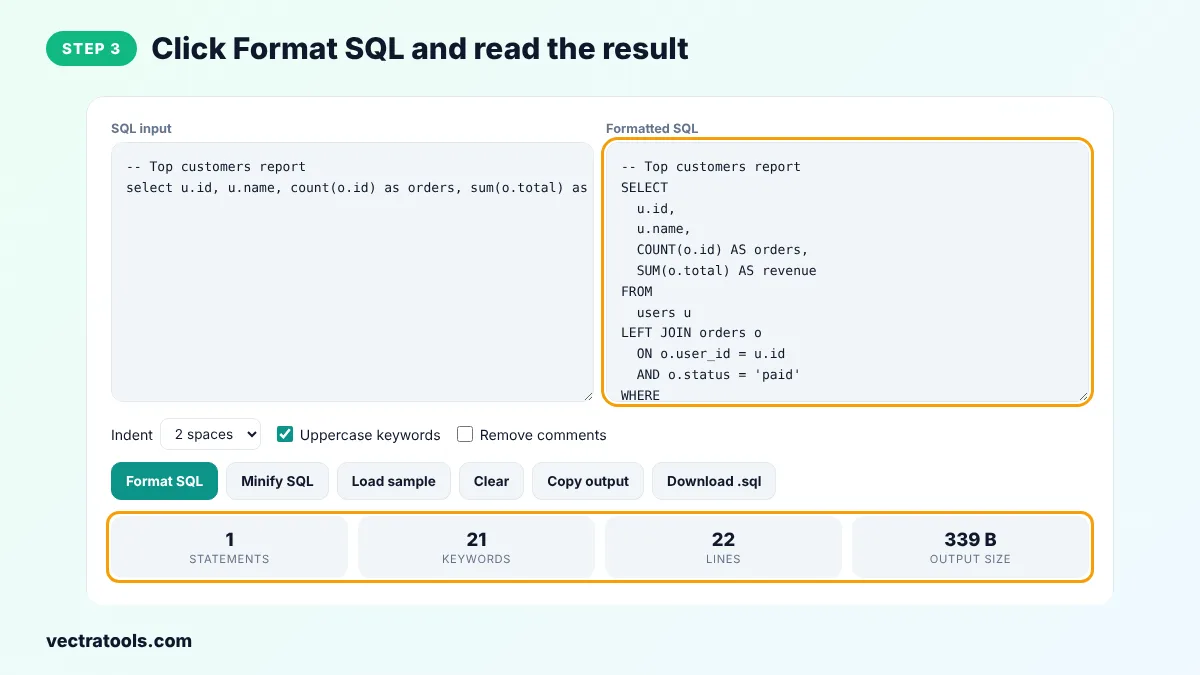
Step 3: Click Format SQL and Read the Result
Click Format SQL. Each clause starts on its own line, columns and conditions are indented under it, and the cards show the number of statements, keywords, lines and the output size.
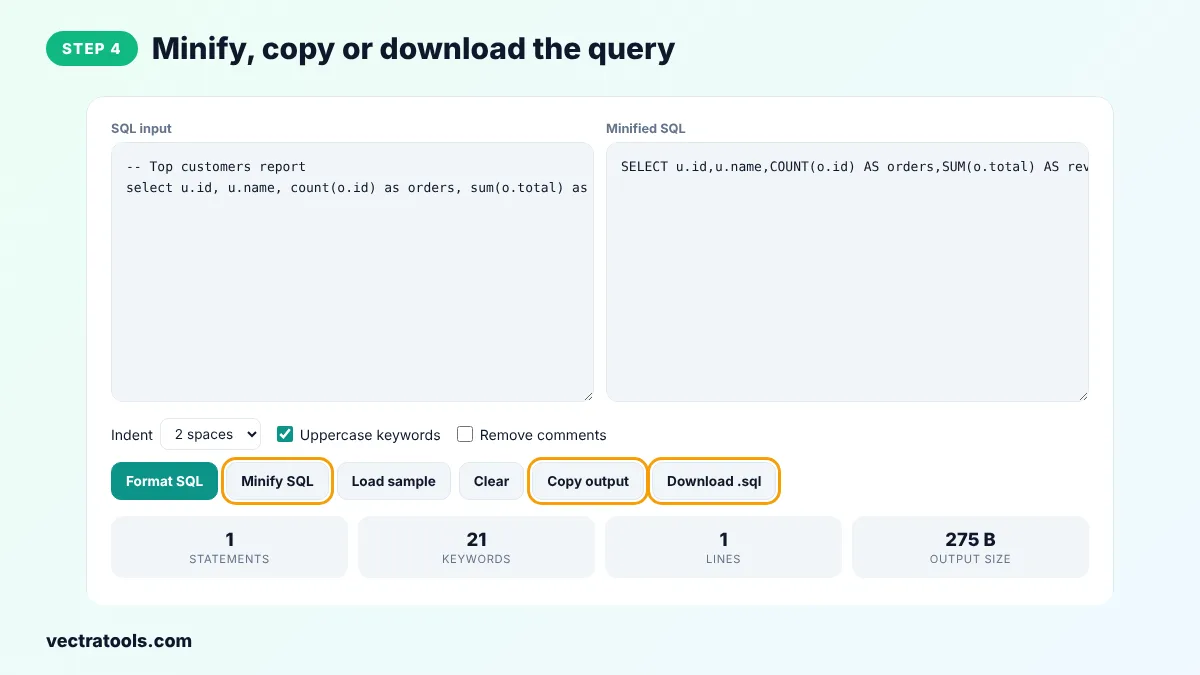
Step 4: Minify, Copy or Download the Query
Click Minify SQL to squeeze the query into one line for code or config files. Use Copy output to copy the result, or Download .sql to save it as a file.
Why Format SQL?
- Readability: clauses and conditions line up, so you can see what a query does at a glance.
- Debugging: a missing join condition, a wrong AND or OR, or an unclosed bracket is much easier to spot.
- Code review: a consistent style keeps diffs small and makes reviews faster.
- Learning: formatted queries show how SELECT, JOIN, GROUP BY and HAVING fit together.
SQL Formatter Tips
- If the tool warns that brackets do not match, look for a missing closing bracket in a function call or subquery.
- Use 4 spaces when you paste SQL into Python or Java code that already uses 4 space indentation.
- Keep comments in queries you share with your team and remove them in queries you paste into code.
- Format a query before you run EXPLAIN on it. The plan is much easier to match with readable SQL.
Frequently Asked Questions
What does an SQL formatter do?
An SQL formatter rewrites a query with consistent line breaks, indentation and keyword case. Each clause such as SELECT, FROM, WHERE and GROUP BY starts on a new line, so the query is easy to read and review.
Does formatting change what my query does?
No. Only whitespace and the case of keywords change. Table names, column names and text inside quotes are left exactly as you wrote them, so the query returns the same result.
Which SQL dialects does it support?
It works with standard SQL used by MySQL, PostgreSQL, SQL Server, SQLite and Oracle. Common keywords, joins, subqueries, CASE expressions and backtick or bracket identifiers are handled.
Can I format several queries at once?
Yes. Separate the statements with semicolons. Each one is formatted on its own with a blank line between them, and the Statements card shows how many were found.
Should SQL keywords be uppercase?
Uppercase keywords are a common style because they stand out from table and column names. SQL itself does not care, so you can untick Uppercase keywords to get lowercase instead.
What does Minify SQL do?
Minify SQL removes comments, line breaks and extra spaces and puts the whole query on one line. This is handy when you need to paste a query into code, a config file or a command line.
Is my SQL sent to a server?
No. The SQL formatter runs entirely in your browser, so queries with real table names or data never leave your device.