

HTML Formatter and Beautifier – Indent or Minify HTML Online
HTML Formatter and Beautifier

Quick answer
An HTML formatter takes messy or minified HTML and rewrites it with one tag per line and consistent indentation, so the structure is easy to read. Paste your code, choose 2 spaces, 4 spaces or tabs and click Beautify HTML. You can also strip comments or minify the HTML to make it smaller for production.
Our free HTML formatter and beautifier is useful for reading code copied from a website, cleaning up templates, reviewing emails and debugging layouts. It keeps the content of script, style and pre tags intact and runs fully in your browser.
What the Beautifier Does
- Puts each block element, such as div, section, p and li, on its own line.
- Indents child elements one level deeper than their parent.
- Keeps inline elements like a, strong, em and span inside the line of text, so spacing stays the same.
- Leaves void elements such as img, br, meta and input unindented, because they have no closing tag.
- Keeps the inside of pre and textarea exactly as written, and keeps script and style code on their own lines.
| Before | After |
|---|---|
| <ul><li><a href="/">Home</a></li></ul> | <ul> <li> <a href="/">Home</a> </li> </ul> |
| <title>My Page</title> on a long line | <title>My Page</title> on its own indented line |
How to Use the HTML Formatter and Beautifier
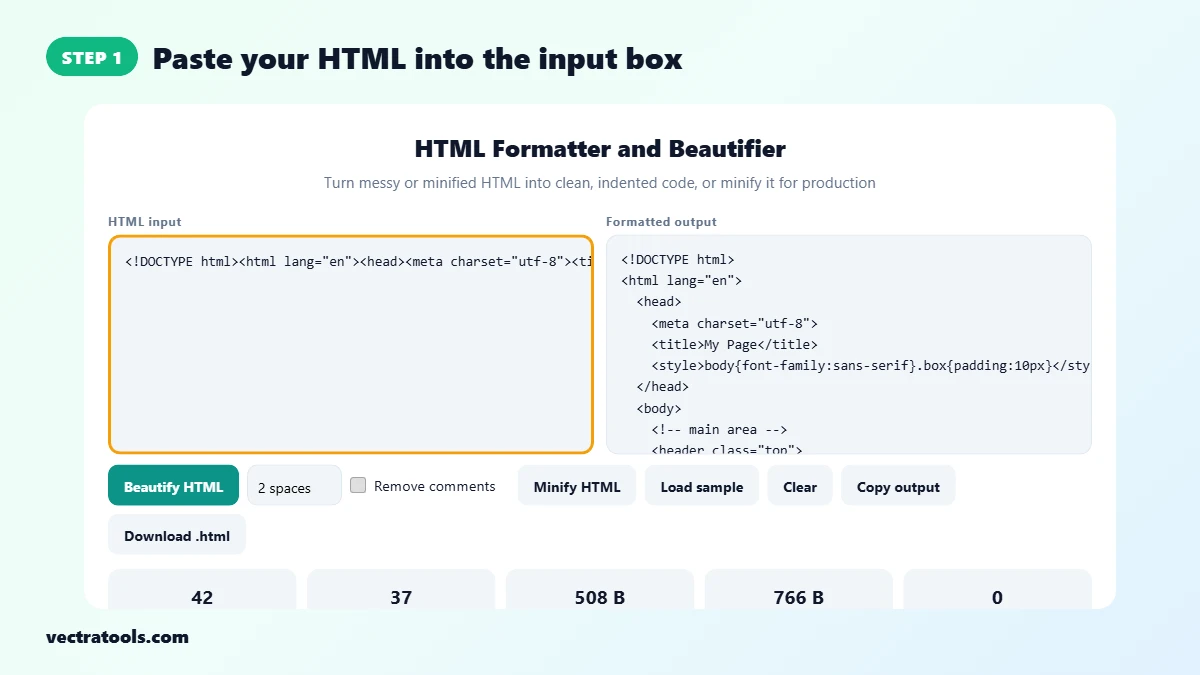
Step 1: Paste Your HTML into the Input Box
Open the HTML formatter and paste your code into HTML input, or click Load sample. Minified HTML from a live page works fine.
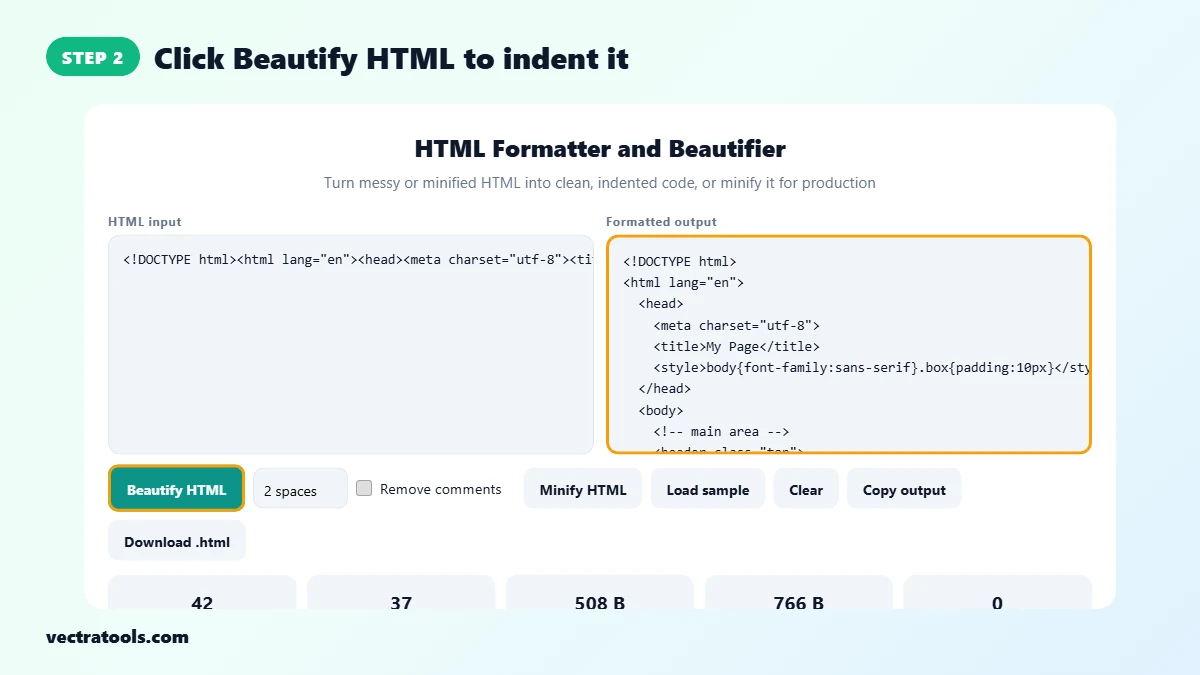
Step 2: Click Beautify HTML to Indent It
Click Beautify HTML. The formatted code appears on the right with one element per line and 2-space indentation. The sample turns from a single line into 37 neat lines.
Step 3: Choose Indentation and Comment Options
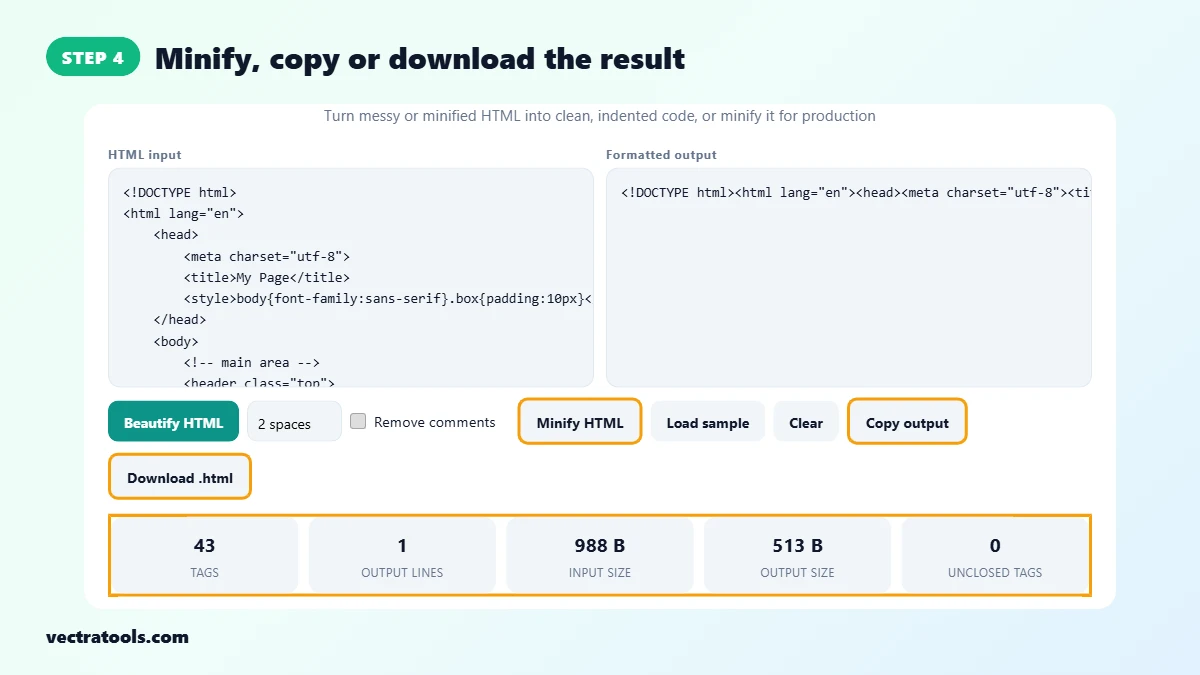
Pick 2 spaces, 4 spaces or Tab from the indent box, and tick Remove comments to strip HTML comments. The output updates straight away. The cards show the tag count, output lines, input and output size and any tags that were opened but not closed.

Step 4: Minify, Copy or Download the Result
Click Minify HTML to remove extra whitespace and line breaks for production. In the example, 988 bytes of formatted HTML shrink to 513 bytes. Use Copy output or Download .html to save the result.
Why Format HTML?
- Readability: indentation shows which element is inside which, so missing closing tags stand out.
- Debugging: it is much easier to find a broken div or a stray tag in formatted code.
- Code review: consistent formatting keeps diffs small and clean.
- Learning: formatted code from real sites shows how pages are built.
HTML Formatter Tips
- If Unclosed tags is above 0, check the indentation where the code drifts to the right. That is usually where a closing tag is missing.
- Minify only the copy you deploy. Keep the formatted version for editing.
- The formatter does not change your tags or attributes, only whitespace, so the page looks the same in the browser.
- Nothing is uploaded. Your code stays on your device.
Frequently Asked Questions
How do I beautify HTML code?
Paste your HTML into the formatter and click Beautify HTML. Choose 2 spaces, 4 spaces or tabs for the indentation.
Does formatting change how my page looks?
No. Only whitespace between tags changes. Inline elements are kept on the same line so text spacing stays the same.
Can I minify HTML with this tool?
Yes. Click Minify HTML to remove line breaks and extra spaces, and tick Remove comments to strip comments too.
Does it format CSS and JavaScript inside the page?
It keeps the code inside style and script tags on separate lines but does not reformat it. Use the CSS minifier for stylesheets.
What does Unclosed tags mean?
It counts elements that were opened but never closed, which often points to a mistake in the markup.
Is my HTML sent to a server?
No. The formatter runs entirely in your browser.
Is this HTML formatter free?
Yes. It is free and needs no sign-up.