

Heading Outline Scraper – Extract H1–H6 Structure from Competitor Pages in 3 Easy Steps
SERP Competitor Heading Scraper
Extract and analyze competitor heading hierarchies (H1-H6) from raw HTML to reverse-engineer top-ranking SEO content structures.
| Heading Tag | SEO Purpose | Best Practice Rule |
|---|---|---|
<H1> | Main Article Title | Strictly ONE per page. Must contain the primary focus keyword. Multiple H1s confuse crawler mapping. |
<H2> | Major Subtopics | Used for primary sections. Use variations of your main keyword (LSI). Do not skip from H1 to H3. |
<H3> to <H6> | Granular Details | Used strictly for nesting under H2s. Essential for breaking down complex topics or lists. |
Use this free heading outline scraper to pull the H1–H6 structure out of any competitor page and see exactly how top-ranking articles are organised.
Quick answer
A heading outline is the H1–H6 skeleton of a web page. To extract it, open a competitor page, press Ctrl+U (or right-click and choose View Page Source), copy all the code and paste it into Raw HTML Input. The tool instantly lists every selected heading as an indented tree, counts H1, H2 and H3 tags, and flags whether the page has exactly one H1. Copy the outline into your content brief to plan a better-structured article.
Table of Contents
When you want to outrank a page, its headings tell you which subtopics Google already rewards. Reading five long competitor articles to note every H2 and H3 takes a long time, and it is easy to miss sections hidden in tabs or accordions.
This heading outline scraper works on pasted HTML, so it sees every heading in the code, not just what is visible. It is a fast way to build content briefs, find content gaps and check your own pages’ heading hierarchy.
Example Outline
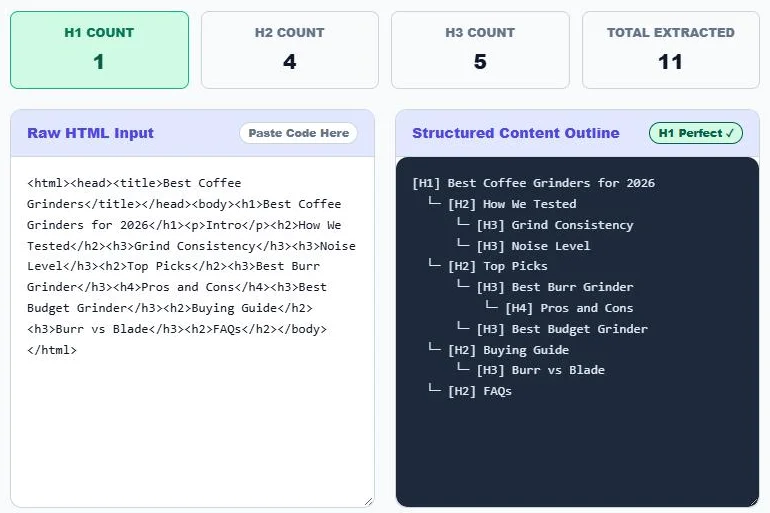
Pasting the HTML of a “best coffee grinders” article returns this structure, with 1 H1, 4 H2s, 5 H3s and 11 headings in total:
[H1] Best Coffee Grinders for 2026
  └─ [H2] How We Tested
      └─ [H3] Grind Consistency
      └─ [H3] Noise Level
  └─ [H2] Top Picks
      └─ [H3] Best Burr Grinder
          └─ [H4] Pros and Cons
      └─ [H3] Best Budget Grinder
  └─ [H2] Buying Guide
      └─ [H3] Burr vs Blade
  └─ [H2] FAQs
How to Use the Heading Outline Scraper
Step 1: Choose Which Headings to Extract
In Tags to Extract, tick the heading levels you want. H1 to H4 are ticked by default; add H5 and H6 for very detailed pages, or untick H4 for a high-level outline.

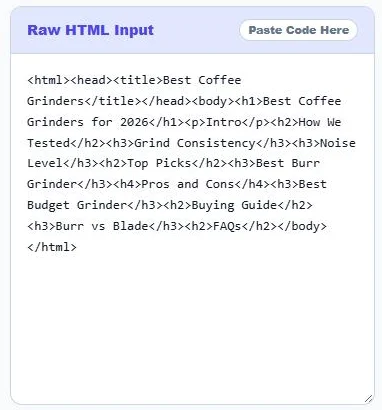
Step 2: Paste the Page HTML
Open the competitor page, press Ctrl+U (Cmd+Option+U on Mac) to view the source, select all and copy. Paste it into Raw HTML Input. You can also paste HTML from your own CMS or a saved file.
Step 3: Read and Copy the Outline
The Structured Content Outline shows each heading with its level, indented under its parent. The counters show H1, H2 and H3 totals and the badge confirms when there is exactly one H1. Click Copy Heading Outline to paste it into a brief.
How to Build a Content Brief from Competitor Outlines
- Search your target keyword and open the top 3–5 organic results.
- Extract each page’s heading outline with this tool and paste them side by side.
- Mark subtopics that appear in most outlines; these are must-cover sections.
- Note sections only one competitor covers; these can become your extra value.
- Write your own outline in a logical order, with one H1, clear H2 sections and H3s for detail.
- Add what no competitor offers: original data, examples, tools or a clearer answer.
Heading Best Practices for SEO
| Heading | Purpose | Best practice |
|---|---|---|
| H1 | Main page title | One per page, including the main keyword naturally |
| H2 | Major sections | Cover the main subtopics and related phrases |
| H3–H6 | Details within a section | Nest under an H2 and do not skip levels |
Headings help readers scan and help search engines understand the topics on a page. A clean hierarchy also makes it easier for Google to pull answers, lists and jump links from your content.
Auditing Your Own Pages
- Paste your own page source to check that it has exactly one H1.
- Look for skipped levels, such as an H4 directly under an H2.
- Spot headings used only for styling, such as “Share this post” in an H3.
- Check that theme widgets, sidebars and footers are not adding unwanted headings.
Why Paste HTML Instead of a URL?
Many sites block automated requests, and pages that load content with JavaScript can hide headings from simple scrapers. Pasting the source from your own browser works on any page you can open, and everything is processed locally, so nothing is sent to a server. For pages built mostly with JavaScript, copy the rendered HTML from your browser’s developer tools (Elements panel) instead.
Frequently Asked Questions
What is a heading outline?
It is the hierarchy of H1 to H6 headings on a page, showing the main title, sections and sub-sections in order.
How do I get a competitor’s HTML?
Open the page, press Ctrl+U (Cmd+Option+U on Mac) to view the source, select all, copy and paste it into the tool.
Can I extract H5 and H6 headings?
Yes. Tick H5 and H6 in Tags to Extract before or after pasting the HTML.
What does “H1 Perfect” mean?
It means the pasted page has exactly one H1 heading, which is the recommended setup.
Is my pasted HTML uploaded?
No. The outline is built in your browser and nothing is sent to a server.
Is the heading outline scraper free?
Yes. It is free with no sign-up or usage limit.