

Text to HTML Converter – Wrap Plain Text in Paragraph Tags in 3 Easy Steps
Text to HTML Paragraph Converter
Instantly wrap plain text with standard HTML tags for clean web publishing.
| HTML Tag | Definition | SEO & Usability Impact |
|---|---|---|
<p> ... </p> | Paragraph Tag | Defines a block of text. Crucial for content structure and readability. Search engines use it to understand content flow. |
<br> | Line Break Tag | Forces a line break without starting a new paragraph. Best used for addresses, poems, or tight line spacing. |
| Indentation (Tab) | Used in the generated code to make HTML source easily readable for developers (Does not affect visual frontend). |
Use this free text to HTML converter to turn plain text into clean paragraph markup ready for a website, email template or CMS.
Quick answer
The converter treats a blank line as the end of a paragraph and wraps each block in <p>…</p>. With Convert single line breaks to <br> on, a line break inside a paragraph becomes <br>, which is ideal for addresses or poems. Example: “Mix coarse coffee with cold water.” and “Steep for 12 to 18 hours.” on two lines become <p>Mix coarse coffee with cold water.<br>Steep for 12 to 18 hours.</p>. Paste text, choose the options and copy the HTML.
Table of Contents
Pasting plain text into a raw HTML field, a custom theme, an email builder or a JSON content file loses all its line breaks. Adding <p> and <br> tags by hand to a long article is slow and error-prone.
This text to HTML converter wraps your text correctly in one step and counts the words and paragraphs, so you know the structure is right before you publish.
How Text Is Converted
| In your text | In the HTML |
|---|---|
| A blank line | Ends one <p> and starts the next |
| A single line break (option on) | <br> inside the same paragraph |
| A single line break (option off) | A space, joining the lines |
| Three or more blank lines (Remove empty lines on) | Treated as one paragraph break |
Example Output
Input with three blocks, including an address, gives three paragraphs:
<p>Cold brew is smooth and easy to make at home.</p>
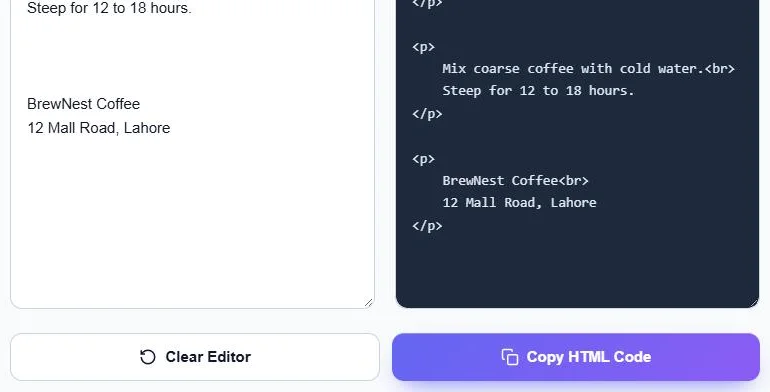
<p>Mix coarse coffee with cold water.<br>Steep for 12 to 18 hours.</p>
<p>BrewNest Coffee<br>12 Mall Road, Lahore</p>
That is the compact version with Indent HTML output turned off. With indent on, each <p> and line sits on its own indented line, which is easier to read and edit.
How to Use the Text to HTML Converter
Step 1: Choose the Output Options
Tick Convert single line breaks to <br> to keep line breaks inside a paragraph (untick to join those lines with a space). Indent HTML output puts each tag on its own indented line for readable code, and Remove empty lines collapses extra blank lines.

Step 2: Paste Your Plain Text
Paste or type into Input (Plain Text). Leave a blank line between paragraphs. The HTML appears instantly in Output (HTML Code), with the word count and paragraph count above the boxes.

Step 3: Copy the HTML
Click Copy HTML Code and paste it into your editor, template or code. Click Clear Editor to start again.
When to Use <p> vs <br>
- <p> is for separate paragraphs. Browsers add space between them, and screen readers treat each as its own block.
- <br> is for line breaks that belong together, such as an address, a poem or a signature.
- Do not use several <br> tags to create space; use separate paragraphs or CSS margins instead.
Good Uses
- Adding articles to a custom HTML field or static site.
- Preparing text for HTML email templates.
- Formatting product descriptions for marketplaces that accept HTML.
- Storing content in JSON or database fields with markup.
Tips
- If your text contains < or > characters that should be shown literally, replace them with < and > after converting.
- Headings, lists and links are not added automatically; add them in your editor after pasting.
- Your text is converted in your browser and never uploaded.
Frequently Asked Questions
How do I convert plain text to HTML?
Paste your text into the converter. Each block separated by a blank line becomes a <p> paragraph, and you can copy the HTML.
How are single line breaks handled?
With Convert single line breaks to <br> on, they become <br> tags. With it off, the lines are joined with a space.
What does Indent HTML output do?
It places each tag and line on its own indented line so the code is easier to read. Turn it off for compact one-line paragraphs.
Will it add headings or links?
No. It only adds paragraph and line break tags. Add headings, lists and links in your editor.
Is my text uploaded?
No. The conversion happens entirely in your browser.
Is the text to HTML converter free?
Yes. It is free and needs no sign-up.