

BBCode to HTML Converter – Free 2-Way Parser With Live Preview in 3 Easy Steps
BBCode & HTML Parser
Use this BBCode to HTML converter to turn forum BBCode into clean HTML, or reverse parse HTML back into BBCode syntax.
Use this free BBCode to HTML converter to turn forum-style BBCode into clean HTML, or switch modes and convert HTML back into BBCode. The output updates as you type, and a live preview shows exactly how the formatted text will look.
Quick answer
BBCode uses square-bracket tags such as [b], [i], [url] and [img], while HTML uses angle-bracket tags like <strong>, <em>, <a> and <img>. To convert, paste your BBCode into the input box: [b]Hello[/b] becomes <strong>Hello</strong> and [url=https://example.com]Link[/url] becomes a clickable <a> link. Copy the result with one click.
Table of Contents
BBCode is still everywhere: phpBB, vBulletin, XenForo and SMF forums, game communities, older CMS plugins and some marketplaces. When you move that content to a website, blog or email, the square-bracket tags need to become HTML. Going the other way is just as common when you post a formatted article to a forum.
This BBCode to HTML converter handles both directions in your browser. Nothing you paste is uploaded.
What Is BBCode?
BBCode, short for Bulletin Board Code, is a simple markup language created for online forums. It lets users format posts without writing raw HTML, which forum software can then sanitise safely. Tags are written in square brackets and usually come in opening and closing pairs, such as [b]bold text[/b].
BBCode to HTML Conversion Chart
| BBCode | HTML output | Result |
|---|---|---|
| [b]text[/b] | <strong>text</strong> | Bold |
| [i]text[/i] | <em>text</em> | Italic |
| [u]text[/u] | <u>text</u> | Underline |
| [s]text[/s] | <del>text</del> | Strikethrough |
| [url=link]text[/url] | <a href="link">text</a> | Link |
| [img]link[/img] | <img src="link"> | Image |
| [color=red]text[/color] | <span style="color:red"> | Coloured text |
| [size=20]text[/size] | <span style="font-size:20px"> | Text size |
| [quote]text[/quote] | <blockquote> | Quote |
| [code]text[/code] | <pre><code> | Code block |
| [list][*]item[/list] | <ul><li>item</li></ul> | Bullet list |
| [list=1][*]item[/list] | <ol><li>item</li></ol> | Numbered list |
| [center]text[/center] | <div style="text-align:center"> | Centred text |
Line breaks in BBCode become <br> tags, and any HTML inside [code] blocks is escaped so it shows as text instead of running.
How to Use the BBCode to HTML Converter
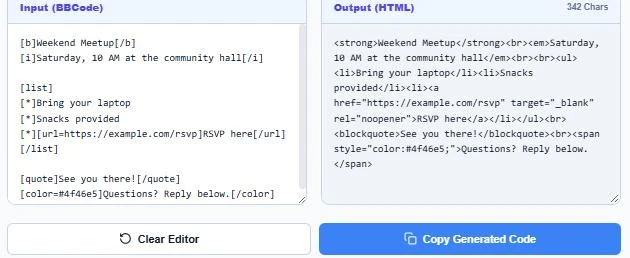
Step 1: Paste Your BBCode
Keep BBCode → HTML selected and paste your forum post into the input box. The HTML version appears on the right straight away, with a character count.
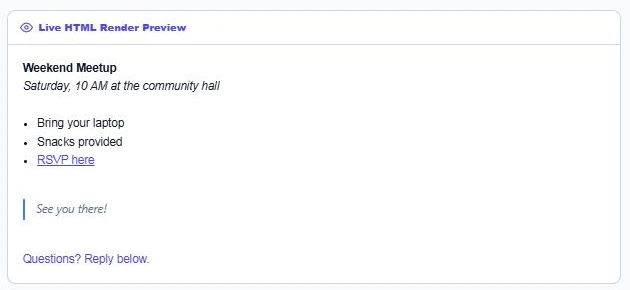
Step 2: Check the Live Preview and Copy
Scroll to the Live HTML Render Preview to see bold text, lists, links, quotes and colours exactly as a browser will show them. When it looks right, press Copy Generated Code and paste the HTML into your website, email template or CMS.
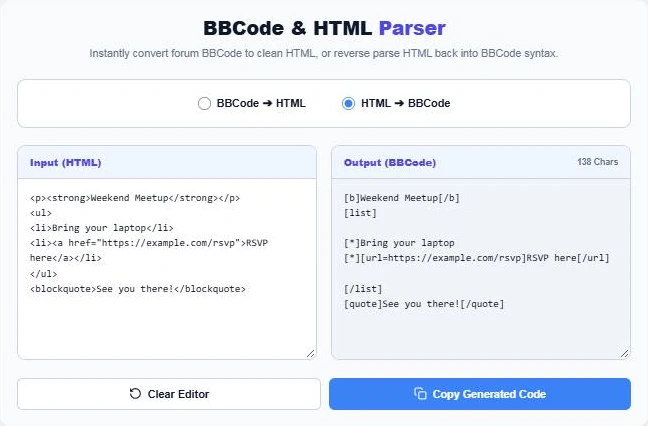
Step 3: Convert HTML Back to BBCode
Choose HTML → BBCode to reverse the process. Paste HTML from a web page or editor and the tool turns <strong>, <a>, <ul> and <blockquote> tags into BBCode you can post on a forum.
When You Need to Convert BBCode
- Moving an old forum archive to WordPress or another CMS.
- Reusing a forum guide or tutorial as a blog post.
- Posting a formatted article from your site to a forum that only accepts BBCode.
- Cleaning up product descriptions copied from marketplaces that use BBCode.
- Building email newsletters from community announcements.
Tips for Clean Conversions
- Before using the BBCode to HTML converter, make sure every tag is closed. An unclosed [b] or [quote] can swallow the rest of the text.
- Use full links in [url] and [img] tags, including https://.
- Check the preview for nested lists or quotes, which some forums format differently.
- Forum-specific tags such as [spoiler] or [youtube] are not standard BBCode and stay as they are.
Need to tidy the HTML afterwards? Run it through the HTML Formatter, or turn plain text into paragraphs with the Text to HTML Paragraph Converter.
Frequently Asked Questions
What is BBCode used for?
BBCode is a markup language for formatting posts on forums and message boards. It uses square-bracket tags such as [b] and [url] instead of HTML.
How do I convert BBCode to HTML?
Paste the BBCode into the converter with BBCode → HTML selected. The HTML appears instantly and you can copy it with one click.
Can I convert HTML to BBCode?
Yes. Switch to HTML → BBCode mode and paste your HTML. Common tags like strong, em, a, img, ul and blockquote are converted.
Is BBCode the same on every forum?
The core tags are the same, but some forums add their own, such as [spoiler] or [youtube]. Those custom tags are left unchanged.
Is it safe to paste HTML here?
Yes. The conversion runs in your browser and nothing is sent to a server. Code inside [code] tags is escaped in the output.
Does the converter keep line breaks?
Yes. New lines in BBCode become <br> tags, except between list items where they are not needed.