

HTML Code Stripper – Remove HTML Tags and Get Clean Plain Text in 3 Easy Steps
HTML Code Stripper
Instantly remove HTML tags, CSS, and scripts to extract pure, readable plain text.
| Element Type | Status | Details |
|---|---|---|
<script> & <style> | Completely Deleted | Removes the tags AND all the JavaScript/CSS code written inside them. |
| All Standard HTML Tags | Stripped | Links, spans, divs, bold, italics, images, and structural tags are cleanly removed. |
HTML Entities (e.g. ©) | Converted | Translates encoded symbols back into readable text (e.g., © becomes ©). |
Use this free HTML code stripper to remove HTML tags from copied code, emails or CMS content and get clean, readable plain text.
Quick answer
To remove HTML tags, the tool deletes <script> and <style> blocks with their code, strips every remaining tag, decodes entities such as & to & and © to ©, and tidies whitespace. With Preserve Line Breaks on, each paragraph, heading and <br> starts a new line. Example: <p>Use <strong>coarse</strong> coffee & cold water.</p> becomes “Use coarse coffee & cold water.”
Table of Contents
Copying text from a web page’s source, an HTML email, a WordPress editor or an export file often brings tags, inline styles and tracking scripts with it. Pasting that into a document, spreadsheet or AI tool makes a mess.
This HTML code stripper lets you remove HTML tags in one step and keeps the structure readable. It also shows the character count of your input and the word count of the result.
Example: Before and After
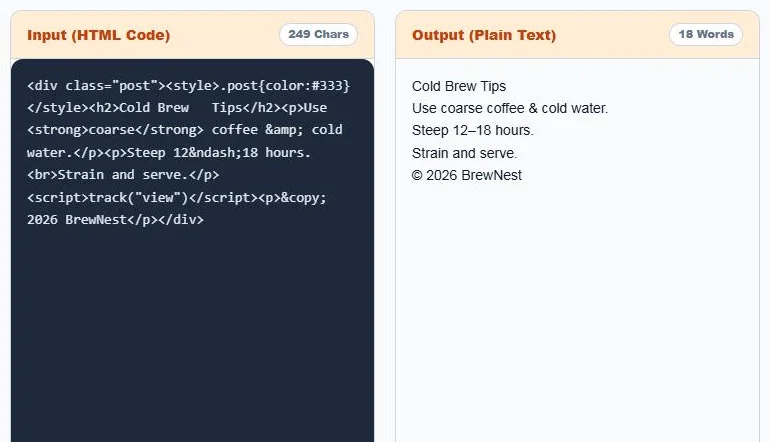
<div class="post"><style>.post{color:#333}</style><h2>Cold Brew Tips</h2>
<p>Use <strong>coarse</strong> coffee & cold water.</p>
<p>Steep 12–18 hours.<br>Strain and serve.</p>
<script>track("view")</script><p>© 2026 BrewNest</p></div>With all options on, the output is:
Cold Brew Tips
Use coarse coffee & cold water.
Steep 12–18 hours.
Strain and serve.
© 2026 BrewNest
The CSS and the tracking script are gone, the double spaces in the heading are cleaned, and the entities become &, – and ©. With Preserve Line Breaks off, the same text comes out on one line with a space between each block.
What Gets Removed and What Stays
| Element | Result |
|---|---|
| <script> and <style> blocks | Removed completely, including the code inside |
| All other tags (div, span, a, strong, img…) | Tags removed, their text kept |
| <p>, <br>, headings, list items, table rows | Become line breaks when Preserve Line Breaks is on |
| HTML entities | Decoded to normal characters when Decode is on |
| Link URLs and image alt text | Removed, because they are inside tag attributes |
How to Use the HTML Code Stripper
Step 1: Choose the Cleaning Options
Keep Preserve Line Breaks (<p>, <br>) on to put each block on its own line, or turn it off to get one continuous paragraph. Clean up extra whitespaces removes double spaces and blank lines, and Decode HTML Entities turns codes like & and – back into symbols.

Step 2: Paste Your HTML
Paste the code into Input (HTML Code). The plain text appears instantly in Output (Plain Text), with the input character count and output word count above each box.
Step 3: Copy the Plain Text
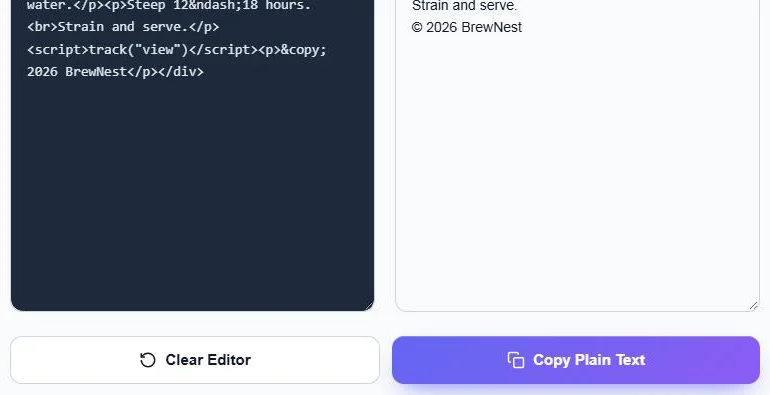
Click Copy Plain Text to copy the result, or Clear Editor to start again.
Common Uses
- Clean text copied from page source before editing it in Word or Google Docs.
- Turn HTML email templates into a plain-text version.
- Prepare content for word counts, readability checks or AI prompts.
- Strip formatting from CMS exports and product descriptions.
- Extract readable text from scraped pages.
Tips
- If you need link URLs, copy them separately first, because attributes are removed.
- Turn off entity decoding when you want to keep codes such as for later HTML use.
- Your HTML is processed in your browser and never uploaded.
Frequently Asked Questions
How do I remove HTML tags from text?
Paste the HTML into the tool. It strips all tags, removes scripts and styles, and gives you plain text instantly.
Does it remove JavaScript and CSS too?
Yes. Script and style blocks are deleted along with all the code inside them.
Can I keep paragraphs and line breaks?
Yes. Keep Preserve Line Breaks on and each paragraph, heading, list item and <br> becomes a new line.
What does Decode HTML Entities do?
It converts codes such as &, © and – into &, © and –.
Are link URLs kept?
No. Only the visible link text is kept; URLs inside href attributes are removed.
Is the HTML code stripper free?
Yes. It is free, runs in your browser and needs no sign-up.