

Hex to RGBA Converter – Add Opacity to Any Hex Color in 2 Easy Steps
Hex to RGBA Converter
Convert hex color codes to RGBA instantly with precise opacity controls.
| Opacity (%) | Alpha Value (0-1) | Hex Extension | CSS RGBA Example |
|---|---|---|---|
| 100% (Solid) | 1.00 | FF | rgba(0, 0, 0, 1) |
| 75% | 0.75 | BF | rgba(0, 0, 0, 0.75) |
| 50% (Half Transparent) | 0.50 | 80 | rgba(0, 0, 0, 0.5) |
| 25% | 0.25 | 40 | rgba(0, 0, 0, 0.25) |
| 10% (Very Faint) | 0.10 | 1A | rgba(0, 0, 0, 0.1) |
Use this free hex to RGBA converter to add transparency to any hex color and copy the CSS value you need.
Quick answer
To convert hex to RGBA, split the hex code into red, green and blue pairs and change each from base 16 to a number from 0 to 255, then add an alpha (opacity) value from 0 to 1. Example: #4F46E5 is red 4F = 79, green 46 = 70, blue E5 = 229, so at 75% opacity it becomes rgba(79, 70, 229, 0.75), or #4F46E5BF as an 8-digit hex. Type the hex code, move the opacity slider and copy the result.
Table of Contents
Designers and developers often need a brand color at partial opacity, for overlays, hover states, shadows, borders or text on images. Hex codes alone cannot express transparency unless you use the 8-digit format, and working out the numbers by hand is easy to get wrong.
This hex to RGBA converter does the maths instantly and shows the result over a checkerboard so you can see the transparency before using it.
How Hex to RGBA Conversion Works
- Remove the # and, for 3-digit codes, double each digit: #0af becomes #00AAFF.
- Split into pairs: RR, GG and BB.
- Convert each pair from hexadecimal: 00 = 0, 80 = 128, FF = 255.
- Add the alpha value from 0 (transparent) to 1 (solid): rgba(R, G, B, A).
| Hex | RGB | RGBA at 50% |
|---|---|---|
| #4F46E5 | rgb(79, 70, 229) | rgba(79, 70, 229, 0.5) |
| #0AF | rgb(0, 170, 255) | rgba(0, 170, 255, 0.5) |
| #FFFFFF | rgb(255, 255, 255) | rgba(255, 255, 255, 0.5) |
| #000000 | rgb(0, 0, 0) | rgba(0, 0, 0, 0.5) |
Opacity to Hex Alpha Chart
| Opacity | Alpha | Hex suffix |
|---|---|---|
| 100% | 1 | FF |
| 90% | 0.9 | E6 |
| 80% | 0.8 | CC |
| 75% | 0.75 | BF |
| 60% | 0.6 | 99 |
| 50% | 0.5 | 80 |
| 40% | 0.4 | 66 |
| 25% | 0.25 | 40 |
| 20% | 0.2 | 33 |
| 10% | 0.1 | 1A |
| 0% | 0 | 00 |
Add the suffix to a 6-digit hex code to get the 8-digit version, for example #4F46E5 at 50% is #4F46E580. If you paste an 8-digit code, the converter reads its last two digits as the opacity.
How to Use the Hex to RGBA Converter
Step 1: Enter the Hex Code and Opacity
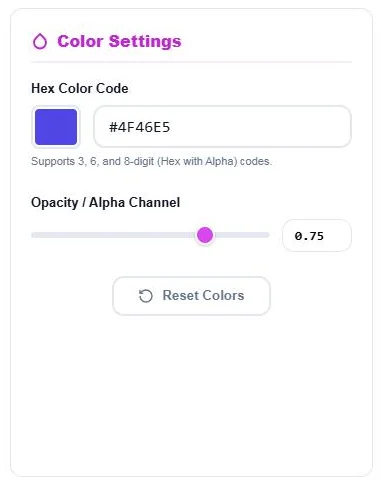
Type a Hex Color Code (3, 6 or 8 digits, with or without #) or pick a color with the swatch. Drag the Opacity / Alpha Channel slider or type a value from 0 to 1. Click Reset Colors to start again.
Step 2: Copy the Color Value
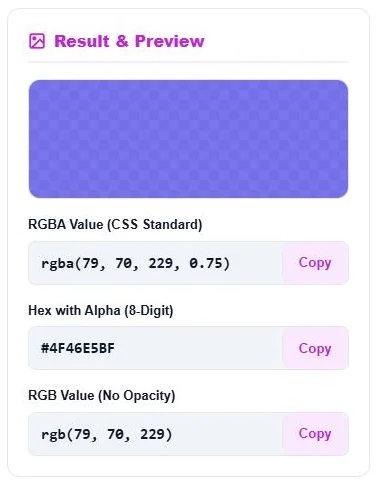
Result & Preview shows the color over a checkerboard, then the RGBA Value, the Hex with Alpha (8-Digit) and the RGB Value. Click Copy next to the format you need.
Using RGBA in CSS
/* Semi-transparent overlay */
.hero::after { background: rgba(79, 70, 229, 0.75); }

/* Soft shadow */
.card { box-shadow: 0 8px 24px rgba(0, 0, 0, 0.12); }

/* Same colour, 8-digit hex */
.badge { background: #4F46E5BF; }
All modern browsers support both rgba() and 8-digit hex. In current CSS you can also write rgb(79 70 229 / 75%), which means the same thing.
RGBA vs the Opacity Property
An rgba() color only makes that color transparent, such as a background, while text and children stay fully visible. The CSS opacity property fades the whole element, including its text and images. For overlays and buttons, rgba() is usually what you want.
Tips
- Check contrast after adding transparency; text on a 50% background may no longer be readable.
- Use the same base color with different alpha values to build hover and focus states.
- Keep a note of both the hex and RGBA versions of your brand colors.
Frequently Asked Questions
How do I convert hex to RGBA?
Convert each pair of hex digits to a number from 0 to 255 for red, green and blue, then add an alpha value from 0 to 1, such as rgba(79, 70, 229, 0.75).
What is 50% opacity in hex?
The alpha suffix for 50% is 80, so #4F46E5 at 50% becomes #4F46E580.
Does the converter support 3-digit hex codes?
Yes. Short codes such as #0af are expanded to #00AAFF before converting.
What is an 8-digit hex color?
It is a hex code with two extra digits for alpha (transparency) at the end, written #RRGGBBAA.
Is rgba() supported in all browsers?
Yes. rgba() works in every modern browser, and 8-digit hex is supported in all current major browsers.
Is the hex to RGBA converter free?
Yes. It is free, runs in your browser and needs no sign-up.