

Find and Replace Tool – Replace Words and Phrases in Text Online
Find and Replace Studio
Scan string contents, modify targeted keywords matrices, and match complex layout strings instantly

Quick answer
A find and replace tool searches your text for a word, phrase or pattern and swaps every match for new text in one go. Paste your text, type what to find and what to replace it with, choose case-sensitive, whole-word or RegEx matching if needed, then click Process Substitution and copy the result. It also counts how many matches were changed.
Our free online find and replace tool works like the Ctrl+H feature in Word or Google Docs, but for any text you can paste: blog drafts, product descriptions, CSV data, code snippets, email templates and URL lists. It replaces all matches at once and shows the character count before and after the change.
How the Find and Replace Tool Matches Text
By default the search is not case sensitive and it matches text anywhere, even inside longer words. Three options let you control that. The table shows what happens when you replace cat with dog in the sentence "The cat sat on the Cat mat. Concatenate cats."
| Options used | Matches changed | Result |
|---|---|---|
| Default (no options) | 4 | The dog sat on the dog mat. Condogenate dogs. |
| Strict Case Sensitive Match | 3 | The dog sat on the Cat mat. Condogenate dogs. |
| Match Absolute Whole Words Only | 2 | The dog sat on the dog mat. Concatenate cats. |
| RegEx with \d{3}-\d{4} replaced by [phone] | 2 | Call 555-1234 or 555-9876 becomes Call [phone] or [phone]. |
How to Use the Find and Replace Tool
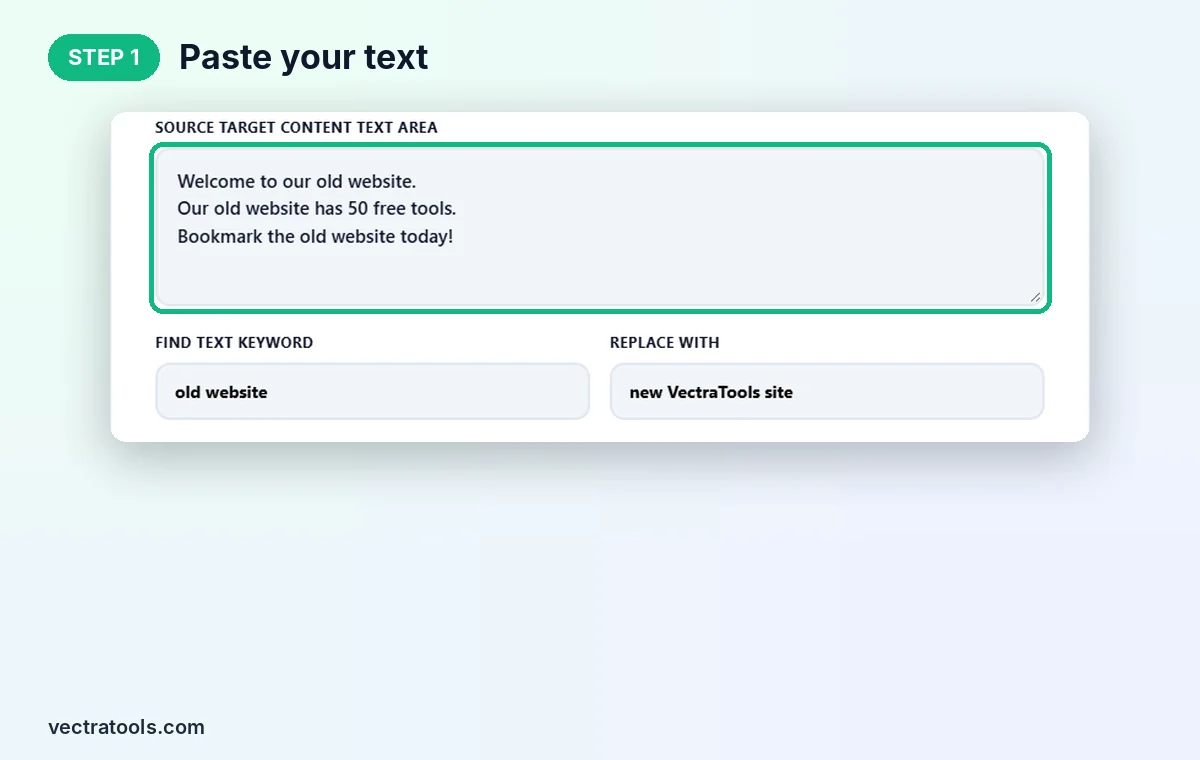
Step 1: Paste Your Text
Open the find and replace tool and paste your content into Source Target Content Text Area. Our example has three lines that each mention "old website".
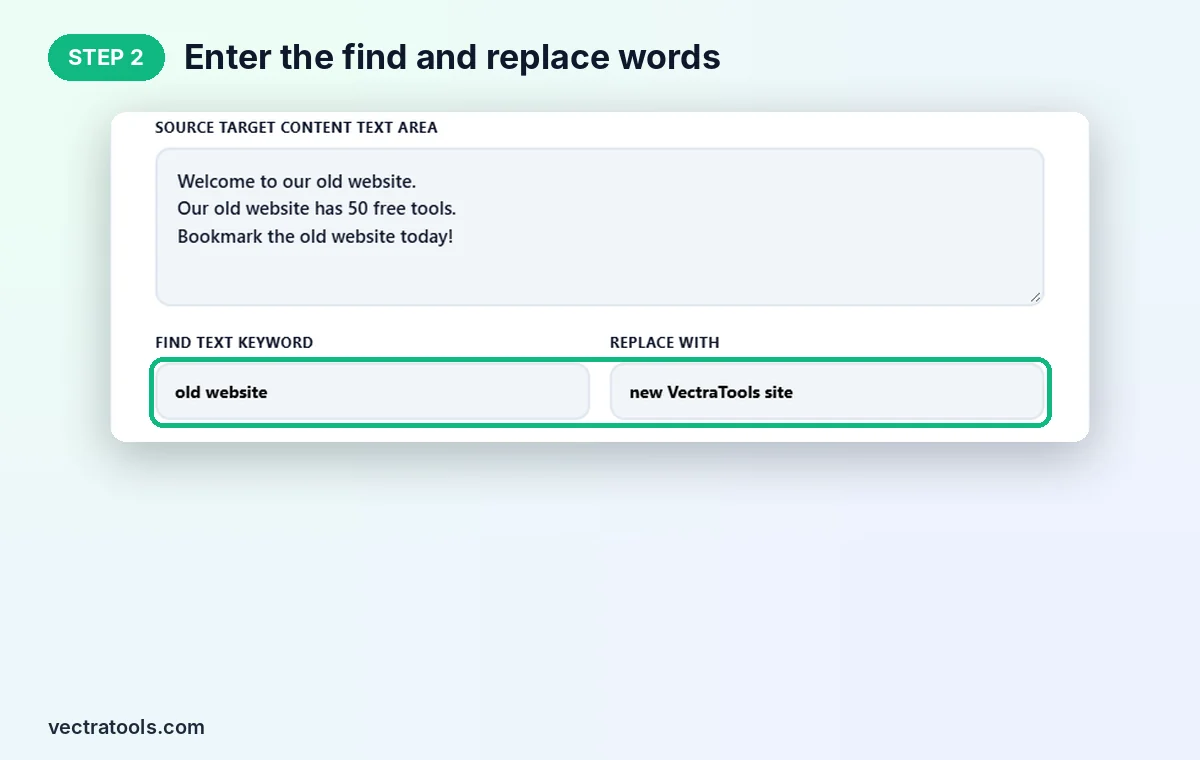
Step 2: Enter the Find and Replace Words
Type the text to search for in Find Text Keyword and the new text in Replace With. We find old website and replace it with new VectraTools site. Leave Replace With empty if you simply want to delete the matches.
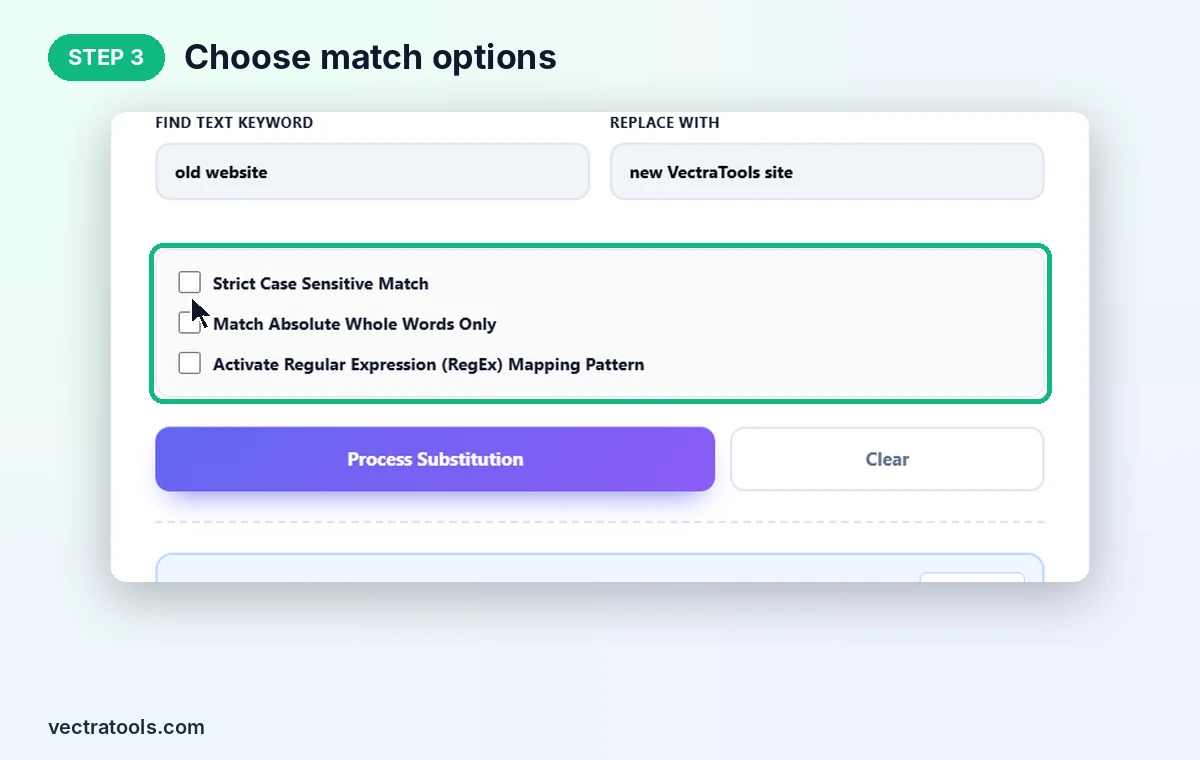
Step 3: Choose Match Options
Tick Strict Case Sensitive Match to respect capital letters, Match Absolute Whole Words Only to skip matches inside longer words, or Activate Regular Expression (RegEx) Mapping Pattern to search with a pattern. For a plain phrase like ours, leave them all off.
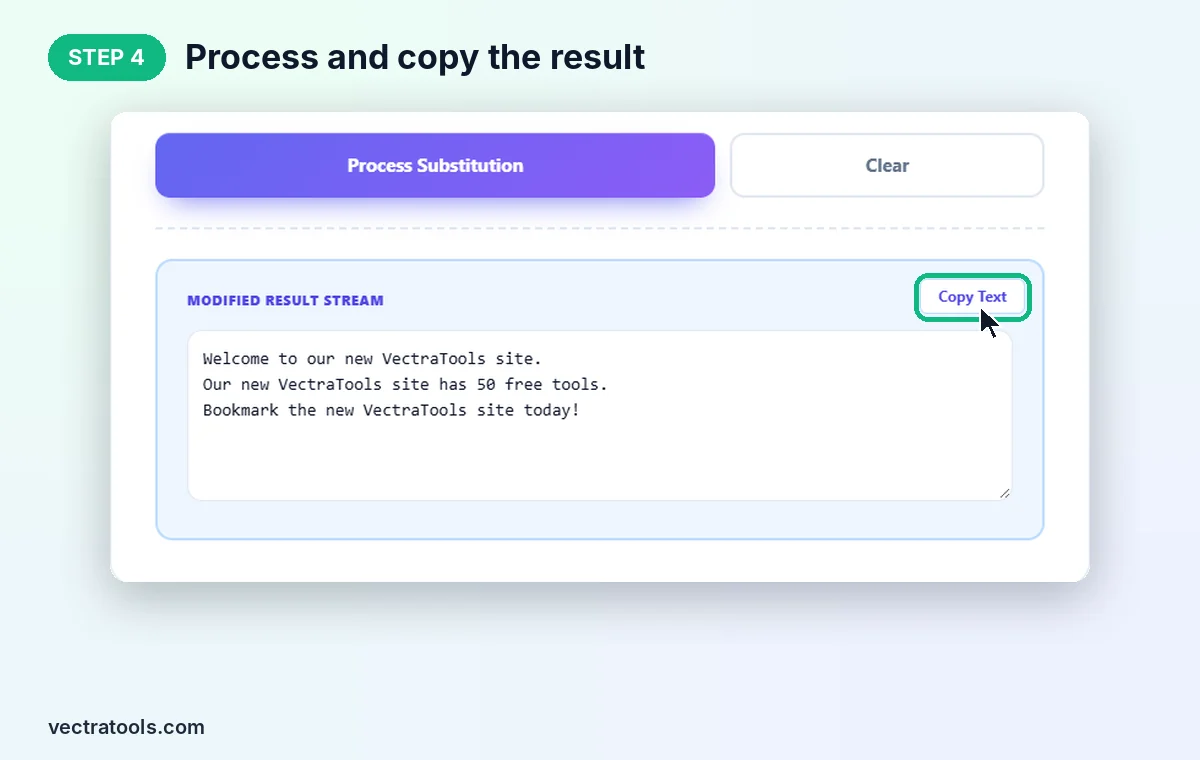
Step 4: Process and Copy the Result
Click Process Substitution. All three matches are replaced, the counters show 94 input characters, 121 output characters and 3 matches changed, and the new text appears in Modified Result Stream. Click Copy Text to copy it.
Where a Find and Replace Tool Saves Time
- Rebranding content: swap an old brand, product or domain name across a whole article.
- Updating templates: change dates, prices or names in email and document templates.
- Cleaning data: replace commas with semicolons, remove unwanted symbols or fix repeated typos in CSV text.
- SEO work: update internal link URLs or anchor text in bulk before pasting into WordPress.
- Developers: rename variables in a snippet or mask emails and phone numbers with a RegEx pattern.
Find and Replace Tool Tips
- Use whole-word matching for short words like "is" or "cat", or they will also change inside longer words.
- Without RegEx mode, symbols such as . * ? and ( ) are treated as normal characters, so you can search for them safely.
- With RegEx mode on, \d matches a digit, \s a space and . any character. Test on a small sample first.
- Check the Matches Changed counter. If it shows 0, check your spelling or turn off case sensitivity.
The find and replace tool runs entirely in your browser, so private documents never leave your device. It is free, has no sign-up and replaces every match in one click.
Frequently Asked Questions
What is a find and replace tool?
It is a tool that searches text for a word, phrase or pattern and replaces every match with new text in one step.
Does it replace all matches or just the first one?
It replaces all matches at once and shows how many were changed in the Matches Changed counter.
Is the search case sensitive?
Not by default, so Cat and cat both match. Tick Strict Case Sensitive Match to only match the exact capitals you type.
Can I use regular expressions?
Yes. Tick Activate Regular Expression (RegEx) Mapping Pattern and enter a pattern such as \d{3}-\d{4} in the find box.
How do I delete a word from text?
Type the word in Find Text Keyword, leave Replace With empty and click Process Substitution.
Is this find and replace tool free?
Yes. It is free, needs no sign-up, and runs entirely in your browser.