

Text Sorter A-Z – Sort Lines Alphabetically or by Length
Text Sorter A-Z Studio
Organize chaotic rows blocks, execute precise alphabetic sorting, and index data sets instantly

Quick answer
A text sorter puts the lines of a list in order. Paste one item per line, choose Alphabetical (A → Z), Reverse Alphabetical (Z → A) or By Row Character Length, click Compile Sorted Output and copy the result. Sorting ignores capital letters and handles numbers naturally, so "item 2" comes before "item 10".
Our free text sorter A-Z organises names, keywords, product lists, tags, references, URLs and any other line-by-line data in a second. It can also trim stray spaces and drop blank rows while sorting, and it shows how many items went in and how many came out.
How the Text Sorter Orders Lines
The text sorter uses a language-aware comparison instead of raw character codes. That means "Apple" and "apple" sit together rather than all capitals coming first, accented words like "Éclair" are placed with the E words, and numbers inside text are compared as numbers. Here is how one list comes out in each mode.
| Mode | Result for: banana, Apple, cherry, item 10, item 2, Éclair, Kiwi |
|---|---|
| Alphabetical (A → Z) | Apple, banana, cherry, Éclair, item 2, item 10, Kiwi |
| Reverse Alphabetical (Z → A) | Kiwi, item 10, item 2, Éclair, cherry, banana, Apple |
| By Row Character Length | Kiwi, Apple, banana, cherry, item 2, Éclair, item 10 (shortest first; equal lengths keep their original order) |
How to Use the Text Sorter A-Z
Step 1: Paste Your List
Open the text sorter and paste your items into Input Disorganized Text Lines, one per line. We paste seven fruits: Mango, banana, Apple, cherry, Kiwi, date and Grapes.
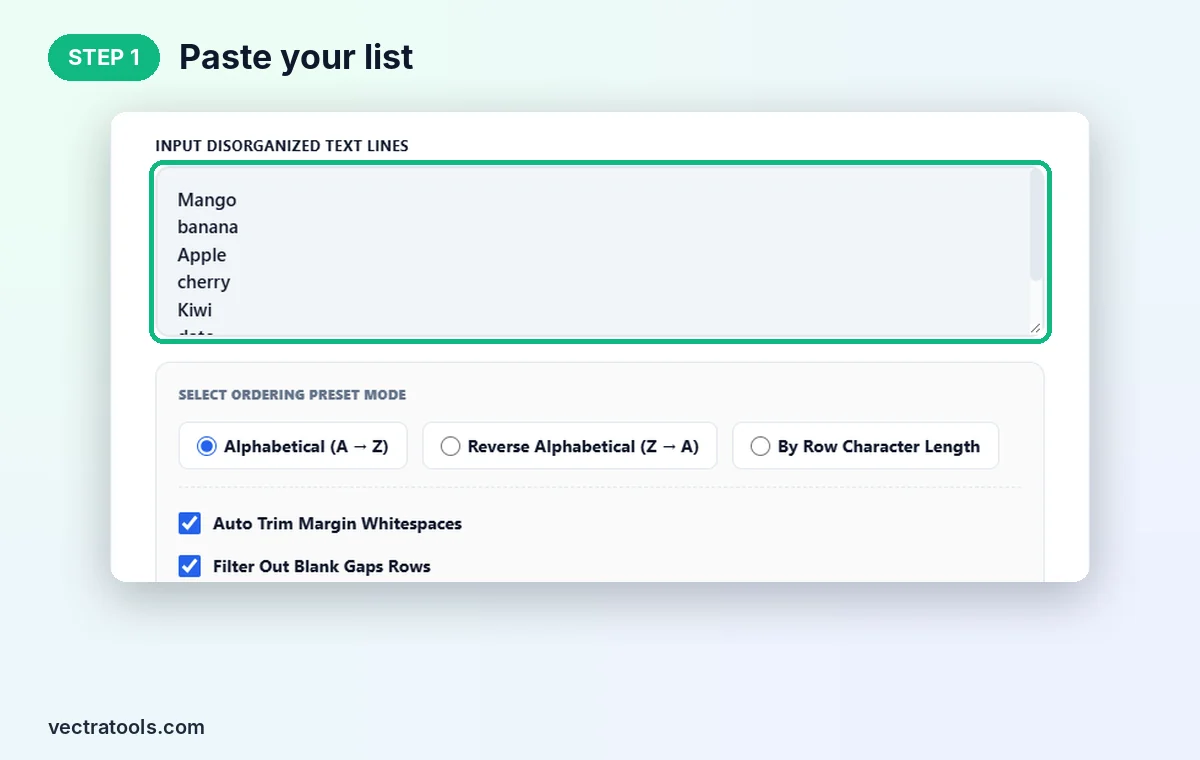
Step 2: Choose the Sort Order
Under Select Ordering Preset Mode pick Alphabetical (A → Z), Reverse Alphabetical (Z → A) or By Row Character Length. Keep Auto Trim Margin Whitespaces and Filter Out Blank Gaps Rows ticked for a clean list.

Step 3: Click Compile Sorted Output
Click Compile Sorted Output. The counters show 7 original items and 7 processed items. If you had blank rows, the processed count would be lower.

Step 4: Copy the Sorted List
The ordered list appears in Sorted Output Dataset: Apple, banana, cherry, date, Grapes, Kiwi, Mango. Click Copy Ordered List to copy it.

Where a Text Sorter Helps
- Name and contact lists: alphabetise guest lists, class registers or team rosters.
- SEO keyword research: sort keyword exports so similar terms sit together.
- Glossaries and indexes: order terms for a glossary, FAQ or reference page.
- Tags and categories: tidy WordPress tags or product attributes before importing.
- Length sorting: find the shortest or longest titles, slugs or meta descriptions quickly.
Text Sorter Tips
- Remove duplicates first with a duplicate line remover if you want each item only once.
- Leading spaces can push items to the top of the list. Keep Auto Trim Margin Whitespaces on to avoid that.
- Sort by length, then copy the first or last lines to find your shortest or longest entries.
- Every line is sorted as one item, so put each value on its own line, not separated by commas.
The text sorter runs in your browser, so your lists stay on your device. It is free, has no sign-up and sorts thousands of lines instantly.
Frequently Asked Questions
What is a text sorter?
It is a tool that sorts lines of text into alphabetical, reverse alphabetical or length order.
Is the sorting case sensitive?
No. Capital and lowercase versions of a word are sorted together, so Apple and apple sit side by side.
How are numbers sorted?
Numbers inside text are compared by value, so item 2 comes before item 10 instead of after it.
Can I sort from Z to A?
Yes. Choose Reverse Alphabetical (Z → A) and click Compile Sorted Output.
Does it remove blank lines?
Yes, when Filter Out Blank Gaps Rows is ticked, which is the default.
Is this text sorter free?
Yes. It is free, needs no sign-up, and runs entirely in your browser.