

Steganography Tool Online – Hide Secret Text Inside an Image
Steganography Tool
Use this free steganography tool online to hide secret text inside images invisibly. Processed 100% locally in your browser.

Quick answer
To use this steganography tool online, stay on Hide Text (Encode), upload a PNG, JPG or WebP image, type your secret message and press Embed & Download Image. You get a PNG that looks the same but carries your text in the least significant bits of its pixels. To read it, open Extract Text (Decode), upload that PNG and press Extract Message. Everything runs in your browser.
Steganography is the art of hiding a message in plain sight. Instead of scrambling text like encryption does, it tucks the text inside something ordinary, such as a photo, so nobody suspects a message is there. This free steganography tool online hides text inside an image and pulls it back out, with no software to install.
The tool changes only the lowest bit of the red, green and blue values of each pixel, which is invisible to the eye. I fixed the encoder to use UTF-8, so messages with accents, emoji and non-English scripts now come back exactly as typed.
Steganography Tool Online Features
| Feature | How it works |
|---|---|
| Hide and extract | Two tabs: Hide Text (Encode) and Extract Text (Decode) |
| LSB encoding | Stores 3 bits per pixel in the least significant bits of the RGB channels |
| Any input image | Upload PNG, JPG or WebP as the carrier image |
| Lossless PNG output | The download is a PNG so the hidden bits are preserved |
| UTF-8 messages | Accents, emoji and non-Latin scripts are supported |
| Capacity check | Warns you if the message is too long for the image |
| Character counter | Shows the length of your secret message |
| Private | Images and text are processed locally and never uploaded |
How to Use the Steganography Tool Online
Step 1: Upload the carrier image
On the Hide Text (Encode) tab, click Upload Carrier Image and choose a PNG, JPG or WebP picture. Bigger images can hold longer messages: each pixel stores 3 bits, so a 500×350 image can carry roughly 65,000 characters of plain text.

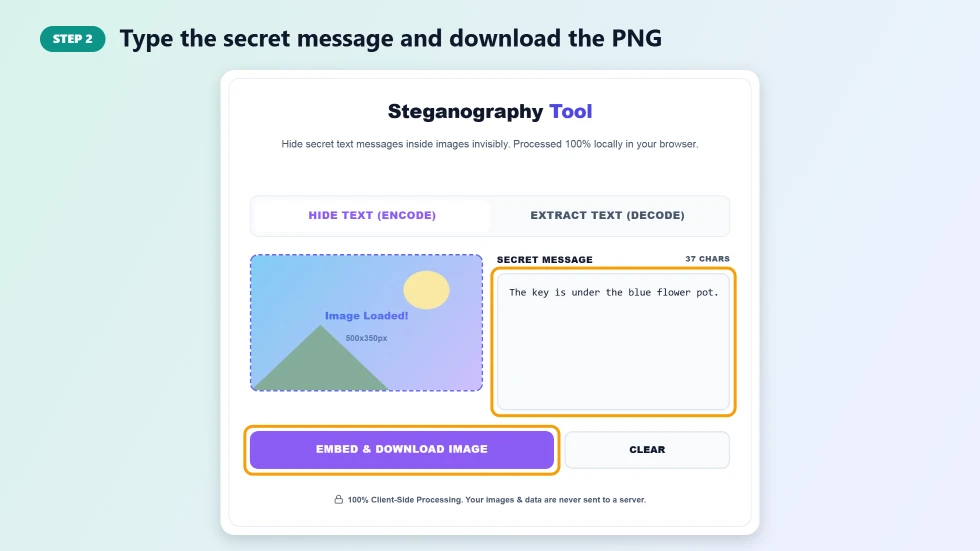
Step 2: Type the secret message and download the PNG
Type your message in the Secret Message box and press Embed & Download Image. The tool hides the text in the pixels and downloads a PNG that looks identical to the original. Send or share that PNG file as it is.
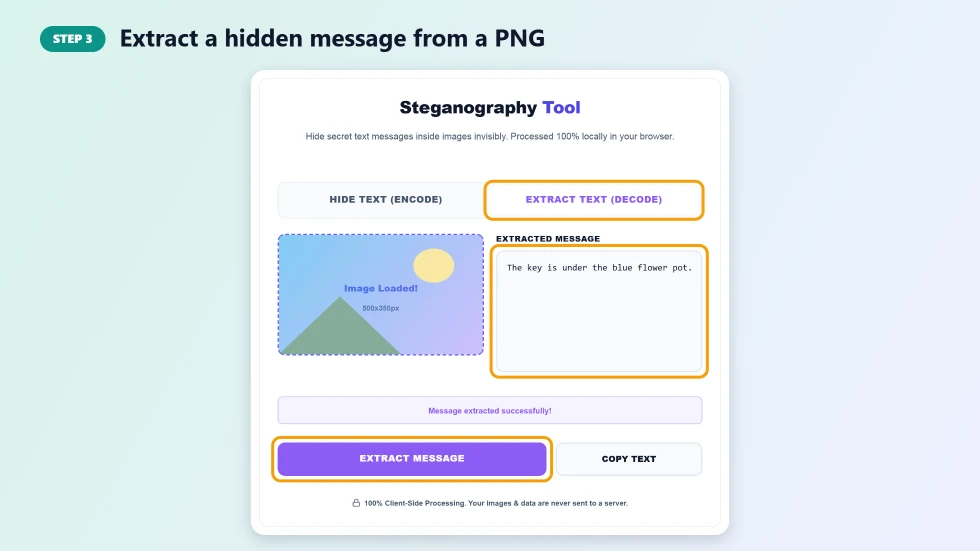
Step 3: Extract a hidden message from a PNG
To read a message, switch to Extract Text (Decode), upload the encoded PNG and press Extract Message. The hidden text appears in the Extracted Message box, ready to copy. If you see No hidden message found, the image was probably compressed or converted along the way.
Why the Image Must Stay a PNG
The hidden message lives in tiny pixel changes. PNG is lossless, so those changes survive. If the image is converted to JPG, resized, edited or compressed by a chat app or social network, the hidden bits are lost. Send the encoded PNG as a file or document attachment rather than as a photo, so apps do not recompress it.
What You Can Do with a Steganography Tool Online
- Hide a note or password inside a holiday photo for a friend who knows to look.
- Create puzzles, scavenger hunts and capture-the-flag challenges.
- Add an invisible ownership note or watermark to your own images.
- Teach how digital images and binary data work in a computer science class.
- Pair steganography with encryption for an extra layer of privacy.
Steganography vs Encryption
Encryption makes a message unreadable, but it is obvious that something secret is there. Steganography hides the fact that a message exists at all. For stronger privacy, encrypt your text first with a password, then hide the ciphertext inside an image. Keep in mind that basic LSB steganography can be detected by specialised analysis tools, so it is best for fun, learning and light privacy rather than high-stakes secrets.
Frequently Asked Questions
Is this steganography tool online free?
Yes. It is free with no sign-up and no limits.
Will the image look different after hiding text?
No. Only the lowest bit of each colour value changes, which is invisible to the human eye.
Why can't I extract my message?
The encoded image must stay an unmodified PNG. Converting to JPG, resizing or sending it through apps that compress photos destroys the hidden data.
How much text can I hide?
Each pixel stores 3 bits, so the capacity is about width × height × 3 ÷ 8 bytes. The tool warns you if your message is too long.
Can I hide emoji or non-English text?
Yes. Messages are encoded as UTF-8, so emoji, accents and scripts such as Urdu or Arabic are supported.
Are my images uploaded?
No. Encoding and decoding run entirely in your browser, and nothing is sent to a server.