

Caesar Cipher Decoder – Decode, Encode and Brute Force Shift Ciphers
Caesar Cipher Decoder
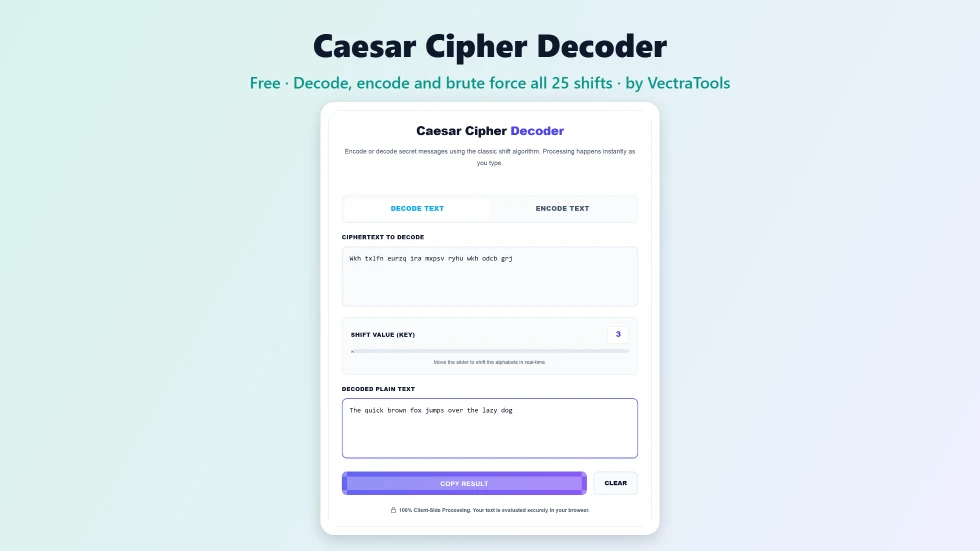
Use this free Caesar cipher decoder to decode or encode secret messages with the classic shift cipher. Processing happens instantly as you type.
Quick answer
To use this Caesar cipher decoder, paste the coded text into Ciphertext to Decode and set the shift with the slider; the plain text appears instantly. If you do not know the key, look at the All 25 shifts panel underneath: every possible shift is listed and the most English-like result is marked Best guess. Click any row to apply that shift. Switch to Encode Text to create your own coded message.
The Caesar cipher is one of the oldest and simplest codes: every letter is moved a fixed number of places along the alphabet, so with a shift of 3, A becomes D and HELLO becomes KHOOR. This free Caesar cipher decoder reverses that in real time and can also encode new messages.
I added a brute-force panel because most people who need a decoder do not know the key. It tries all 25 shifts at once and ranks them by how much they look like English, so the right answer usually jumps out straight away.
Caesar Cipher Decoder Features
| Feature | How it works |
|---|---|
| Decode and encode | Switch between Decode Text and Encode Text tabs |
| Any shift 1 to 25 | A slider sets the key and updates the result live |
| Brute force all shifts | Lists every possible shift when the key is unknown |
| Best guess highlight | Ranks results by English letter frequency and common words |
| Click to apply | Click a row in the brute-force list to set that shift |
| Keeps formatting | Upper and lower case, spaces, numbers and punctuation are preserved |
| Copy and clear | Copy the result or clear both boxes in one click |
| Private | Runs locally in your browser |
How to Use the Caesar Cipher Decoder
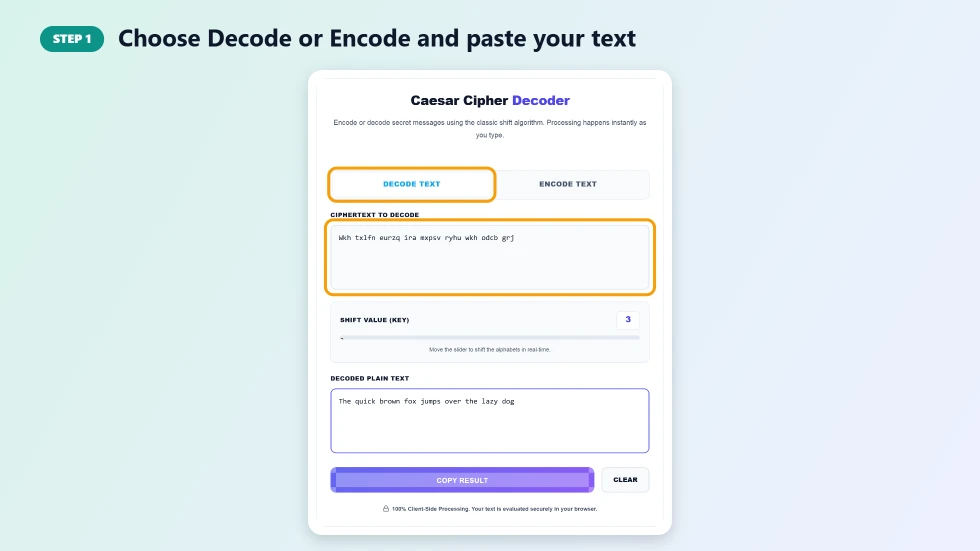
Step 1: Choose Decode or Encode and paste your text
The tool opens on Decode Text. Paste the scrambled message into Ciphertext to Decode. To make your own code instead, click Encode Text and type your plain message.
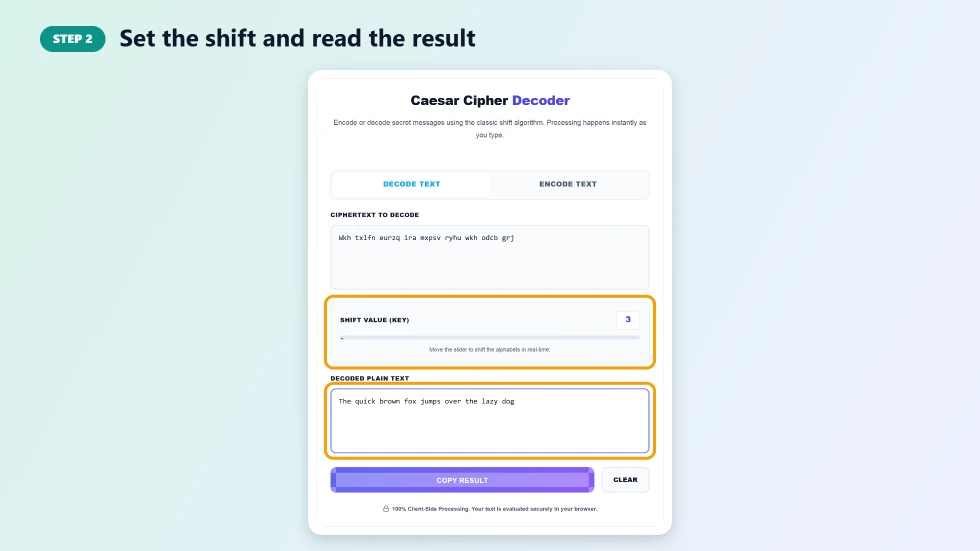
Step 2: Set the shift and read the result
Move the Shift Value slider to the key you were given, from 1 to 25. The result box updates as you move it. A shift of 13 is the famous ROT13, which encodes and decodes with the same setting.
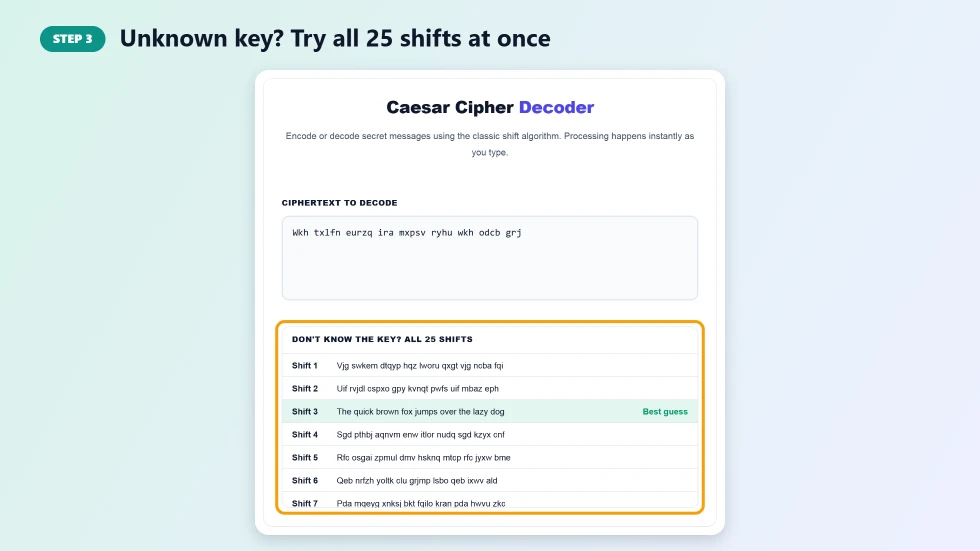
Step 3: Unknown key? Try all 25 shifts at once
In Decode mode, the All 25 shifts panel lists the text decoded with every possible key. The most readable line is highlighted as Best guess. Click it, or any other line, to set the slider to that shift and copy the result.
How the Caesar Cipher Works
Each letter is replaced by the letter a fixed number of positions further down the alphabet, wrapping around from Z back to A. With a shift of 3, the alphabet ABCDEFGHIJKLMNOPQRSTUVWXYZ becomes DEFGHIJKLMNOPQRSTUVWXYZABC. To decode, you shift back by the same amount. Because there are only 25 useful keys, a Caesar cipher decoder can simply try them all.
Where You Will See Caesar Ciphers
- Puzzles and escape rooms: a classic way to hide a clue.
- Geocaching: hints are often written in ROT13.
- School lessons: a first introduction to cryptography and modular arithmetic.
- Online forums: ROT13 is used to hide spoilers and punchlines.
- History: Julius Caesar reportedly used a shift of 3 for military messages.
Caesar Cipher Decoder Tips
- Short messages may produce more than one readable result; check the top few lines.
- If no line makes sense, the text may use a different cipher, such as Vigenere or a substitution cipher.
- Numbers and symbols are not shifted, so dates and punctuation stay the same.
- The Caesar cipher is not secure; use real encryption for private information.
Frequently Asked Questions
Is this Caesar cipher decoder free?
Yes. It is free with no sign-up and works in any modern browser.
How do I decode a Caesar cipher without the key?
Paste the text in Decode mode and check the All 25 shifts panel. The tool tries every key and highlights the most English-like result as Best guess.
What is ROT13?
ROT13 is a Caesar cipher with a shift of 13. Because the alphabet has 26 letters, applying it twice gives back the original text.
Does it change numbers and punctuation?
No. Only the letters A to Z are shifted. Numbers, spaces and punctuation stay exactly as they are.
Is the Caesar cipher secure?
No. With only 25 possible keys it can be broken in seconds. It is great for puzzles and learning, not for real secrets.
Can it decode other languages?
It shifts the English alphabet A to Z. The Best guess ranking is tuned for English text, so for other languages check the full list yourself.