

AES Text Encryptor Online – Encrypt and Decrypt Messages with a Password
AES Text Encryptor
Use this free AES text encryptor online to lock and unlock messages with AES-256 encryption. Processes 100% locally in your browser.

Quick answer
To use this AES text encryptor, stay on the Encrypt tab, type your message and a secret key, then press Encrypt Text. The tool turns the message into AES-256 ciphertext that starts with U2FsdGVkX1, which you can copy and send. To read it, open the Decrypt tab, paste the ciphertext, enter the same key and press the button. Everything happens in your browser and the key is never sent anywhere.
Sometimes you need to send a note, a code or a piece of private text through a channel you do not fully trust. This free AES text encryptor locks that text with a password using AES-256, one of the most widely used encryption standards. Only someone with the same password can turn the ciphertext back into readable text.
The encryption runs locally with the well-known CryptoJS library, and the output uses the same salted format as OpenSSL. I tested it with accented letters and emoji to make sure messages come back exactly as they went in, and a wrong key shows a clear error instead of garbage.
AES Text Encryptor Online Features
| Feature | How it works |
|---|---|
| AES-256 encryption | Password-based AES with a 256-bit key and a random salt for each message |
| Encrypt and Decrypt tabs | Switch modes with one click |
| OpenSSL-compatible output | Base64 ciphertext in the Salted__ format (starts with U2FsdGVkX1) |
| Unicode safe | Accents, emoji and non-Latin scripts decrypt correctly |
| Show or hide key | An eye button reveals the key while you type it |
| Clear error messages | A wrong key or damaged ciphertext shows a helpful warning |
| One-click copy | Copy Result puts the output on your clipboard |
| Private | Your text and key never leave your browser |
How to Use the AES Text Encryptor Online
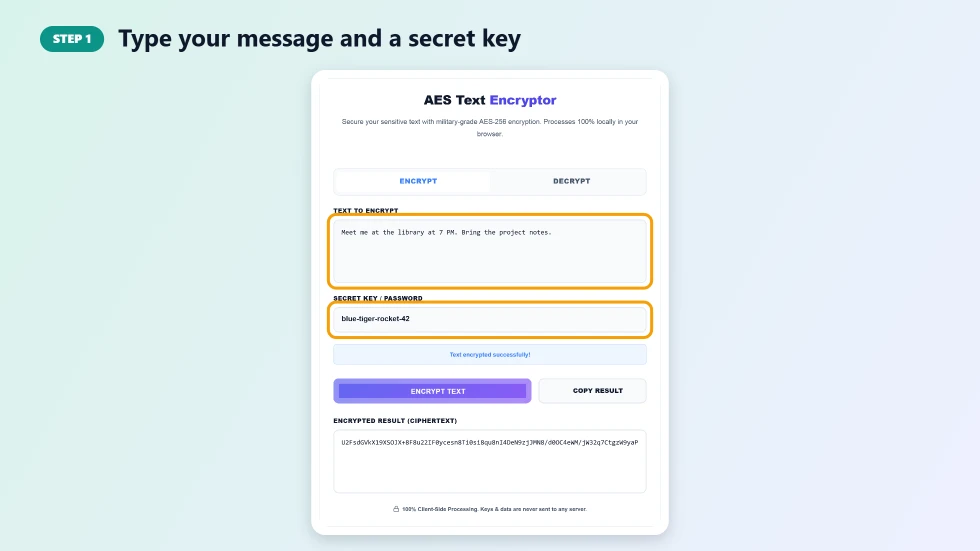
Step 1: Type your message and a secret key
On the Encrypt tab, type or paste your text in Text to Encrypt. Then enter a secret key in Secret Key / Password. Use a long passphrase of several random words, because the encryption is only as strong as the key you choose.
Step 2: Press Encrypt Text and copy the ciphertext
Press Encrypt Text. The scrambled result appears in the Encrypted Result box and starts with U2FsdGVkX1. Press Copy Result and send the ciphertext by email or chat. Share the key separately, ideally by a different channel or in person.

Step 3: Switch to Decrypt to unlock a message
To read an encrypted message, click the Decrypt tab, paste the ciphertext, enter the same secret key and press the button. The original message appears in the result box. If the key is wrong or the text was changed, you will see a Decryption failed warning.

When to Use an AES Text Encryptor
- Sending a Wi-Fi password, door code or account recovery note to a family member.
- Keeping private notes inside a shared document or cloud file.
- Posting a puzzle or secret message that only people with the key can read.
- Protecting snippets of sensitive text before saving them in an email draft.
- Learning how symmetric encryption works in a class or workshop.
How the Encryption Works
This AES text encryptor uses password-based AES-256 in CBC mode. Each time you encrypt, a random 8-byte salt is generated and combined with your password to derive the key, so the same message encrypted twice gives different ciphertext. The result is encoded in Base64 with an OpenSSL Salted__ header, which means it can also be decrypted with OpenSSL using the matching options. Because the key comes from your password, a short or common password can be guessed; a long passphrase keeps your message safe.
Tips for Safe Encryption
- Use a passphrase of at least four or five random words as the key.
- Never send the key in the same message as the ciphertext.
- Keep a copy of the key: if you lose it, the message cannot be recovered.
- For files, legal documents or ongoing chats, use dedicated end-to-end encrypted apps.
- Check the decrypted text carefully; any change to the ciphertext makes decryption fail.
Frequently Asked Questions
Is this AES text encryptor free?
Yes. It is free to use with no account and no limits.
Is my text or key sent to your server?
No. Encryption and decryption run in your browser, and neither your text nor your key is uploaded or stored.
What happens if I forget the key?
The message cannot be recovered. There is no reset or backdoor, so keep your key somewhere safe.
Why does the same text give a different result each time?
A new random salt is used for every encryption. This is normal and makes the ciphertext harder to analyse.
Can I decrypt this with OpenSSL?
Yes. The output uses the OpenSSL Salted__ format for AES-256-CBC with an MD5-based key derivation, so OpenSSL can decrypt it when given the same password and the matching options.
How strong is the encryption?
AES-256 itself is very strong. In practice the security depends on your password, so use a long, random passphrase rather than a short word.