

Smart URL Deduplicator – Remove Duplicate URLs and Keep the Best Price or Metric in 3 Easy Steps
Smart URL Deduplicator
Paste URLs, Prices, and Metrics. The tool will remove duplicates while preserving the row with the best logic criteria.
Use this free URL deduplicator to clean bulk site lists and keep only the best offer for each domain, with its price and metric kept in sync.
Quick answer
A smart URL deduplicator removes repeated URLs from a list but, unlike a plain duplicate remover, it decides which copy to keep. Paste URLs, prices and a metric (such as allowed links or DR) in three matching columns, choose Keep Highest or Keep Lowest for the metric and a price tie-break, and click Process Data. With normalisation on, www.site.com, http://site.com and site.com/ count as the same site. The URL, price and metric of each kept row stay aligned.
Table of Contents
Guest post vendors, link sellers and outreach sheets often list the same website several times at different prices or with different terms. Removing duplicates with a basic tool keeps the first copy, which is not always the best deal, and it breaks the link between each URL and its price.
This smart URL deduplicator keeps the three columns synced. For every duplicate domain it keeps the row with the best metric, uses price to break ties, and outputs clean URL, price and metric lists you can paste straight back into your spreadsheet.
How the Smart Deduplication Works
- Each URL is normalised (when enabled) by removing http://, https://, www. and a trailing slash, so different spellings of one site are grouped together.
- Within each group, the row with the best metric wins, using your Keep Highest or Keep Lowest setting.
- If two rows have the same metric, the price tie-break decides: lowest or highest price.
- The winning row’s URL, price and metric are written to the three output boxes in the order each site first appeared.
Worked Example
Six rows from two vendors, with Keep Highest Value and Prefer Lowest Price:
| Input URL | Price | Allowed links |
|---|---|---|
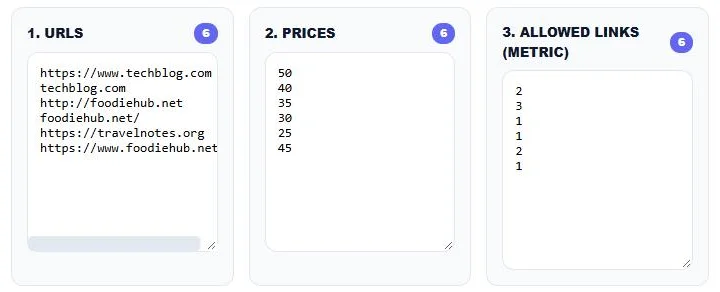
| https://www.techblog.com | 50 | 2 |
| techblog.com | 40 | 3 |
| http://foodiehub.net | 35 | 1 |
| foodiehub.net/ | 30 | 1 |
| https://travelnotes.org | 25 | 2 |
| https://www.foodiehub.net | 45 | 1 |
Result: techblog.com – $40 – 3 (highest metric wins), foodiehub.net/ – $30 – 1 (all three have metric 1, so the lowest price wins) and https://travelnotes.org – $25 – 2. Six rows become three, and every price still matches its site.
How to Use the Smart URL Deduplicator
Step 1: Paste URLs, Prices and Metrics
Paste your site list into 1. URLS, the matching prices into 2. PRICES and the matching metric into 3. ALLOWED LINKS (METRIC), one value per line. Row 1 of each box must belong to the same site. The counters show how many lines each box has, so you can check that they match.
Step 2: Choose the Keep Rules
Set Metric Priority to Keep Highest Value or Keep Lowest Value, set Price Tie-Break to Prefer Lowest Price or Prefer Highest Price, and pick a Currency Format for the output prices. Leave Normalize URLs ticked to treat www, http, https and a trailing slash as the same site. Click Process Data.

Step 3: Copy or Download the Clean List
The Output URLs, Output Prices and Output Metrics boxes show one row per unique site, still in matching order, and the badge shows how many unique sites remain. Copy each column back into your sheet or click Download CSV.

Which Settings Should You Use?
| Goal | Metric Priority | Price Tie-Break |
|---|---|---|
| Most links per post for the money | Keep Highest Value | Prefer Lowest Price |
| Highest DR or traffic site version | Keep Highest Value | Prefer Lowest Price |
| Fewest outbound links (cleaner pages) | Keep Lowest Value | Prefer Lowest Price |
| Check the most expensive listing | Keep Highest Value | Prefer Highest Price |
The metric column can hold any number you want to rank by: allowed links, DR, DA, traffic or turnaround days.
Who Uses It
- SEO agencies merging guest post lists from several vendors.
- Link builders comparing prices for the same site across marketplaces.
- Outreach teams cleaning prospect sheets before sending emails.
- Publishers tidying their own site inventory before sharing it with buyers.
Tips for Clean Results
- Make sure all three boxes have the same number of lines. A missing price shifts every row below it.
- Paste numbers only in the price and metric boxes; remove currency symbols first and add them back with Currency Format.
- Turn off Normalize URLs if subdomains or http and https versions are sold as different sites.
- Keep a copy of the original sheet in case you want to change the rules later.
Privacy
All processing happens in your browser. Your vendor lists and prices are not uploaded to any server.
Frequently Asked Questions
What is a URL deduplicator?
It is a tool that removes repeated URLs from a list. This smart version also keeps each URL’s price and metric aligned and chooses which duplicate to keep.
Which duplicate does the tool keep?
The row with the highest or lowest metric, depending on Metric Priority. If metrics tie, the lowest or highest price wins, depending on Price Tie-Break.
Does it treat www and non-www as the same site?
Yes, when Normalize URLs is ticked. It also ignores http, https and a trailing slash.
Can I use DR or traffic as the metric?
Yes. The metric box accepts any number, such as DR, DA, traffic or allowed links.
What happens if my columns have different lengths?
Rows will no longer line up correctly. Check the counters above each box before processing.
Is the URL deduplicator free?
Yes. It is free, runs in your browser and needs no sign-up.