

Bulk URL Cross-Matcher – Find Duplicate URLs Between Two Lists in 2 Easy Steps
Bulk URL Cross-Matcher
Paste up to 100k+ URLs. We auto-normalize HTTP/HTTPS/WWW to find exact duplicates between two lists instantly.
Use this free URL cross matcher to find which websites from one list already exist in another, even when they are written differently.
Quick answer
A URL cross matcher compares two lists and returns the URLs that appear in both. Paste your master list into Input A and the list you want to check into Input B, then click Find Matching URLs. Before comparing, the tool treats http and https, www and non-www, a trailing slash and upper or lower case as the same, so https://www.Site.com/ matches site.com. The output lists the matching URLs as they were written in Input B.
Table of Contents
Link builders, SEO agencies and outreach teams constantly compare lists: a new vendor sheet against sites already used, a prospect list against a do-not-contact list, or this month’s backlinks against last month’s. Spreadsheet lookups miss matches when one list has www or https and the other does not.
This bulk URL cross-matcher normalises both lists first and then finds every overlap in one pass, so you can see straight away which sites are repeats.
How URL Normalisation Works
| Difference ignored | Example treated as equal |
|---|---|
| Protocol | http://site.com = https://site.com |
| www subdomain | www.site.com = site.com |
| Trailing slash | site.com/ = site.com |
| Letter case | Site.COM = site.com |
Paths are still compared, so site.com/blog and site.com are treated as different URLs. Paste root domains only if you want domain-level matching.
Worked Example
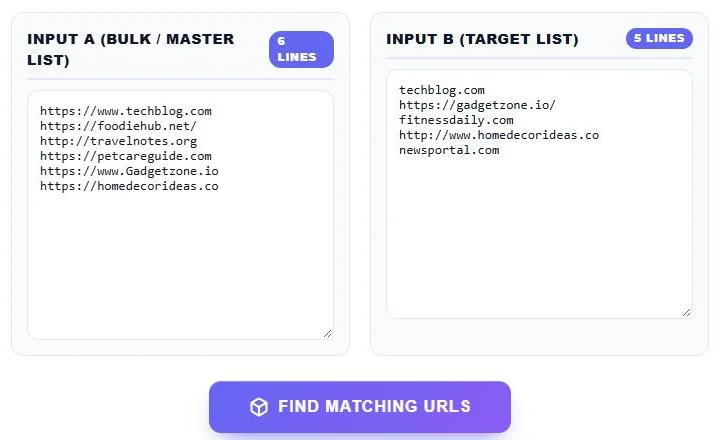
Input A has six sites: https://www.techblog.com, https://foodiehub.net/, http://travelnotes.org, https://petcareguide.com, https://www.Gadgetzone.io and https://homedecorideas.co. Input B has five: techblog.com, https://gadgetzone.io/, fitnessdaily.com, http://www.homedecorideas.co and newsportal.com.
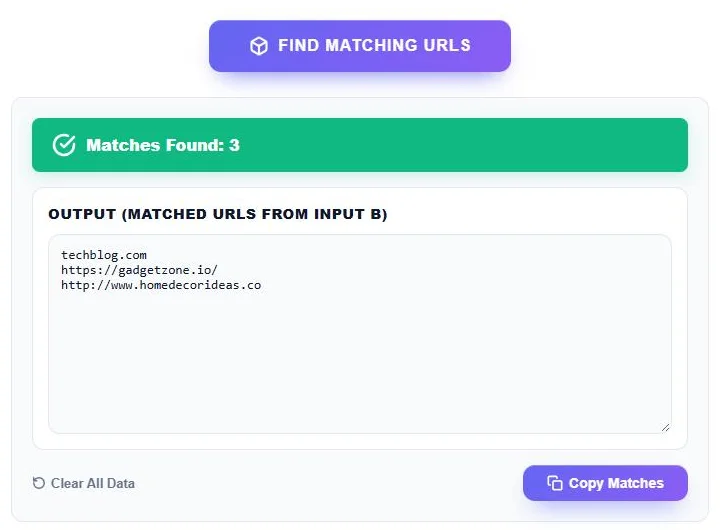
The cross-matcher finds 3 matches: techblog.com, https://gadgetzone.io/ and http://www.homedecorideas.co. A plain spreadsheet lookup would find none of them, because every pair is written differently.
How to Use the Bulk URL Cross-Matcher
Step 1: Paste Your Two URL Lists
Paste the master list, such as sites you have already used, into Input A (Bulk / Master List). Paste the list you want to check, such as a new vendor sheet, into Input B (Target List). Put one URL per line; the line counters confirm how many URLs each list has. Click Find Matching URLs.
Step 2: Review and Copy the Matches
The green bar shows how many matches were found, and Output (Matched URLs from Input B) lists each one as written in your target list. Click Copy Matches to paste them into your sheet, or Clear All Data to start again.
Common Uses
- Avoid duplicate guest posts: check a new vendor list against sites where you already have links.
- Clean outreach lists: remove prospects who are already in your CRM or on a blocklist.
- Compare backlink exports: see which referring domains appear in both your site’s and a competitor’s report.
- Merge vendor sheets: find the sites two sellers both offer, then compare prices.
- Audit redirects or sitemaps: check which URLs from an old list still appear in a new one.
Input A or Input B: Which List Goes Where?
The output shows URLs from Input B, so put the list you want to act on in B. For example, to remove already-used sites from a new vendor sheet, put used sites in A and the vendor sheet in B, then delete the matched rows from the vendor sheet.
Tips for Accurate Matching
- Use one URL per line and remove notes, prices or extra columns first.
- Strip paths if you want to match by domain only.
- Subdomains other than www, such as blog.site.com, are kept and are not matched to site.com.
- Run the tool again with the lists swapped if you need the A-side spelling.
Privacy and Large Lists
The comparison runs in your browser, so your link lists are never uploaded. Large lists of thousands of URLs are handled on your own device.
Frequently Asked Questions
What does a URL cross matcher do?
It compares two lists of URLs and returns the ones that appear in both, after ignoring differences such as http or https and www.
Does it treat www and non-www as the same?
Yes. www.site.com and site.com are treated as the same URL, as are http and https, trailing slashes and different letter case.
Which list are the results taken from?
Matched URLs are shown as they appear in Input B, the target list.
Can it match different pages on the same domain?
No. Paths are compared, so site.com/page and site.com do not match. Paste root domains for domain-level matching.
How many URLs can I compare?
The tool is built for very large lists, and the limit depends on your device memory rather than a fixed cap.
Is the URL cross matcher free?
Yes. It is free, runs in your browser and needs no sign-up.