

Screen Resolution Calculator – Aspect Ratio, Resolution Scaler and PPI
Resolution Calculator
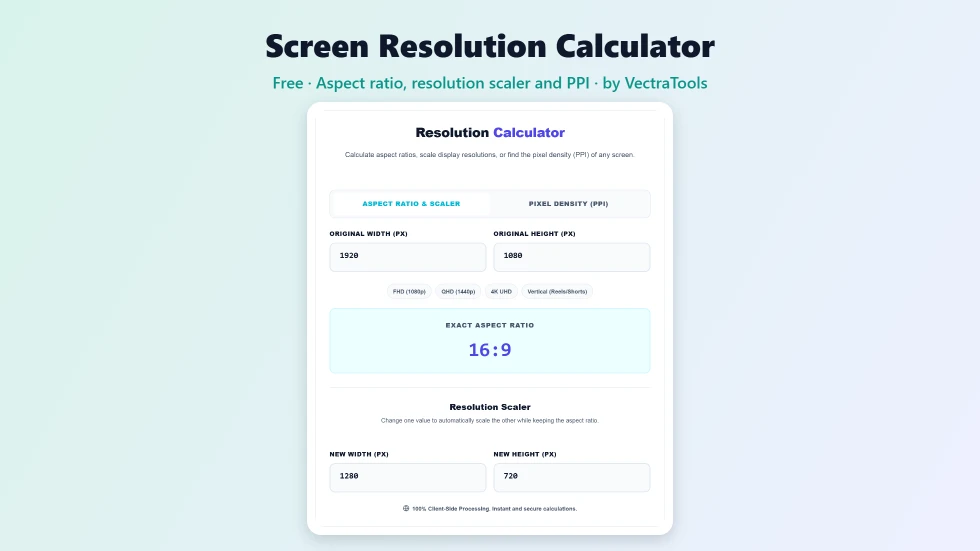
Use this free screen resolution calculator to find aspect ratios, scale resolutions or work out the pixel density (PPI) of any screen.
Resolution Scaler
Change one value to automatically scale the other while keeping the aspect ratio.
Quick answer
To use this screen resolution calculator, enter a width and height such as 1920 × 1080 to see its exact aspect ratio (16:9). In the Resolution Scaler, change the new width or height and the other value updates to keep the same shape, so 1920 × 1080 scaled to 1280 wide becomes 1280 × 720. Switch to Pixel Density (PPI) and enter a resolution and diagonal size to get the screen's PPI.
Screen sizes and resolutions come with a lot of numbers: 1080p, 1440p, 4K, 16:9, 21:9 and PPI. This free screen resolution calculator turns those numbers into answers. It finds the aspect ratio of any resolution, scales a resolution up or down without stretching and calculates how sharp a display is.
I tested it against common resolutions, including ultrawide monitors and older laptop panels such as 1366 × 768, which is shown as approximately 16:9. Quick presets for FHD, QHD, 4K and vertical Reels or Shorts sizes save typing.
Screen Resolution Calculator Features
| Feature | How it works |
|---|---|
| Exact aspect ratio | Reduces any width and height to its simplest ratio |
| Approximate labels | Flags near matches such as 1366 × 768 ≈ 16:9 |
| Resolution scaler | Change width or height and the other updates automatically |
| Quick presets | FHD 1080p, QHD 1440p, 4K UHD and vertical 9:16 |
| Pixel density (PPI) | From resolution and diagonal screen size |
| Total pixels | See the pixel count of a display |
| Live updates | Results change as you type |
| Private | Pure calculations in your browser |
How to Use the Screen Resolution Calculator
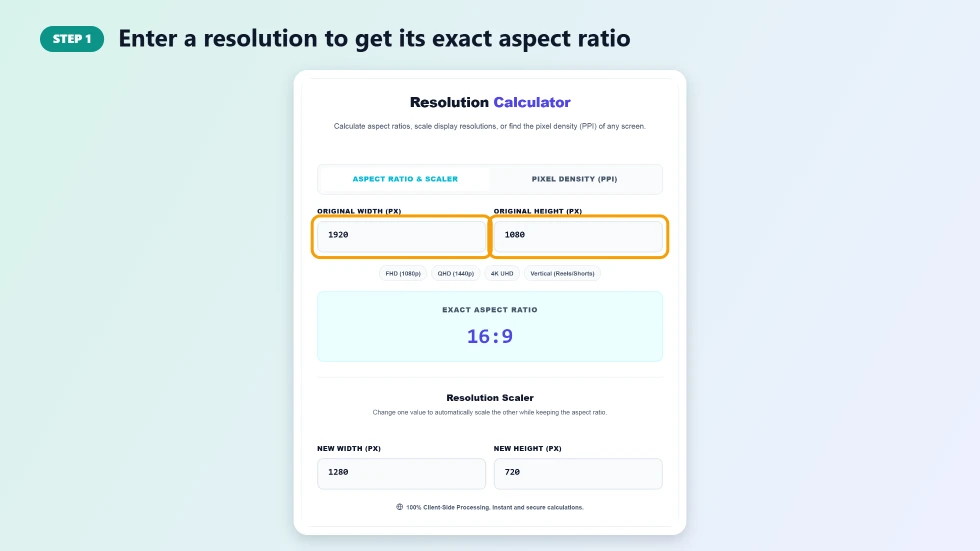
Step 1: Enter a resolution to get its exact aspect ratio
On Aspect Ratio & Scaler, type the original width and height in pixels, or click a preset such as FHD or 4K UHD. Exact Aspect Ratio shows the simplified ratio, for example 16:9 for 1920 × 1080 or 64:27 (often marketed as 21:9) for 2560 × 1080.
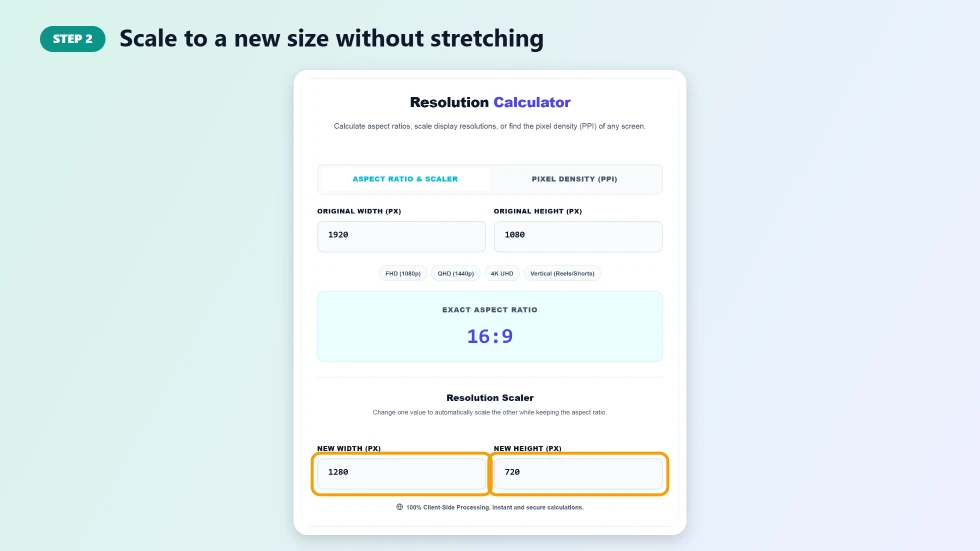
Step 2: Scale to a new size without stretching
In Resolution Scaler, type a new width and the height is calculated for you, or type a new height and the width updates. This is useful for resizing videos, wallpapers, game settings and design artboards.
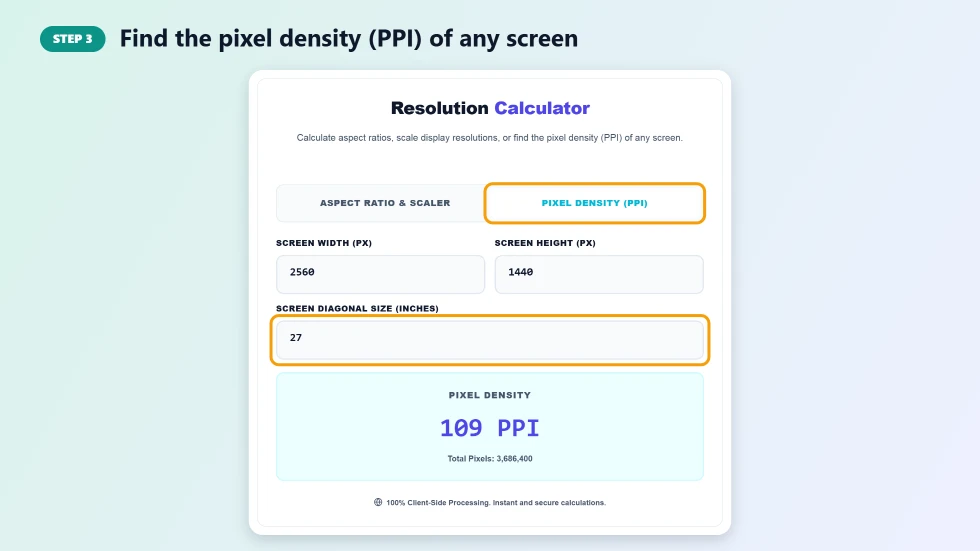
Step 3: Find the pixel density (PPI) of any screen
Switch to Pixel Density (PPI), enter the screen resolution and diagonal size in inches. The tool calculates pixels per inch and total pixels. A 27-inch 2560 × 1440 monitor, for example, has about 109 PPI.
Common Screen Resolutions
- HD (720p): 1280 × 720, 16:9
- Full HD (1080p): 1920 × 1080, 16:9
- QHD (1440p): 2560 × 1440, 16:9
- 4K UHD: 3840 × 2160, 16:9
- Ultrawide: 2560 × 1080 or 3440 × 1440, about 21:9
- Vertical video: 1080 × 1920, 9:16 for Reels, Shorts and TikTok
How PPI Is Calculated
PPI = √(width² + height²) ÷ diagonal size in inches. The square root gives the number of pixels along the diagonal, and dividing by the diagonal length gives pixels per inch. Higher PPI means a sharper image at the same viewing distance. Phones often exceed 400 PPI, while desktop monitors are usually between 90 and 160 PPI.
Screen Resolution Calculator Tips
- Keep the same aspect ratio when resizing video to avoid black bars or stretching.
- For text-heavy work, about 110 PPI or higher on a desktop monitor looks crisp at normal distance.
- Ultrawide resolutions often reduce to unusual ratios like 64:27 or 43:18; these are all marketed as 21:9.
- Use the DPI calculator for printing, since print size depends on DPI, not screen PPI.
Frequently Asked Questions
Is this screen resolution calculator free?
Yes. It is free with no sign-up and runs in your browser.
What aspect ratio is 1920x1080?
1920 × 1080 is 16:9, the standard widescreen ratio for TVs, monitors and YouTube videos.
How do I resize a resolution without stretching it?
Use the Resolution Scaler: enter the original size, then type the new width or height and the other value is calculated to keep the same aspect ratio.
How is PPI calculated?
Divide the diagonal resolution in pixels by the diagonal screen size in inches. The calculator does this for you.
What is a good PPI for a monitor?
Around 90 to 110 PPI is typical for 24 to 27-inch monitors, and 140 PPI or more looks very sharp for text.
Why does 2560x1080 show 64:27 instead of 21:9?
64:27 is the exact mathematical ratio. Manufacturers round it and market it as 21:9 ultrawide.