

Screen DPI PPI Converter – Pixels to Inches in 3 Easy Steps
Screen DPI/PPI Converter
Use this screen DPI PPI converter to change pixel dimensions to physical sizes (Inches/CM) by setting your target pixel density.
Use this free screen DPI PPI converter to turn pixels into inches and centimetres, or work out how many pixels you need for a print. Set the pixel density, then type pixels, inches or centimetres, and the other values update instantly.
Quick answer
Inches = pixels ÷ PPI, and pixels = inches × PPI. Centimetres = inches × 2.54. A 1920 px wide image is 20 inches (50.8 cm) at 96 PPI, but only 6.4 inches at 300 DPI. For an 8.5 inch wide print at 300 DPI you need 2,550 pixels.
Table of Contents
Pixels have no fixed physical size. The same image can be a poster or a postage stamp depending on how many pixels you squeeze into each inch, which is exactly what DPI (dots per inch) and PPI (pixels per inch) describe.
This screen DPI PPI converter links pixels, inches and centimetres so you can size images for screens, print and design projects without guesswork.
DPI and PPI Formulas
- Inches = pixels ÷ PPI
- Pixels = inches × PPI
- Centimetres = inches × 2.54
- Pixels from cm = cm ÷ 2.54 × PPI
- PPI of a screen = √(width² + height²) ÷ diagonal in inches
Pixels to Inches at Common Resolutions
| Pixels | 72 PPI | 96 PPI | 150 DPI | 300 DPI |
|---|---|---|---|---|
| 1080 px | 15.00 in | 11.25 in | 7.20 in | 3.60 in |
| 1920 px | 26.67 in | 20.00 in | 12.80 in | 6.40 in |
| 2550 px | 35.42 in | 26.56 in | 17.00 in | 8.50 in |
| 3000 px | 41.67 in | 31.25 in | 20.00 in | 10.00 in |
| 3508 px | 48.72 in | 36.54 in | 23.39 in | 11.69 in (A4 height) |
How to Use the Screen DPI PPI Converter
Step 1: Set the Pixel Density and Pixel Size
Enter the density in Pixel Density (DPI / PPI) and the width or height in Digital Size (px). At 96 PPI, 1920 pixels is 20 inches or 50.8 cm.

Step 2: Find the Pixels Needed for a Print
Change the density to 300 for print, then type the print size in Physical Size (in) or (cm). For a US Letter width of 8.5 inches, you need 2,550 pixels (21.59 cm). Pixel values are rounded to whole pixels.

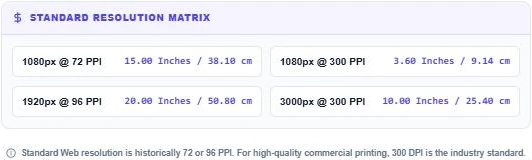
Step 3: Check the Standard Resolution Matrix
The Standard Resolution Matrix shows quick answers: 1080 px is 15 inches at 72 PPI or 3.6 inches at 300 PPI, and 3000 px is exactly 10 inches at 300 PPI. Press Clear Fields to start over.
DPI vs PPI
PPI counts the pixels in a digital image or on a screen. DPI counts the ink dots a printer lays down. In everyday use the two are treated as the same setting when preparing files for print, and a "300 DPI image" usually means 300 pixels per inch at the final print size.
Recommended Resolutions
| Use | Recommended density |
|---|---|
| Website images | Size in pixels; DPI setting is ignored by browsers |
| Office and home prints | 150–200 DPI |
| Magazines, brochures, photo prints | 300 DPI |
| Large posters viewed from a distance | 100–150 DPI |
| Billboards | 15–50 DPI |
Common Print Sizes at 300 DPI
- 4 × 6 inch photo: 1200 × 1800 px
- A4 (8.27 × 11.69 in): 2480 × 3508 px
- US Letter (8.5 × 11 in): 2550 × 3300 px
- A3 (11.69 × 16.54 in): 3508 × 4961 px
Changing DPI Without Losing Quality
Changing the DPI number in an image editor without resampling does not change the pixels; it only changes the print size. A 3000 px photo set to 300 DPI prints at 10 inches, and the same file set to 150 DPI prints at 20 inches with the same detail spread over a larger area. Use the screen DPI PPI converter to see that trade-off before you send a file to print.
More unit tools: the Length Converter, the Frequency Converter and the Lux to Foot-Candle Converter.
Frequently Asked Questions
How do I convert pixels to inches?
Divide the pixel count by the PPI. 1920 px ÷ 96 PPI = 20 inches.
How many pixels do I need for a 300 DPI print?
Multiply the print size in inches by 300. An 8.5 inch width needs 2,550 pixels.
Is DPI the same as PPI?
Not exactly. PPI is pixels in an image or screen and DPI is printer dots, but both are used to mean pixels per inch when preparing print files.
Does DPI matter for website images?
No. Browsers display images by pixel size. Only the pixel dimensions and file size matter for the web.
What PPI is a typical screen?
Many desktop monitors are about 90–110 PPI, while phones are often 300–500 PPI.
Is my data stored?
No. The screen DPI PPI converter runs in your browser and nothing is saved.