

DPI Calculator for Images – Pixels to Print Size and Print Size to Pixels
Image DPI Calculator
Use this free DPI calculator for images to get exact print dimensions from pixels, or the pixels you need for a print size.

Quick answer
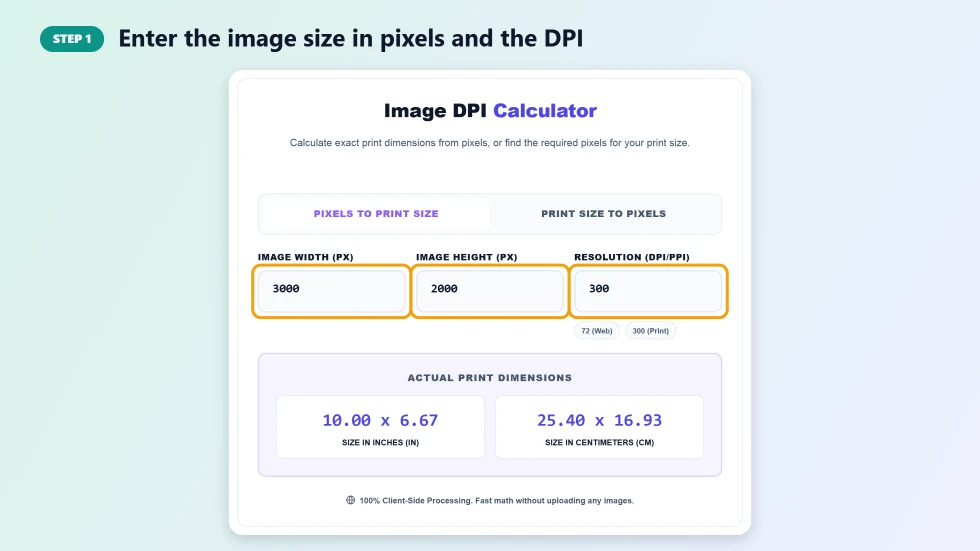
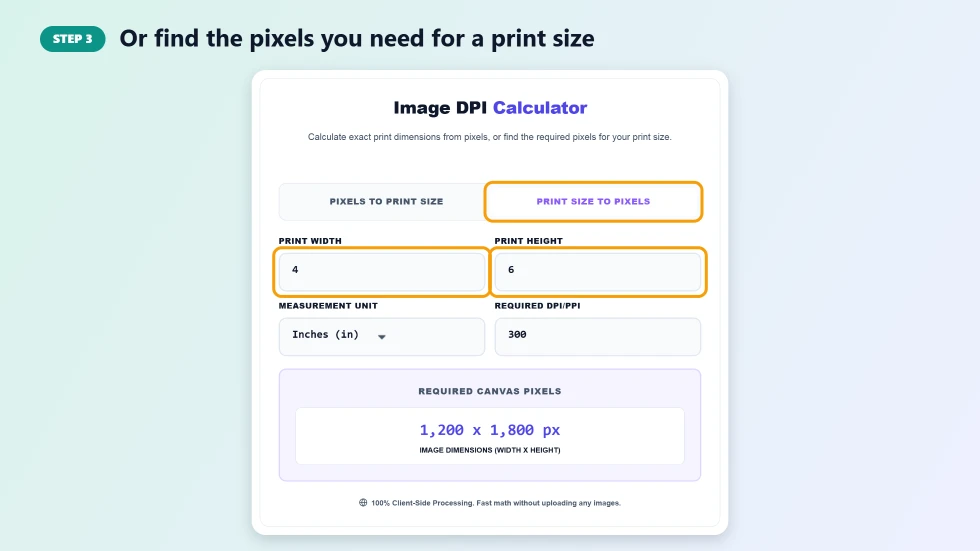
To use this DPI calculator, open Pixels to Print Size, enter the image width and height in pixels and the DPI, and you instantly see the print size in inches and centimetres. For example, 3000 × 2000 pixels at 300 DPI prints at 10 × 6.67 inches. Switch to Print Size to Pixels to go the other way: a 4 × 6 inch print at 300 DPI needs 1200 × 1800 pixels.
Whether a photo looks sharp on paper depends on how many pixels are spread across each inch, measured in DPI (dots per inch) or PPI (pixels per inch). Print a small image too large and it looks soft or blocky. This free DPI calculator shows exactly how big you can print an image, and how many pixels you need for a particular print size.
It works both ways and supports inches and centimetres, so it is handy for photographers, designers, print shops and anyone preparing posters, photo prints, flyers or book covers.
DPI Calculator for Images Features
| Feature | How it works |
|---|---|
| Pixels to print size | Width and height in inches and centimetres |
| Print size to pixels | Required pixel dimensions for any print size |
| Inches or centimetres | Choose your unit for the print size |
| Any DPI | Use 300 for photo prints, 150 for posters or 72 for screen |
| Instant results | Updates as you type |
| Common presets | Quick reference for web (72) and print (300) resolutions |
| Exact maths | Rounds pixels to whole numbers so they are ready to use |
| Private | Pure calculation; no images are uploaded |
How to Use the DPI Calculator for Images
Step 1: Enter the image size in pixels and the DPI
On Pixels to Print Size, type the image width and height in pixels; you can find them in your photo app or file properties. Enter the DPI you plan to print at: 300 is standard for high-quality photo prints.
Step 2: Read the print size in inches and centimetres
Actual Print Dimensions shows the size in inches and centimetres. Divide pixels by DPI to get inches: 3000 pixels ÷ 300 DPI = 10 inches. If the size is smaller than you need, lower the DPI slightly or use a bigger image.

Step 3: Or find the pixels you need for a print size
Switch to Print Size to Pixels, enter the print width and height, choose inches or cm and set the DPI. The tool shows the required canvas size in pixels, for example 1200 × 1800 px for a 4 × 6 inch print at 300 DPI.
Which DPI Should You Use?
- 300 DPI: photo prints, magazines, brochures and anything viewed up close.
- 200 to 240 DPI: acceptable for many photo labs and home printers.
- 150 DPI: posters and large prints viewed from a distance.
- 72 to 96 DPI: screens; DPI does not affect how images look on websites.
Common Print Sizes at 300 DPI
- 4 × 6 in: 1200 × 1800 pixels
- 5 × 7 in: 1500 × 2100 pixels
- 8 × 10 in: 2400 × 3000 pixels
- A4 (8.27 × 11.69 in): about 2480 × 3508 pixels
- 11 × 17 in: 3300 × 5100 pixels
DPI Calculator Tips
- Changing the DPI number in a file without adding pixels does not improve quality; only the print size changes.
- Upscaling a small image to reach 300 DPI rarely looks as good as starting with enough pixels.
- Ask your print shop which DPI and bleed they require before preparing files.
- For screens, think in pixels only; DPI settings do not matter on the web.
Frequently Asked Questions
Is this DPI calculator free?
Yes. It is free with no sign-up and works in any browser.
How do I calculate print size from pixels?
Divide the number of pixels by the DPI. For example, 2400 pixels ÷ 300 DPI = 8 inches.
How many pixels do I need for a 4x6 print?
At 300 DPI, a 4 × 6 inch print needs 1200 × 1800 pixels.
Is DPI the same as PPI?
Strictly, DPI refers to printer dots and PPI to image pixels, but most people use them interchangeably when sizing images for print.
Does DPI matter for web images?
No. Screens only care about pixel dimensions. The DPI value stored in a file has no effect on how it looks online.
Can I use centimetres?
Yes. In Print Size to Pixels you can choose inches or cm, and the Pixels to Print Size results show both.