

Thumbnail Generator Online – YouTube, Instagram and Blog Covers in HD
Pro Thumbnail Generator
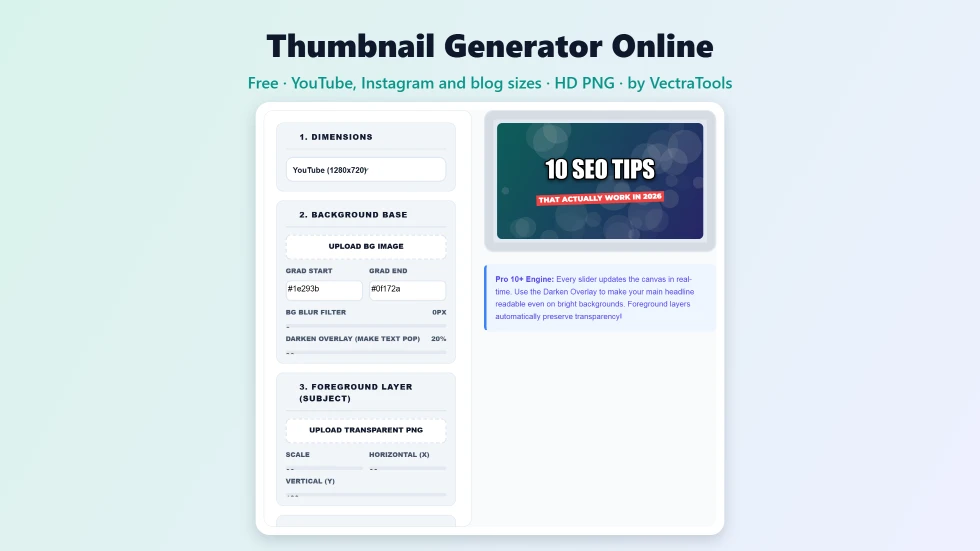
Use this free thumbnail generator online to design click-worthy covers. Add gradients, upload character layers, apply cinematic filters, and craft heavy typography instantly.
📐 1. Dimensions
🖼️ 2. Background Base
🦸 3. Foreground Layer (Subject)
✍️ 4. Main Headline
🏷️ 5. Subtitle & Ribbon
✨ 6. Effects & Badges
Quick answer
To use this thumbnail generator online, pick a size (YouTube 1280×720, Instagram 1080×1080 or Blog / Facebook 1200×630), then upload a background image or use the gradient. Add an optional cut-out PNG layer, type a bold headline and a ribbon subtitle, and adjust size, colour and position with the sliders. Add a LIVE, NEW, PRO or FREE badge or a border, then press Download HD PNG. It is free and runs in your browser.
A thumbnail decides whether someone clicks your video or post, often in less than a second. This free thumbnail generator online gives you the building blocks that high-performing thumbnails share: a strong background, a cut-out subject, a huge outlined headline, a contrasting ribbon and an optional badge. Everything updates live on the canvas, and the download is a full-size PNG.
I built it as a layered editor in a single page, so creators can make a thumbnail without opening a heavy design app. Your images stay on your device, because the whole design is drawn in the browser.
Thumbnail Generator Online Features
| Feature | How it works |
|---|---|
| Three size presets | YouTube 1280×720, Instagram square 1080×1080 and Blog / Facebook 1200×630 |
| Background layer | Upload a photo or use a two-colour gradient, with blur up to 20px and a darken overlay up to 100% |
| Cut-out subject layer | Upload a transparent PNG or WebP and set its scale and X/Y position |
| Bold headline | Impact, Montserrat, Bangers or Righteous with fill colour, outline colour, size and position |
| Auto-fit headline | Long headlines shrink automatically so they never run off the edge |
| Ribbon subtitle | A tilted coloured ribbon with its own size, colour and position |
| Badges and borders | LIVE, NEW, PRO or FREE badges plus a thin or thick inner border |
| HD PNG export | Downloads at the exact preset size, named after your headline |
How to Use the Thumbnail Generator Online
Step 1: Choose the size and background
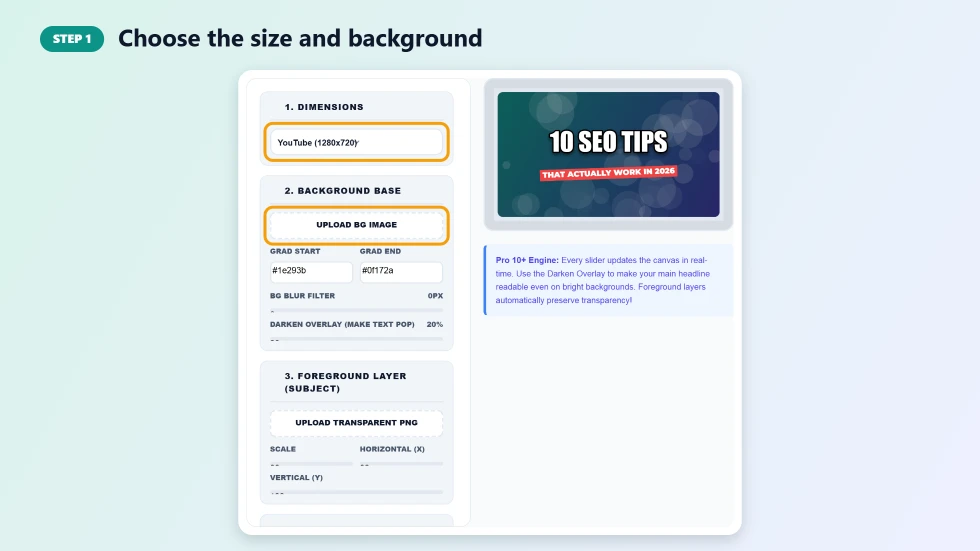
Open Dimensions and choose YouTube (1280×720), Instagram Sq (1080×1080) or Blog / Facebook (1200×630). Under Background Base, press Upload BG Image to use your own photo, or keep the gradient and pick its two colours. The BG Blur Filter softens a busy photo and Darken Overlay makes text stand out.
Step 2: Write the headline and ribbon text
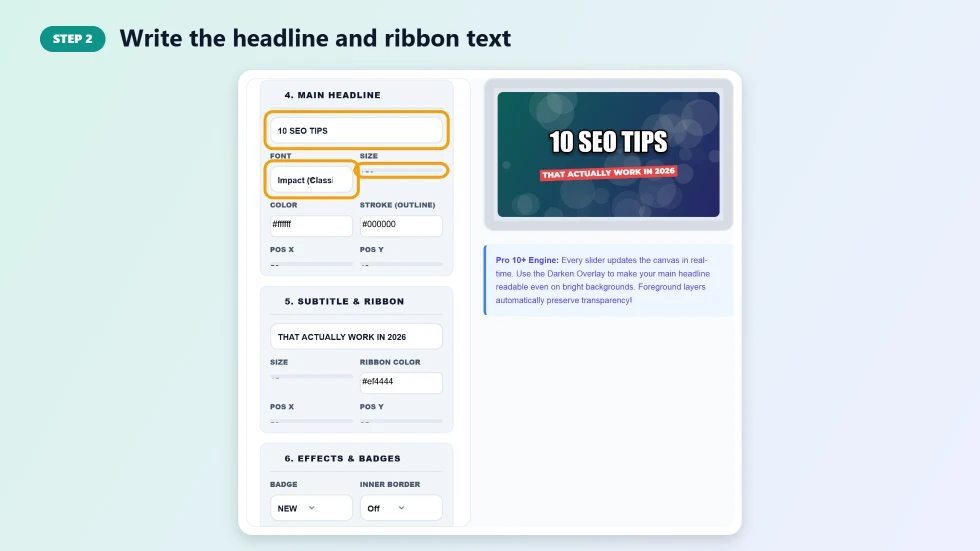
Type your main headline in the Main Headline box and choose a font, size, fill colour and outline colour. Move it with the Pos X and Pos Y sliders. Add a short supporting line in Subtitle & Ribbon and set the ribbon colour. For a face or product, upload a transparent PNG in the foreground layer and scale it into place.
Step 3: Add a badge or border and download the HD PNG
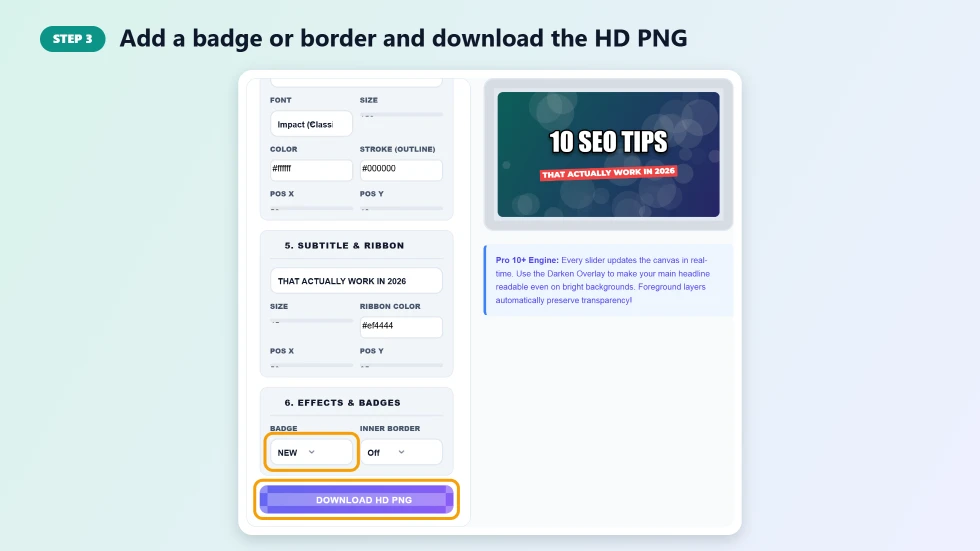
Under Effects & Badges, pick a LIVE, NEW, PRO or FREE badge and an inner border if you want one. When the preview looks right, press Download HD PNG. The file is saved at the full preset size, ready to upload to YouTube, Instagram or your blog.
What Makes a Thumbnail Get Clicks
- Three to five words: big, short headlines are readable even at phone size.
- High contrast: light text with a dark outline on a darkened background stands out in any feed.
- A clear subject: a face or product cut-out gives viewers something to focus on.
- One accent colour: a bright ribbon or badge draws the eye without clutter.
- Consistency: using the same fonts and colours across videos builds a recognisable channel style.
Tips for Using the Thumbnail Generator Online
- Use the Darken Overlay at 30 to 50% when your background photo is bright.
- Leave space on one side of the canvas for your cut-out image, and place the headline on the other side.
- Keep the ribbon text shorter than the headline so the two do not compete.
- Check the preview at a small size; if you cannot read it, increase the headline size or shorten it.
- Make a square Instagram version as well as a YouTube version so your promotion looks right everywhere.
Recommended Thumbnail Sizes
YouTube recommends 1280×720 pixels with a 16:9 ratio, which is the default preset here. Instagram feed posts look best as 1080×1080 squares, and most blogs and Facebook link previews use around 1200×630. Because this thumbnail generator online exports at those exact sizes, you can upload the PNG without cropping or resizing.
Frequently Asked Questions
Is this thumbnail generator online free?
Yes. It is free to use with no sign-up and no watermark on the downloaded thumbnail.
What size is a YouTube thumbnail?
YouTube thumbnails are 1280×720 pixels in a 16:9 ratio. That is the default preset, and the download matches it exactly.
Can I add my own face or product image?
Yes. Upload a transparent PNG or WebP in the foreground layer, then use the scale and position sliders to place it.
Which fonts are available?
You can choose Impact, Montserrat, Bangers or Righteous for the headline, with any fill and outline colour.
What happens if my headline is too long?
The headline shrinks automatically to fit the width of the canvas, so letters never get cut off at the edges.
Are my images uploaded to a server?
No. The thumbnail is drawn in your browser and your images never leave your device.