

Banner Maker Online – Website, Twitter, Facebook and YouTube Banners
Quick answer
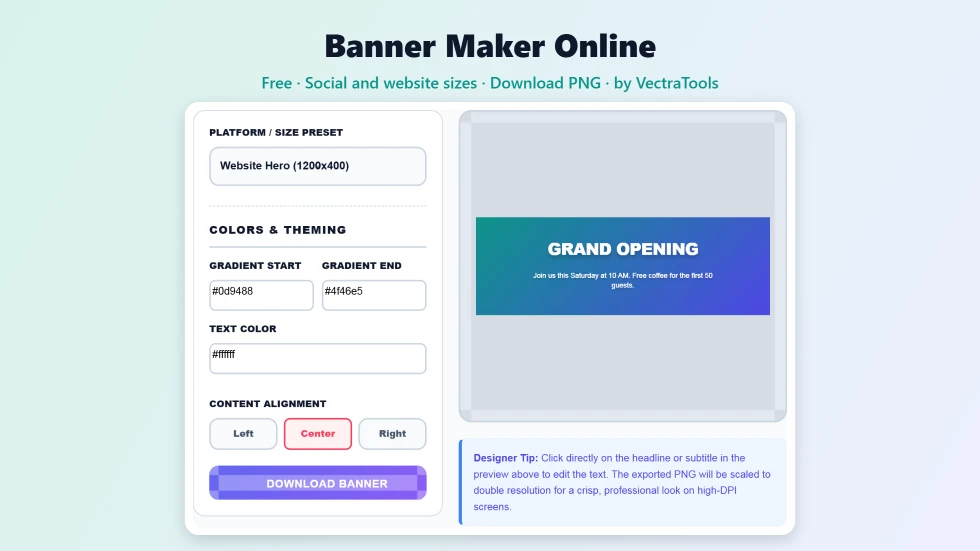
To use this banner maker online, choose a size preset such as Website Hero (1200×400), Twitter Header (1500×500), Facebook Cover (820×312) or YouTube 16:9. Pick a gradient start colour, end colour and text colour, then click the headline and subtitle on the preview to type your own words. Choose left, centre or right alignment and press Download Banner to save a high-resolution PNG. It is free and needs no account.
A good banner is often the first thing people see on your website, channel or profile. This free banner maker online helps you make one in under a minute. Choose the platform size, pick two gradient colours, write a headline and a short line underneath, and download a sharp PNG that is ready to upload.
I designed it for quick, clean results rather than endless options. The text scales with the banner, so what you see in the preview is exactly what you get in the download, on a laptop or a phone.
Banner Maker Online Features
| Feature | How it works |
|---|---|
| Four size presets | Website Hero 1200×400, Twitter Header 1500×500, Facebook Cover 820×312 and YouTube 16:9 |
| Gradient backgrounds | Pick a start and end colour for a smooth diagonal gradient |
| Custom text colour | Set the headline and subtitle colour to match your brand |
| Edit on the banner | Click the headline or subtitle in the preview and type |
| Text alignment | Left, centre or right alignment in one click |
| Responsive text | Font sizes scale with the banner, so the preview matches the export on any screen |
| HD PNG export | Downloads at least 1200 to 1920 pixels wide depending on the preset |
| Private | Runs in your browser with no upload and no sign-up |
How to Use the Banner Maker Online
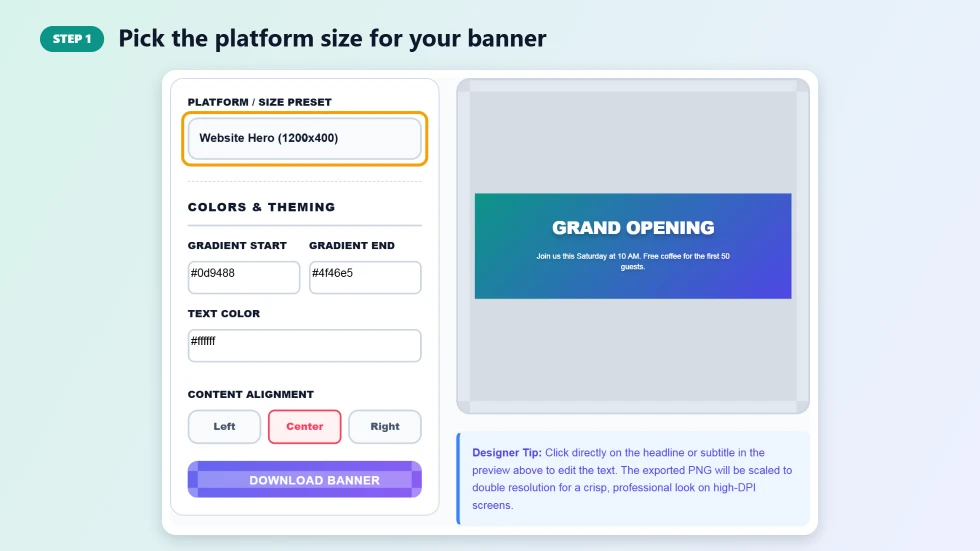
Step 1: Pick the platform size for your banner
Open the Platform / Size Preset menu and choose where the banner will be used. Website Hero is 1200×400, Twitter Header is 1500×500, Facebook Cover is 820×312 and YouTube / Standard is 16:9. The preview changes shape straight away so you can see how much room the text has.
Step 2: Set the colours and type your headline
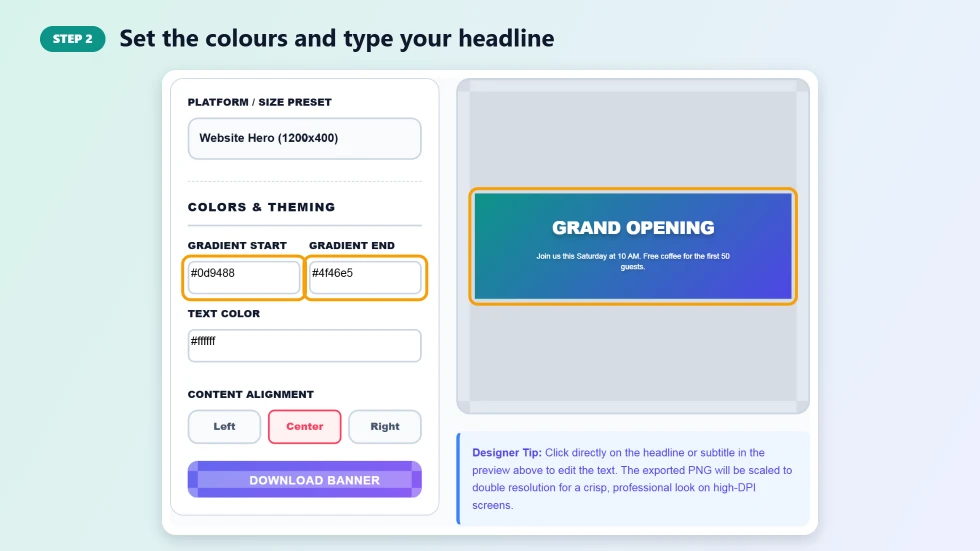
Choose a Gradient Start and Gradient End colour for the background and a Text Color that stands out against them. Then click the headline on the banner and type your message, and do the same for the subtitle line below it. Short headlines of two to five words read best.
Step 3: Align the text and download the banner
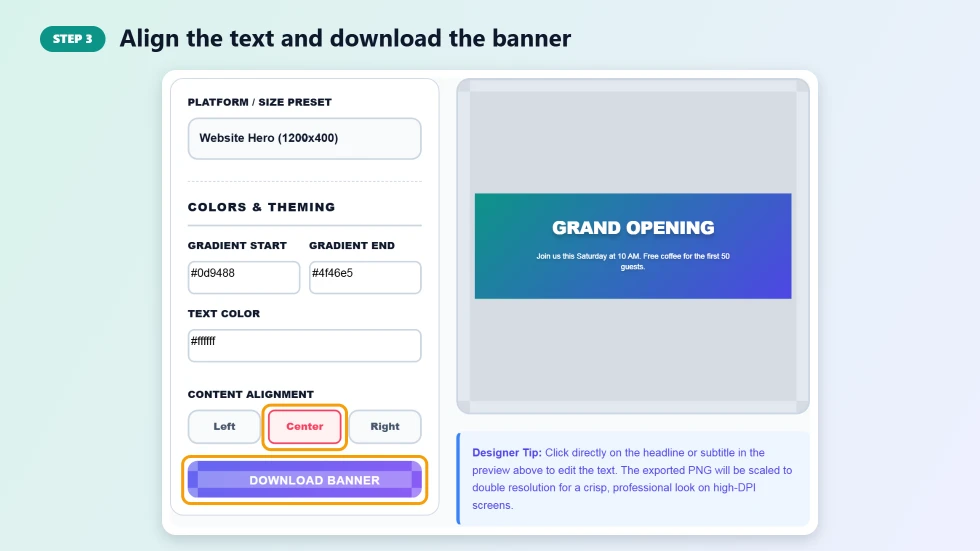
Use the Left, Center or Right buttons to position the text. Left or right alignment leaves space for a profile photo or logo on the other side. Press Download Banner to save the design as a PNG, scaled up for a crisp result on high-resolution screens.
Banner Sizes and Where to Use Them
- Website Hero (1200×400): the wide strip at the top of a homepage, landing page or blog.
- Twitter / X Header (1500×500): the cover image across the top of your profile.
- Facebook Cover (820×312): the cover photo on a personal profile or business page.
- YouTube / Standard 16:9: video thumbnails, presentation title slides and general widescreen graphics.
Tips for a Banner That Gets Noticed
- Keep the headline short and specific, such as Grand Opening or New Course Out Now.
- Choose two colours that are close on the colour wheel for a smooth, professional gradient.
- Check contrast: white or very dark text works on most gradients.
- On social profiles, keep important text away from the corner where your profile photo sits.
- Make a version for each platform rather than stretching one banner to fit every size.
Banner Maker Online or a Full Design App?
Full design apps are great when you need photos, icons, layers and brand kits. For a fast, clean text banner, they can be slow to open and hard to learn. This banner maker online covers the common case in a few clicks: correct size, brand colours, a clear headline and an HD download. When you need more, you can still use the PNG as a starting background in another tool.
Frequently Asked Questions
Is this banner maker online free?
Yes. It is free to use with no sign-up and no watermark on the downloaded banner.
Which banner sizes are available?
There are four presets: Website Hero 1200×400, Twitter Header 1500×500, Facebook Cover 820×312 and YouTube or standard 16:9.
What resolution is the download?
The PNG is exported at least 1200 pixels wide for the website size, 1500 for Twitter, 1640 for Facebook and 1920 for 16:9, and never below twice the preview size, so it stays sharp.
Can I add my own image or logo?
The banner uses a gradient background with a headline and subtitle. To add a logo, align the text to one side and place your logo on the free space in your website or profile settings.
How do I edit the text?
Click directly on the headline or subtitle in the preview and type. The text updates on the banner as you go.
Is my design uploaded anywhere?
No. The banner is built and exported in your browser, and nothing is sent to a server.