

Keyword Density Analyzer – Check Top Phrases in 3 Easy Steps
Keyword Density Analyzer
Check keyword density and analyze your content for top 1-word, 2-word, and 3-word phrases to optimize SEO and prevent keyword stuffing.
| Keyword | Count | Density |
|---|
| Phrase | Count | Density |
|---|
| Phrase | Count | Density |
|---|
Use this free keyword density analyzer to see which words and phrases appear most in your article. Paste your text, press Analyze Content, and the tool lists the top 1-word, 2-word and 3-word phrases with their count and density, so you can spot keyword stuffing before you publish.
Quick answer
Keyword density = (times the keyword appears ÷ total words) × 100. A 1,000-word article that uses a phrase 15 times has a density of 1.5%. Most SEOs aim for roughly 1% to 2.5% for the main keyword and treat anything above 3% as a warning sign of stuffing.
Table of Contents
Google does not use a fixed keyword density target, but repeating a phrase too often makes text read badly and can look spammy. Using it too rarely can leave the page unclear about its topic.
This keyword density analyzer gives you the real numbers in a few seconds, so you can balance the focus keyword, supporting phrases and natural language.
Keyword Density Formula
- Density (%) = keyword count ÷ total words × 100
- Total words includes every word in the text, stop words too.
- Phrases are counted inside sentences only, so a phrase never joins the end of one sentence to the start of the next.
- Pure numbers such as 12 or 2026 are skipped in the phrase tables.
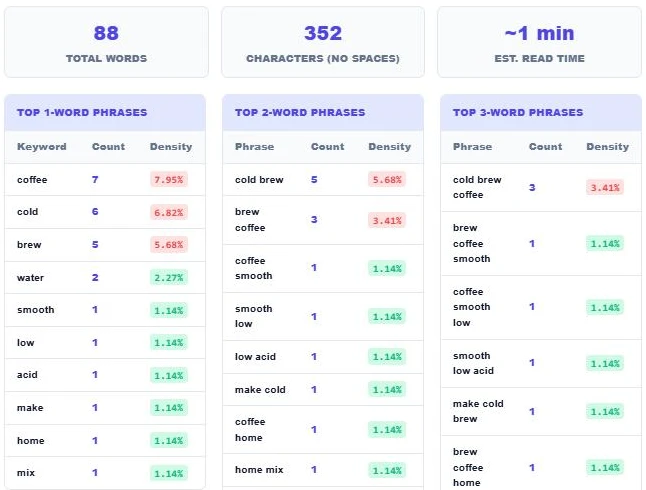
Example: in an 88-word paragraph, "coffee" appears 7 times. 7 ÷ 88 × 100 = 7.95%, which is far too high for a real article.
What Is a Good Keyword Density?
| Density | What it usually means |
|---|---|
| Below 0.5% | The keyword may be too rare for the page topic to be clear. |
| 0.5% to 1% | Light use. Fine for long articles and secondary keywords. |
| 1% to 2.5% | A natural range for the main keyword in most articles. |
| 2.5% to 3% | Getting heavy. Read the text aloud and vary the wording. |
| Above 3% | Likely keyword stuffing. Rewrite with synonyms and related terms. |
The tool colours each density badge green when it is in a safe range and red when it is high, so problem phrases stand out at a glance.
How to Use the Keyword Density Analyzer
Step 1: Paste Your Content
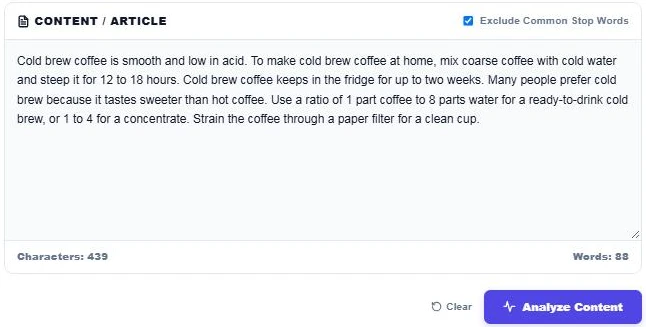
Paste your article, blog post or product description into the Content / Article box. The live counter shows characters and words as you type. Keep Exclude Common Stop Words ticked to hide words like the, and, is and for.
Step 2: Check Your Top Keywords
Press Analyze Content. The summary shows total words, characters without spaces and reading time. In our 88-word coffee sample, "coffee" appears 7 times (7.95%), "cold" 6 times and "brew" 5 times, all flagged red because the text repeats them too often.
Step 3: Review 2-Word and 3-Word Phrases
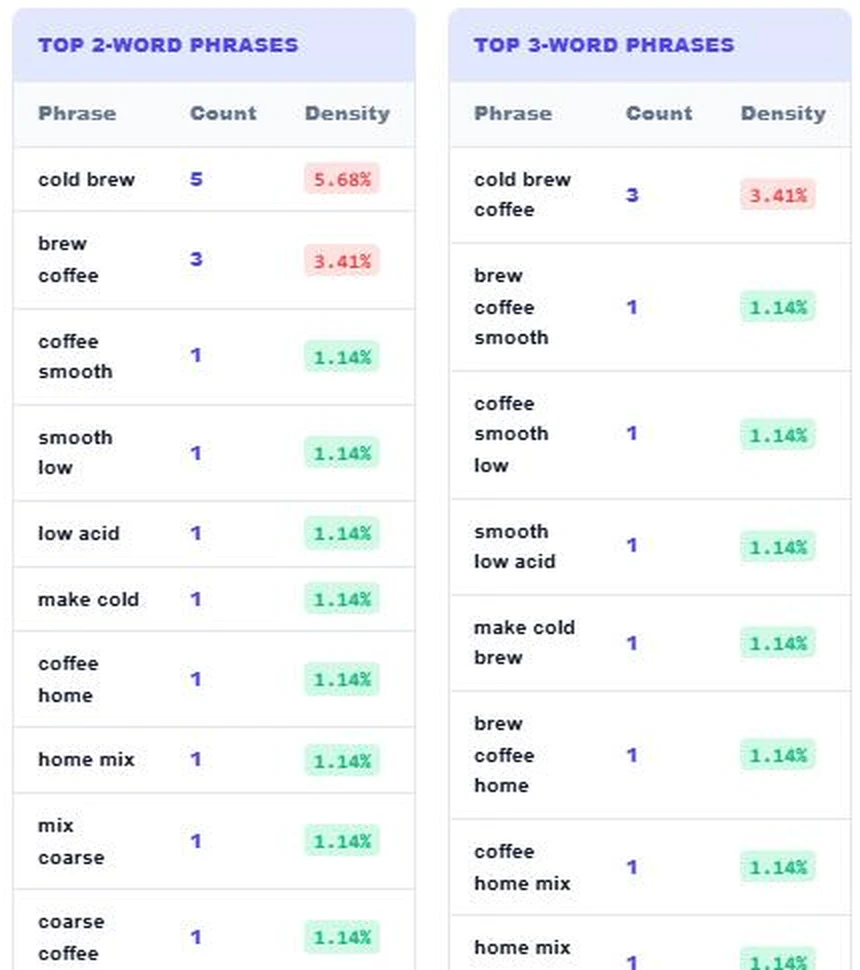
The phrase tables show which keyword combinations you lean on most. Here "cold brew" appears 5 times (5.68%) and "cold brew coffee" 3 times (3.41%). Swap some of them for variations like "this brew", "the concentrate" or "iced coffee", then analyze again.
Why Check 2-Word and 3-Word Phrases?
Most searches are phrases, not single words. A page about cold brew might have a safe density for "coffee" but still overuse the exact phrase "cold brew coffee". N-gram tables show these repeated phrases clearly, which a simple single-word counter misses.
Tips to Fix Keyword Stuffing
- Use the main keyword in the title, the first paragraph, one subheading and naturally in the body.
- Replace repeats with pronouns, synonyms and related terms.
- Answer real questions on the topic. Extra useful content lowers density naturally.
- Read the text aloud. If a phrase sounds forced, cut it.
- Check headings and image alt text too, because they often hide extra repeats.
Stop Words and Density
Stop words are very common words such as a, the, of and to. Excluding them keeps the tables focused on meaningful terms. The density is still worked out against the total word count, so the percentage matches what most SEO plugins report.
Polishing a post? Try the Reading Time Calculator, the Character Counter or the SEO Title Case Converter.
Frequently Asked Questions
How do I calculate keyword density?
Divide the number of times the keyword appears by the total word count and multiply by 100. 15 uses in 1,000 words is 1.5%.
What is the ideal keyword density for SEO?
There is no official number. Around 1% to 2.5% for the main keyword reads naturally in most articles. Above 3% often looks like stuffing.
Does Google use keyword density as a ranking factor?
Google has said it does not use a target density. Relevance, helpful content and natural language matter more, but heavy repetition can still hurt quality.
Should I exclude stop words?
Yes for finding your topic keywords. Stop words like the and and always top the list otherwise, which hides the useful terms.
Why does the tool show 2-word and 3-word phrases?
Most keywords are phrases. The tables show if you repeat a phrase such as "cold brew coffee" too often, even when each single word looks fine.
Is my text stored?
No. The keyword density analyzer runs in your browser and nothing you paste is uploaded.