

Text Case Converter – Title Case, Sentence Case and More for SEO Titles in 2 Easy Steps
Text Case Converter
Format your text to Title Case, Uppercase, or Sentence Case while monitoring standard SEO length limits.
| Format Type | SEO Best Practice | Ideal Length |
|---|---|---|
| Title Case | Capitalize all major words. Keep minor words (a, the, in, of) lowercase unless they start the title. Best for <title> and <h1> tags to increase CTR. | 50 to 60 characters |
| Sentence case | Capitalize only the first letter of the sentence and proper nouns. Best for standard body content, paragraphs, and Meta Descriptions. | 150 to 160 characters |
| UPPERCASE | Use sparingly. Only recommended for acronyms or highly emphasized short labels. Avoid ALL CAPS in SEO titles as Google may rewrite them. | N/A |
Use this free text case converter to format headlines, SEO titles and meta descriptions in the right capitalisation and check their length at the same time.
Quick answer
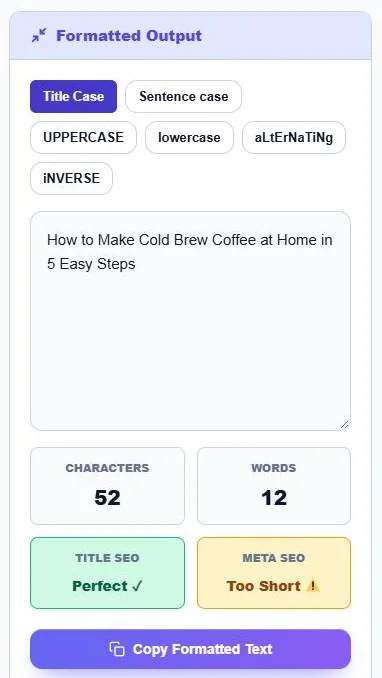
A text case converter changes capitalisation without retyping. Paste your text, then choose Title Case (major words capitalised), Sentence case (only the first word and names), UPPERCASE, lowercase, aLtErNaTiNg or iNVERSE. Example: “how to make cold brew coffee at home in 5 easy steps” becomes “How to Make Cold Brew Coffee at Home in 5 Easy Steps”, 52 characters, which the tool marks as a good SEO title length (about 50–60 characters).
Table of Contents
Inconsistent capitalisation makes titles look careless, and fixing it by hand is slow, especially for long lists of headings or product names. Title tags and meta descriptions also need to stay within the length Google usually shows.
This text case converter does both jobs. It reformats text in one click and shows the character and word count with quick checks for SEO title and meta description length.
Case Formats Explained
| Format | Example | Best for |
|---|---|---|
| Title Case | How to Make Cold Brew Coffee at Home | Title tags, H1s, blog headlines |
| Sentence case | How to make cold brew coffee at home | Meta descriptions, body text, UI labels |
| UPPERCASE | HOW TO MAKE COLD BREW COFFEE | Short labels and acronyms |
| lowercase | how to make cold brew coffee | URL slugs, tags, cleaning data |
| aLtErNaTiNg | hOw To MaKe CoLd BrEw | Memes and playful social posts |
| iNVERSE | hOW TO mAKE cOLD bREW | Fixing text typed with Caps Lock on |
Title Case Rules
The converter capitalises major words and keeps short minor words lowercase unless they start the title:
- Capitalise: nouns, verbs, adjectives, adverbs and pronouns, plus the first word.
- Keep lowercase: articles (a, an, the), short prepositions (in, of, at, for, to) and conjunctions (and, or, but) in the middle of a title.
- After a colon: most style guides capitalise the first word after a colon. Check this by hand, because the converter keeps short words such as “a” lowercase there.
SEO Length Guidelines
| Element | Recommended length | Why |
|---|---|---|
| Title tag | About 50–60 characters | Longer titles are often cut off in search results |
| Meta description | About 150–160 characters | Google shortens longer snippets |
| H1 heading | Clear and concise | Should match the page topic and title |
Google measures titles by pixel width, not characters, so a title with many wide letters can be cut a little earlier. Put the main keyword near the start.
How to Use the Text Case Converter
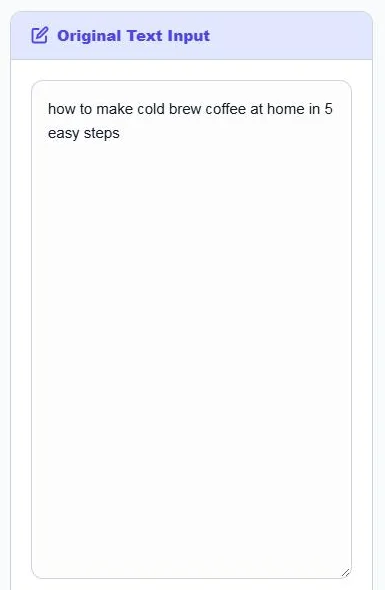
Step 1: Paste Your Text
Type or paste a title, heading, paragraph or list into Original Text Input. Click Clear Text to empty the box.
Step 2: Choose a Case and Copy
Click a format button: Title Case, Sentence case, UPPERCASE, lowercase, aLtErNaTiNg or iNVERSE. The Formatted Output updates, and the cards show characters, words and whether the text fits an SEO title or a meta description. Click Copy Formatted Text.
Does Capitalisation Affect SEO?
Search engines treat uppercase and lowercase the same for ranking. Capitalisation matters for people: a neat Title Case headline looks more professional and is easier to scan in search results. Avoid ALL CAPS titles, which look like shouting and may be rewritten by Google.
Tips
- Keep brand names, acronyms and product codes (iPhone, SEO, USB-C) correct by checking them after converting.
- Pick one style for all headlines on a site and stick to it.
- Use lowercase for URL slugs, joined with hyphens.
Frequently Asked Questions
What does a text case converter do?
It changes the capitalisation of text to formats such as Title Case, Sentence case, UPPERCASE or lowercase without retyping.
What is the difference between Title Case and Sentence case?
Title Case capitalises most words; Sentence case capitalises only the first word and proper nouns.
Which case should I use for SEO titles?
Title Case is the most common choice for title tags and headlines. Sentence case also works if it matches your site style.
How long should an SEO title be?
Around 50–60 characters. The tool shows the character count and marks whether the length is good.
How do I fix text typed with Caps Lock on?
Use iNVERSE to flip the case of every letter, or lowercase followed by Sentence case.
Is the text case converter free?
Yes. It is free, runs in your browser and needs no sign-up.