

Robots.txt Syntax Validator – Find Errors in 3 Easy Steps
Robots.txt Validator
Paste your file into this robots.txt syntax validator to instantly check syntax, identify typos, and audit crawling directives.
Use this free robots.txt syntax validator to check your robots.txt file before search engines read it. Paste the file, press Validate Syntax, and you get a line-by-line report that flags typos, unsupported rules, bad paths and broken sitemap URLs.
Quick answer
A valid robots.txt groups rules under a User-agent line, uses only supported directives (User-agent, Disallow, Allow, Sitemap), starts every path with / or *, and lists sitemaps as full URLs. Common mistakes are misspelled directives like "Disalow", Noindex lines that Google ignores, and paths without a leading slash.
Table of Contents
One wrong character in robots.txt can hide a whole site from Google or leave private folders open to crawlers. The file is plain text and has no error messages of its own, so mistakes often go unnoticed for months.
This robots.txt syntax validator reads every line the way a crawler would and tells you exactly which line has a problem and why, so you can fix it before publishing.
What the Robots.txt Validator Checks
- Directive spelling: catches typos such as Disalow, Useragent or Sitemaps and suggests the right word.
- Unsupported rules: flags Noindex, Nofollow and Noarchive, which Google stopped supporting in robots.txt in 2019.
- Rule order: errors when Allow or Disallow appears before any User-agent line.
- Path format: warns when a path does not start with / or *.
- Sitemap URLs: checks that each sitemap is a full http or https address.
- Engine-specific rules: notes that Crawl-delay is ignored by Googlebot and that Host and Clean-param are Yandex-only.
Robots.txt Directives Explained
| Directive | What it does | Supported by |
|---|---|---|
| User-agent | Names the crawler the next rules apply to. * means all bots. | All major crawlers |
| Disallow | Blocks crawling of a path. An empty value allows everything. | All major crawlers |
| Allow | Re-opens a path inside a blocked folder. | Google, Bing, Yandex |
| Sitemap | Points crawlers to your XML sitemap with a full URL. | Google, Bing, Yandex |
| Crawl-delay | Asks the bot to wait between requests (in seconds). | Bing, Yandex (not Google) |
| Host / Clean-param | Preferred host and URL parameter rules. | Yandex only |
| Noindex | Not a valid robots.txt rule. | None (Google dropped it in 2019) |
How to Use the Robots.txt Syntax Validator
Step 1: Paste Your Robots.txt File
Open yourdomain.com/robots.txt in a browser, copy everything, and paste it into the Robots.txt Content box. You can also paste a draft before you upload it to your server.
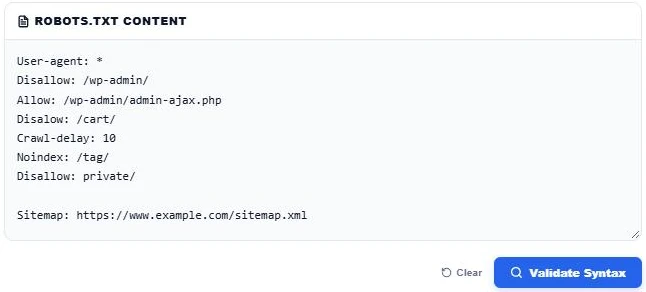
Step 2: Validate and Read the Summary
Press Validate Syntax. The summary cards count user-agents, Allow and Disallow rules, sitemaps and errors. In our sample file the tool found 1 user-agent, 3 rules, 1 sitemap and 2 errors, so the status shows FAILED.
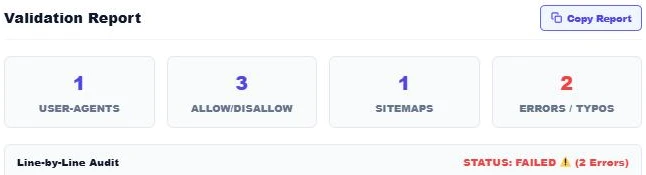
Step 3: Fix Each Line in the Audit
The line-by-line audit marks every line as OK, WARN or ERROR. Here it caught "Disalow" and suggested Disallow, flagged the Noindex line, and warned that "private/" needs a leading slash. Fix the lines, validate again until the status says PASSED, then use Copy Report to share the results.
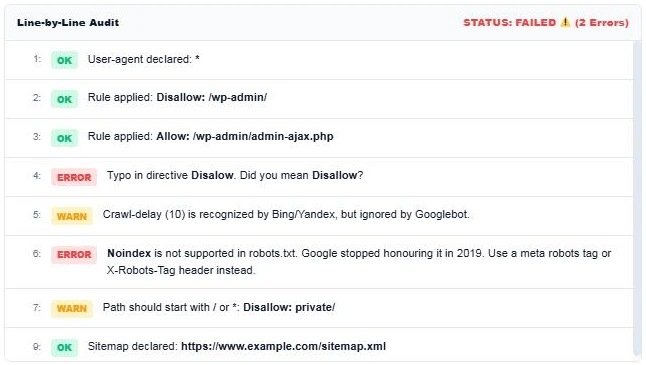
Example of a Clean Robots.txt File
User-agent: *
Disallow: /wp-admin/
Allow: /wp-admin/admin-ajax.php
Disallow: /cart/
Disallow: /*?s=

Sitemap: https://www.example.com/sitemap.xml
This file lets every crawler in, keeps the WordPress admin and cart pages out, blocks internal search result URLs, and points bots to the sitemap.
Common Robots.txt Mistakes
- Blocking the whole site: "Disallow: /" under User-agent: * stops all crawling. It is often left over from a staging site.
- Using robots.txt to hide pages from Google: a blocked URL can still be indexed if other sites link to it. Use a noindex meta tag on a crawlable page instead.
- Blocking CSS and JavaScript: Google needs these files to render pages properly.
- Wrong file location: robots.txt must sit at the root of the domain, not in a subfolder.
- Case mistakes in paths: paths are case sensitive, so /Private/ and /private/ are different.
Robots.txt Rules Google Follows
- The most specific matching rule wins, and Allow wins a tie.
- * matches any sequence of characters and $ marks the end of a URL.
- Google reads up to 500 KiB of a robots.txt file and ignores anything after that.
- Each subdomain and protocol needs its own robots.txt file.
Working on other technical SEO tasks? Try the Bulk URL Slug Generator, the HTML Code Stripper or the SEO Title Case Converter.
Frequently Asked Questions
How do I check if my robots.txt is valid?
Copy the file from yourdomain.com/robots.txt, paste it into the robots.txt syntax validator and press Validate Syntax. Fix any line marked ERROR or WARN until the status says PASSED.
Does Google support Noindex in robots.txt?
No. Google stopped supporting Noindex in robots.txt in September 2019. Use a meta robots noindex tag or an X-Robots-Tag HTTP header instead.
Does Googlebot follow Crawl-delay?
No. Googlebot ignores Crawl-delay. Bing and Yandex do respect it.
Where should robots.txt be placed?
At the root of the host, for example https://www.example.com/robots.txt. Crawlers do not look for it in subfolders.
What does an empty Disallow mean?
"Disallow:" with no path means nothing is blocked for that user-agent, so the bot may crawl the whole site.
Is my robots.txt file uploaded anywhere?
No. The validator runs entirely in your browser and nothing you paste is sent or stored.