

CSS Button Generator – Design Buttons with Hover Effects
CSS Button Generator
Style a button with colours, padding, radius, border and hover effect, see it live and copy the CSS

Quick answer
A CSS button generator lets you design a button visually and copy ready-to-use CSS. Choose the background, text and hover colours, padding, font size, border radius, border and shadow, and the tool writes a .btn class with a smooth hover effect. Add the class to any link or button element.
Our free CSS button generator includes presets such as Teal solid, Pill, Outline, Big CTA and Flat, shows a live button you can hover over, and produces clean, readable CSS with a transition. It is handy for landing pages, forms, email sign-ups and call-to-action blocks.
What the CSS Button Generator Controls
- Button text, so you can test real labels such as Sign up or Download.
- Background colour, text colour and hover background.
- Horizontal and vertical padding, which set the size of the button.
- Font size and bold or normal weight.
- Border radius, border width and border colour.
- An optional soft shadow for a raised look.
Button Styles You Can Create
| Style | Best for |
|---|---|
| Solid | Main calls to action such as Buy now or Get started |
| Pill | Friendly, modern interfaces and mobile apps |
| Outline | Secondary actions next to a solid button |
| Big CTA | Hero sections and pricing tables |
| Flat | Minimal designs, dashboards and admin panels |
How to Use the CSS Button Generator
Step 1: Pick a Button Style Preset
Click Teal solid, Pill, Outline, Big CTA or Flat to load a ready-made style, or start from the default button.

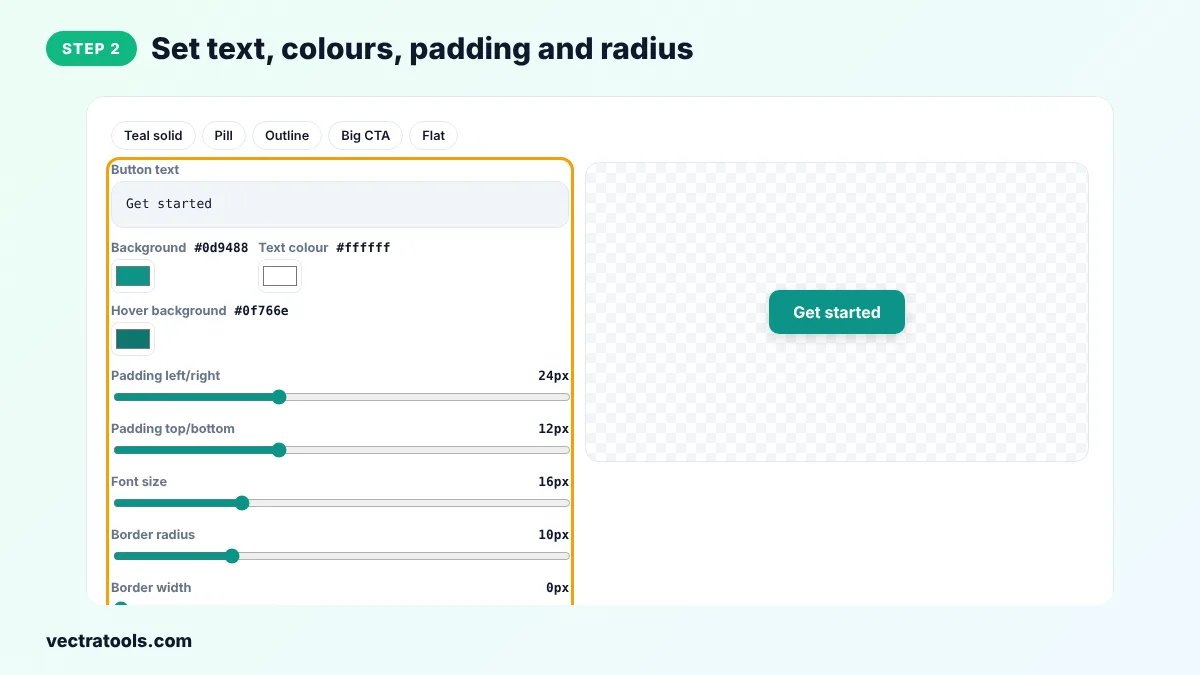
Step 2: Set Text, Colours, Padding and Radius
Type your button text, pick the background, text and hover colours, then adjust padding, font size, border radius and border. Tick Shadow or Bold text if you want them.
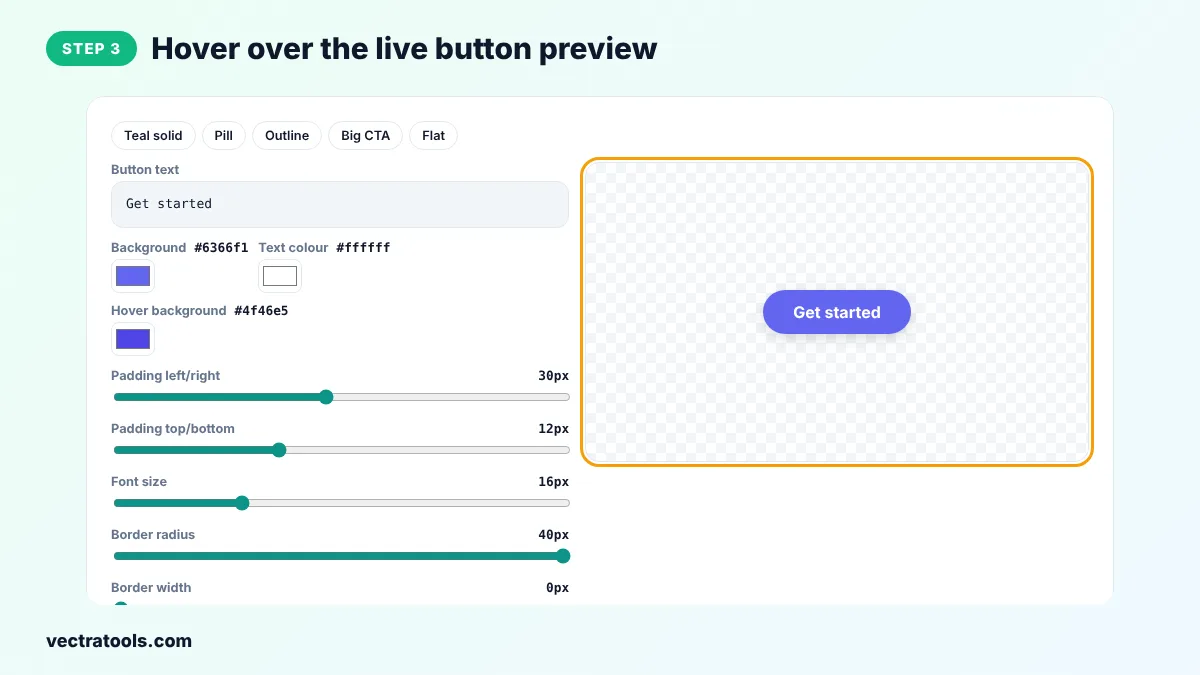
Step 3: Hover over the Live Button Preview
Move your mouse over the button in the preview to see the hover colour and the small lift effect.
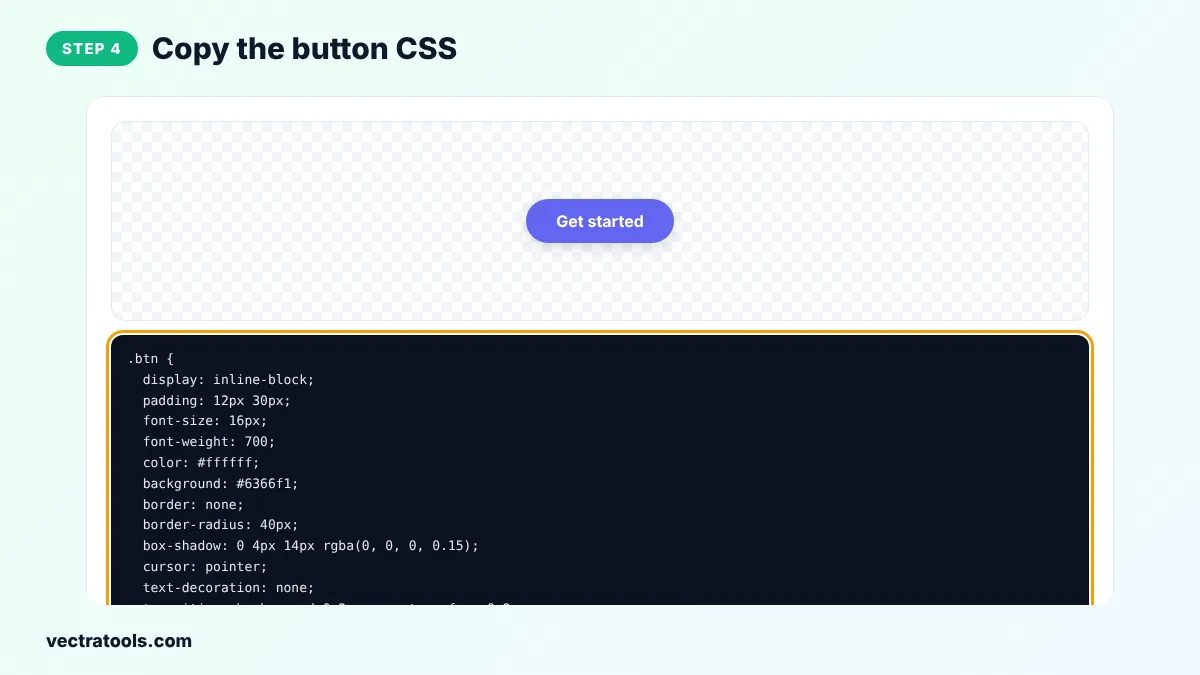
Step 4: Copy the Button CSS
Click Copy CSS to copy the .btn and .btn:hover rules. Paste them into your stylesheet and add class="btn" to a link or button.
Marketers, bloggers and developers use the CSS button generator to make call-to-action buttons that match a brand without opening a design tool. The CSS button generator is free, has no sign-up and creates code you can paste into WordPress custom CSS, a theme stylesheet or a page builder.
Common Button Design Mistakes
- Low contrast between the text and the background, which hurts readability and accessibility.
- Buttons that are too small to tap on a phone.
- Several buttons with the same strong style competing for attention.
- No visible hover or focus state, so users are not sure the button is clickable.
How to Use the Button CSS
<a href="/signup" class="btn">Get started</a>
<button type="submit" class="btn">Send</button>
The same class works on both <a> links and <button> elements. Rename .btn to anything you like, for example .btn-primary, if your site already uses that name.
CSS Button Generator Tips
- Make sure the text colour has strong contrast with the background so the label is easy to read.
- Keep buttons at least 44px tall on mobile so they are easy to tap.
- Use one solid colour for the main action on a page and outline buttons for less important ones.
- Make the hover colour a little darker than the normal background so users can see the button reacts.
- Add a :focus-visible style with an outline so keyboard users can see which button is selected.
The CSS button generator writes standard CSS that works in all modern browsers.
Frequently Asked Questions
How do I create a button in CSS?
Style a link or button element with padding, a background colour, a text colour and a border radius. The CSS button generator writes all of this as a reusable .btn class.
How do I add a hover effect to a button?
Use the :hover pseudo-class, for example .btn:hover { background: #0f766e; }. The generated code includes a hover colour and a smooth transition.
Should I use a link or a button element?
Use <a> when the button goes to another page and <button> when it submits a form or runs an action on the page.
How do I make a rounded or pill button?
Increase the border radius. Values around 8px give soft corners and a large value such as 40px gives a pill shape.
How do I make an outline button?
Set the background to white or transparent, add a border width and border colour, and use the border colour for the text. The Outline preset shows this.
Will the button work on mobile?
Yes. The CSS is responsive. Keep enough padding so the button is easy to tap.
Is the CSS button generator free?
Yes. It is free, needs no sign-up and runs in your browser.