

URL Redirect Chain Tracer – Check 301 and 302 Hops in 3 Easy Steps
URL Redirect Chain Tracer
Use this URL redirect chain tracer to trace HTTP redirect paths (301/302) to audit SEO link equity and identify routing loops.
Use this free URL redirect chain tracer to see every hop a link takes before it reaches the final page. Enter a URL, press Trace Path, and the tool shows each redirect with its HTTP status code, the server that answered, the final destination and the total number of redirects.
Quick answer
A redirect chain is when one URL redirects to another URL that redirects again, for example http://wikipedia.org → https://wikipedia.org → https://www.wikipedia.org. Each extra hop adds load time and can waste crawl budget. Aim for a single 301 redirect straight to the final 200 OK page.
Table of Contents
Redirects are normal: sites move to HTTPS, add or drop www, and change URL structures. Problems start when redirects stack up over the years and links pass through three or four hops before landing.
This URL redirect chain tracer checks the real HTTP response at every step, so you can spot long chains, temporary redirects that should be permanent, and loops.
HTTP Redirect Status Codes
| Code | Name | Meaning | SEO use |
|---|---|---|---|
| 301 | Moved Permanently | The page has moved for good. | Best for permanent URL changes. |
| 302 | Found | A temporary move. | Use only for short-term changes. |
| 307 | Temporary Redirect | Temporary, keeps the request method. | Common with HSTS and APIs. |
| 308 | Permanent Redirect | Permanent, keeps the request method. | Works like 301. |
| 200 | OK | The final page loaded. | The end of a healthy chain. |
| 404 / 410 | Not Found / Gone | The page does not exist. | A broken chain. Fix or update the link. |
How to Use the URL Redirect Chain Tracer
Step 1: Enter the URL to Trace
Type or paste any address into the box, with or without http://, and press Trace Path. Start with the old or short version of a link, such as http://wikipedia.org, because that is where chains usually begin.

Step 2: Review Each Redirect Hop
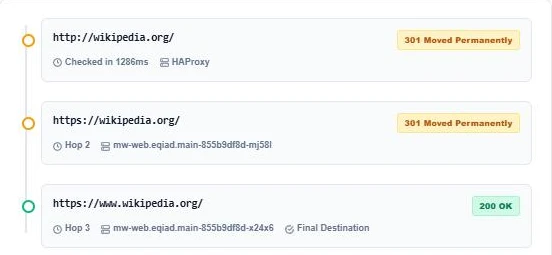
The timeline lists every hop in order. In our test, http://wikipedia.org returned 301 Moved Permanently to https://wikipedia.org, which returned another 301 to https://www.wikipedia.org, which answered 200 OK. Each card also shows the server name the site reported.
Step 3: Check the Total Redirects
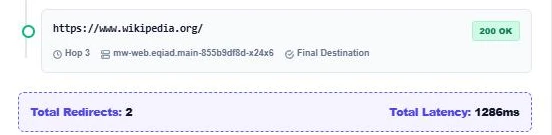
The summary bar shows Total Redirects: 2 and how long the full check took. Two hops is a short chain, but it could be one: linking straight to https://www.wikipedia.org removes both. Use Copy Trace Report to send the result to your developer.
Why Redirect Chains Hurt SEO
- Slower pages: every hop is another request before the page starts loading.
- Crawl budget: search engine bots spend time following hops instead of crawling content.
- Lost signals: Google follows up to about 10 hops, but long chains risk being dropped.
- Mixed signals: a 302 in the middle of a permanent move can confuse which URL should rank.
How to Fix Redirect Chains
- Point every old URL straight to the final URL in one 301.
- Update internal links, menus and sitemaps to use the final URL so no redirect is needed.
- Combine HTTP to HTTPS and non-www to www rules into a single server rule.
- Replace 302 redirects with 301 when the move is permanent.
- Re-trace important URLs after every site migration.
Redirect Loops
A loop happens when URL A redirects to B and B redirects back to A. Browsers show "too many redirects" and the page never loads. If the tracer shows the same URL twice, check your server rules, CDN settings and plugin redirects for conflicting rules.
When to Trace Redirects
- After moving a site from HTTP to HTTPS.
- After changing permalinks or URL structure.
- Before and after a domain migration.
- When Search Console reports "Page with redirect" for many URLs.
- When checking affiliate, short or tracking links before sharing them.
Reading Server Names in the Trace
Each hop in the URL redirect chain tracer shows the server header the site sent back. Names like cloudflare, HAProxy or nginx tell you which layer made the redirect, which helps your developer find the rule that needs changing.
More technical SEO tools: the URL Canonical Tag Checker, the Robots.txt Syntax Validator and the Reverse IP Domain Checker.
Frequently Asked Questions
What is a redirect chain?
It is a series of two or more redirects between the first URL and the final page, such as HTTP to HTTPS and then non-www to www.
How many redirects are too many?
One is ideal. Two is acceptable. Three or more should be fixed so the first URL points straight to the final page.
Is a 301 or 302 better for SEO?
Use 301 (or 308) for permanent moves. Use 302 (or 307) only when the original URL will come back.
Does a redirect chain lose link equity?
Google says 301 and 302 redirects pass signals, but long chains slow crawling and risk being cut off. Short is safer.
Why does the tracer show a different server on each hop?
Different hops can be answered by a load balancer, a CDN or the web server itself, which report different server names.
Is my URL stored?
No. The URL is sent to HackerTarget’s public header service to fetch the redirects, and VectraTools does not store it. Free checks are limited per day.