

Reverse IP Domain Checker – Find Sites on One Server in 3 Easy Steps
Reverse IP Domain Checker
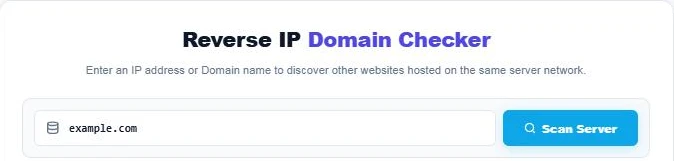
Use this reverse IP domain checker: enter an IP address or Domain name to discover other websites hosted on the same server network.
| # | Hosted Domain Name | Record |
|---|
Use this free reverse IP domain checker to find other websites hosted on the same server. Enter an IP address or a domain name, and the tool resolves the domain to its IPv4 address, then lists every hostname known to point at that IP, with a total count and a one-click copy of the full list.
Quick answer
A reverse IP lookup takes an IP address and returns the domains that resolve to it. If you enter a domain, the checker first finds its A record with Google Public DNS, then looks up that IP in HackerTarget’s reverse IP data. One result usually means a dedicated IP, a handful means a VPS, and hundreds mean shared hosting or a CDN such as Cloudflare.
Table of Contents
Every website lives on a server with an IP address, and many sites can share the same one. Knowing who your neighbours are helps with security checks, SEO research and choosing a host.
This reverse IP domain checker uses live public DNS and reverse IP data, so the domains you see are real records, not sample data.
What Is a Reverse IP Lookup?
A normal DNS lookup turns a domain into an IP address. A reverse IP lookup works the other way: it starts with the IP and finds the domains that point to it. This is different from a reverse DNS (PTR) lookup, which returns only the single hostname the IP owner set for that address.
How to Read the Results
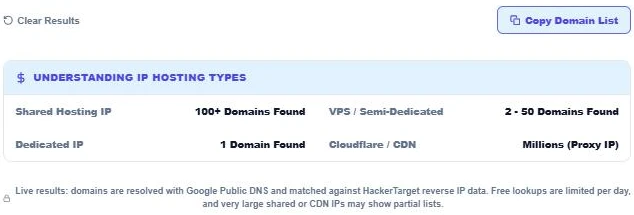
| Domains found | Likely hosting type | What it means |
|---|---|---|
| 1 | Dedicated IP | The site has its own IP address. |
| 2 – 50 | VPS or semi-dedicated server | A small group of sites, often owned by one person or agency. |
| 100+ | Shared hosting | Many unrelated sites share one server. |
| Thousands | CDN or proxy (e.g. Cloudflare) | The IP belongs to a network edge, not the real origin server. |
How to Use the Reverse IP Domain Checker
Step 1: Enter an IP Address or Domain
Type an IPv4 address such as 104.20.23.154, or a domain such as example.com, and press Scan Server. You can paste a full URL. The tool removes https:// and www. for you.
Step 2: Review Domains on the Same Server
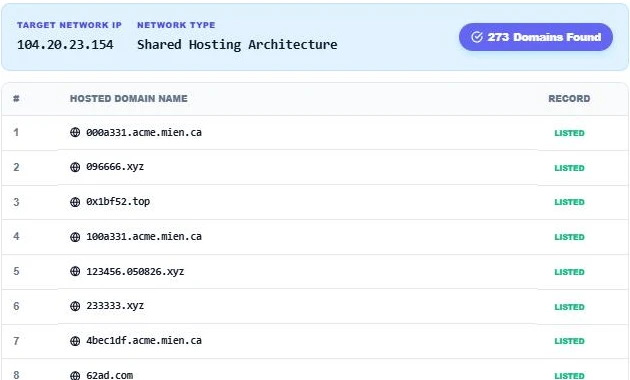
The summary shows the target IP, the network type and the number of domains found. In our test, example.com resolved to 104.20.23.154, a Cloudflare address, and the lookup returned 273 domains. The list scrolls inside the panel so long results stay easy to browse.
Step 3: Copy the List and Check the Hosting Type
Press Copy Domain List to copy a plain-text report with the IP, the total and every domain. Compare the count with the Understanding IP Hosting Types panel, and press Clear Results to run another lookup.
Why Use a Reverse IP Lookup?
- Security checks: see if your site shares an IP with spam or malware domains.
- Competitor research: find other sites run by the same owner or agency on a private server.
- Hosting decisions: confirm whether a plan is truly dedicated or shared.
- Email deliverability: a shared IP with a poor reputation can affect mail sent from the same server.
- Incident response: map which sites are affected when a server goes down.
Limits of Reverse IP Data
- Results come from collected DNS records, so very new domains may not appear yet.
- CDN IPs show sites that use the same edge node, not the real host behind the proxy.
- Only IPv4 addresses are supported.
- Free lookups are limited per day for each network, so plan large checks in batches.
Does Sharing an IP Hurt SEO?
Google has said for years that shared hosting is normal and is not a ranking problem by itself. What matters more is server speed, uptime and security. A dedicated IP can still help with email reputation and some security setups.
More technical SEO tools: the Robots.txt Syntax Validator, the URL Redirect Chain Tracer and the IDN Punycode Decoder.
Frequently Asked Questions
How do I find all websites on the same IP?
Enter the IP or one of the domains into the reverse IP domain checker and press Scan Server. It lists every hostname in the reverse IP data for that address.
Why do I see hundreds of unrelated domains?
The IP is probably shared hosting or a CDN edge such as Cloudflare, where many sites use the same address.
What is the difference between reverse IP and reverse DNS?
Reverse DNS (PTR) returns one hostname set by the IP owner. Reverse IP returns all domains that point their A records to that IP.
Can I look up IPv6 addresses?
Not yet. The checker supports IPv4 addresses and domains that have an A record.
Why did my lookup fail?
The domain may have no A record, or the free daily lookup limit for your network may be used up. Try again later.
Is my search saved?
No. The page sends the query to Google Public DNS and HackerTarget to get results, and VectraTools does not store your searches.