

Google SERP Snippet Previewer – Perfect Titles in 3 Easy Steps
Google SERP Snippet Previewer
Preview your Google SERP snippet and optimize your meta tags in real-time to maximize CTR on Desktop and Mobile search results.
Use this free Google SERP snippet previewer to see how your title tag and meta description will look in search results before you publish. Type your title, description and URL, and the preview updates live on desktop and mobile, with character counters that turn red when text is likely to be cut off.
Quick answer
Keep title tags to about 50–60 characters and meta descriptions to about 120–155 characters so Google is less likely to truncate them. Put the main keyword near the start, write a clear benefit, and give every page its own title and description. Google may still rewrite snippets, so treat these limits as safe guides, not strict rules.
Table of Contents
Your search snippet is the first thing people see before they decide to click. A title that ends in "..." or a description that stops mid-sentence looks careless and can cost clicks, even when the page ranks well.
This Google SERP snippet previewer shows you the result as searchers will see it, so you can fix the length and wording in seconds.
What Is a Google SERP Snippet?
A SERP snippet is a single search result. It has four main parts:
- Site name and favicon: your brand name shown at the top.
- URL breadcrumb: the domain and path, for example example.com › blog › post.
- Title link: the blue clickable headline, usually taken from your title tag.
- Description: the grey text below, often taken from your meta description. Words that match the search are shown in bold.
Title and Meta Description Length Guide
| Element | Safe length | Tool warning | What happens if too long |
|---|---|---|---|
| Title tag | 50–60 characters | Red above 65 | Cut with "..." at about 600 pixels on desktop |
| Meta description | 120–155 characters | Red above 160 | Cut with "..." after about two lines |
| URL slug | 3–5 words | Shown as breadcrumb | Long paths are shortened in the breadcrumb |
Google measures width in pixels, not characters. Wide letters like W and M use more space than i or l, so the counters are a close guide rather than an exact cut-off.
How to Use the Google SERP Snippet Previewer
Step 1: Enter Your Title and Meta Description
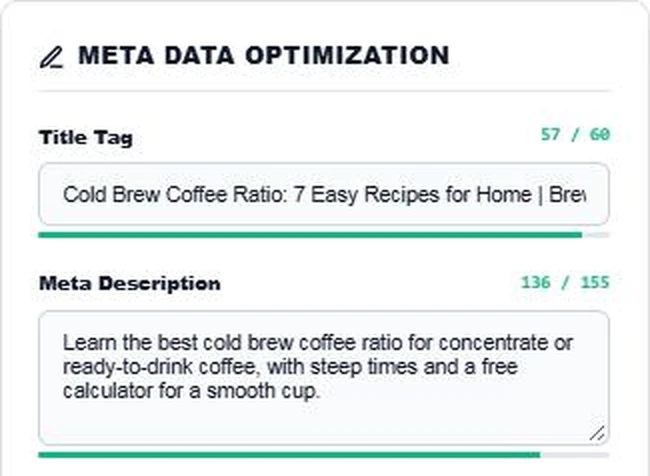
Type your title tag and meta description into the Meta Data Optimization panel. Add the page URL, your site name and up to a few keywords to bold. In our example the title is 57 characters and the description 136 characters, so both bars stay green.
Step 2: Check the Desktop Preview
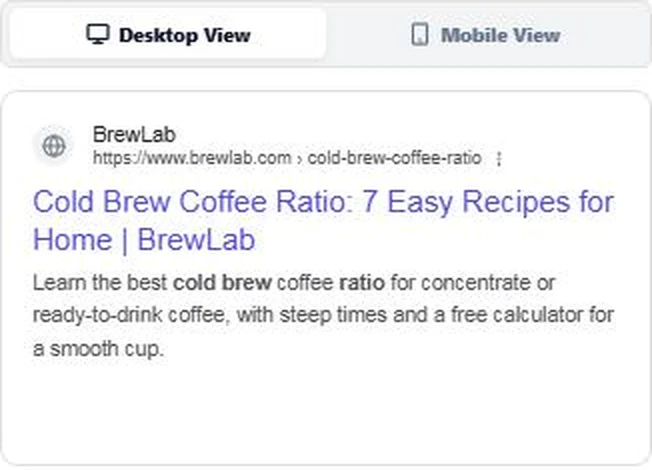
The Desktop View shows the result with your site name, breadcrumb URL, blue title and description. The keywords "cold brew" and "ratio" appear in bold, just as Google bolds words that match the search.
Step 3: Test Mobile View and Fix Truncation
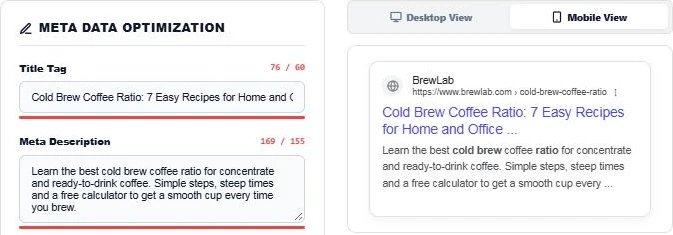
Switch to Mobile View and try a longer version. Here a 76-character title and 169-character description both turn red, and the preview cuts them with "..." exactly where searchers would lose the message. Shorten the text until the counters are green again, then press Clear Data to test the next page.
How to Write Snippets That Get Clicks
- Put the main keyword in the first half of the title.
- Add a number, year or clear benefit, such as "7 Easy Recipes" or "Free Calculator".
- Write the description as a short promise of what the page gives, then add a reason to click.
- Use your brand name at the end of the title, separated with a pipe or dash.
- Avoid duplicate titles and descriptions across pages.
- Match search intent: a how-to search wants steps, a product search wants price or features.
Why Google Rewrites Some Snippets
Google may replace your title or description when it thinks other text on the page answers the search better. This happens more often when a title is stuffed with keywords, too long, or does not match the page heading. Clear, accurate titles that match the H1 are rewritten less often.
Common Snippet Mistakes
- Leaving the meta description empty, so Google pulls a random sentence.
- Using the same title template on hundreds of pages.
- Writing titles in all capitals.
- Promising something the page does not deliver, which can raise bounce rates.
More SEO helpers: the Keyword Density Analyzer, the SEO Title Case Converter and the Bulk URL Slug Generator.
Frequently Asked Questions
How long should a title tag be?
About 50 to 60 characters. Google cuts titles at roughly 600 pixels on desktop, so shorter titles are safer.
How long should a meta description be?
About 120 to 155 characters. Longer descriptions are often cut after about two lines.
Does the meta description affect rankings?
Not directly. It affects how many people click your result, which makes it important for traffic.
Why does Google show a different title from mine?
Google rewrites titles that are too long, stuffed with keywords or do not match the page content. Keep the title accurate and close to the H1.
Why are some words bold in the snippet?
Google bolds words that match or are close to the search. Use the Bolded Keywords box to preview that effect.
Is my data saved?
No. The Google SERP snippet previewer runs in your browser and nothing is stored.