

XML Sitemap Validator – Check Sitemap Errors in 3 Easy Steps
XML Sitemap Validator
Paste raw code into this XML sitemap validator to instantly audit structure, missing tags, and URL counts locally.
Use this free XML sitemap validator to check a sitemap before you submit it to Google Search Console. Paste the raw XML, press Validate Sitemap, and the tool checks the syntax, the root element, the number of URLs, missing <loc> tags, relative or broken URLs, invalid lastmod dates and duplicate URLs.
Quick answer
A valid XML sitemap starts with <urlset> (or <sitemapindex> for an index), uses the sitemaps.org namespace, and gives every <url> a <loc> with a full absolute URL. Dates in <lastmod> must use W3C format such as 2026-10-23. One sitemap can hold up to 50,000 URLs and 50 MB uncompressed.
Table of Contents
A sitemap tells search engines which pages you want crawled. If it has XML errors, relative URLs or fake dates, Google may ignore parts of it or report errors in Search Console.
This XML sitemap validator reads the file in your browser and lists every problem with the item number, so you can find and fix it fast.
What the Sitemap Validator Checks
| Check | Result | Why it matters |
|---|---|---|
| XML syntax | FAIL if broken | One unclosed tag stops the whole file from being read. |
| Root element | urlset or sitemapindex | Any other root is not a valid sitemap. |
| Item count | Total URLs or sitemaps | Shows the size and flags files over 50,000 URLs. |
| <loc> present | FAIL if missing | Every entry needs a URL. |
| Absolute URLs | FAIL if relative | Sitemaps must use full http or https URLs. |
| lastmod format | FAIL if invalid | Dates like 2026-13-40 are rejected. |
| Duplicate URLs | WARN | Duplicates waste crawl attention and suggest a generator bug. |
How to Use the XML Sitemap Validator
Step 1: Paste Your Raw XML Code
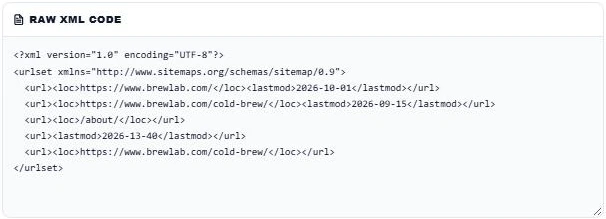
Open your sitemap in a browser, for example yoursite.com/sitemap.xml, view the source and copy everything into Raw XML Code. Our test sitemap has five entries with a few planted mistakes.
Step 2: Validate and Check the Summary
Press Validate Sitemap. The summary shows VALID XML syntax, the sitemap type (Standard Sitemap) and 5 total URLs. Valid syntax means the file parses, but you still need to read the audit log for content errors.

Step 3: Fix the Errors in the Audit Log
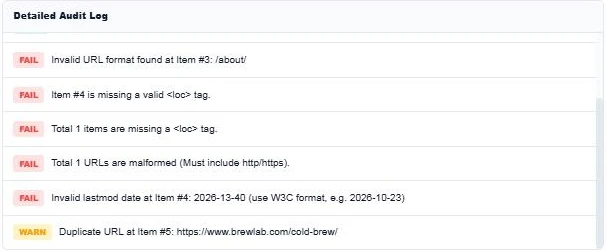
The Detailed Audit Log lists each issue. Here it flags the relative URL /about/ at item 3, a missing <loc> at item 4, the impossible lastmod date 2026-13-40 and a duplicate cold-brew URL at item 5. Fix them in your generator or plugin, validate again and use Copy Report to share the audit.
Example of a Valid Sitemap
<?xml version="1.0" encoding="UTF-8"?>
<urlset xmlns="http://www.sitemaps.org/schemas/sitemap/0.9">
  <url>
    <loc>https://www.example.com/</loc>
    <lastmod>2026-10-01</lastmod>
  </url>
</urlset>
Sitemap Best Practices
- Include only canonical, indexable pages that return 200 OK.
- Leave out redirected, noindexed and duplicate URLs.
- Update lastmod only when page content really changes. Google ignores dates that are always "today".
- Split large sites into several sitemaps and list them in a sitemap index.
- Add the sitemap URL to robots.txt and submit it in Search Console.
- Google ignores the priority and changefreq tags, so you do not need them.
Sitemap Index Files
A sitemap index uses <sitemapindex> as the root and lists <sitemap> entries, each with a <loc> pointing to another sitemap file. WordPress SEO plugins usually create one index with separate sitemaps for posts, pages and categories. The validator detects both types automatically.
Common Sitemap Problems in Search Console
- Couldn’t fetch: the sitemap URL is blocked, redirects or returns an error. Open it in a browser first.
- Sitemap is HTML: the URL returns a web page instead of XML, often because of a caching or security plugin.
- Invalid date: a lastmod value is not in W3C format. The validator flags these lines.
- URL not allowed: the sitemap lists URLs on a different domain or protocol than the sitemap itself.
Run the XML sitemap validator after every plugin update or site migration, because those are the moments sitemaps most often break.
More technical SEO tools: the Robots.txt Syntax Validator, the URL Canonical Tag Checker and the URL Redirect Chain Tracer.
Frequently Asked Questions
How do I check if my XML sitemap is valid?
Copy the sitemap source into the XML sitemap validator and press Validate Sitemap. Fix every FAIL in the audit log, then validate again.
Can a sitemap use relative URLs?
No. Every loc must be a full absolute URL that starts with http:// or https://.
What format should lastmod use?
W3C Datetime, such as 2026-10-23 or 2026-10-23T14:30:00+05:00.
How many URLs can one sitemap hold?
Up to 50,000 URLs and 50 MB uncompressed. Use a sitemap index for more.
Does Google use priority and changefreq?
No. Google ignores both. Accurate lastmod dates are more useful.
Is my sitemap uploaded?
No. The XML sitemap validator parses the code in your browser and nothing is stored.