

Hreflang Tags Generator – International SEO Tags in 3 Easy Steps
Hreflang Tags Generator
Use this hreflang tags generator to create valid HTML link attributes to target specific languages and regions for International SEO.
Use this free hreflang tags generator to create the link tags that tell Google which language or country version of a page to show each searcher. Add an x-default fallback URL, enter each language version with its language and optional region code, and copy the ready-made HTML for your page head.
Quick answer
Hreflang tags look like <link rel="alternate" hreflang="en-GB" href="https://example.com/uk/" />. Use an ISO 639-1 language code (en, es, fr), optionally followed by an ISO 3166-1 region code (US, GB, MX). Every version must list all the others and itself, and an x-default tag should point to the fallback page for everyone else.
Table of Contents
If your site has pages in more than one language, or separate English pages for the US and the UK, Google needs a clear map of which page belongs to which audience. Without it, a Spanish speaker may land on the English page, or the UK page may compete with the US one.
This hreflang tags generator builds that map for you, cleans up the codes, and outputs one correct block you can paste into every version of the page.
Hreflang Code Format
- Language only: es, fr, de. Targets everyone who speaks that language.
- Language and region: en-US, en-GB, es-MX. Targets one language in one country.
- x-default: the fallback page for languages or regions you do not target.
- Language codes are lowercase and region codes are uppercase. The generator fixes the case for you, so "EN" and "us" become en-US.
Common Hreflang Codes
| Audience | Code |
|---|---|
| English (USA) | en-US |
| English (UK) | en-GB |
| Spanish (Spain) | es-ES |
| Spanish (Mexico) | es-MX |
| French (France) | fr-FR |
| French (Canada) | fr-CA |
| German (Germany) | de-DE |
| Arabic (UAE) | ar-AE |
| Urdu (Pakistan) | ur-PK |
How to Use the Hreflang Tags Generator
Step 1: Set the X-Default Fallback URL
Type the page that should appear for anyone outside your target languages in Default Fallback Page (x-default). This is often the main English page or a language picker. In our example it is https://www.brewlab.com/.

Step 2: Add Each Language Version
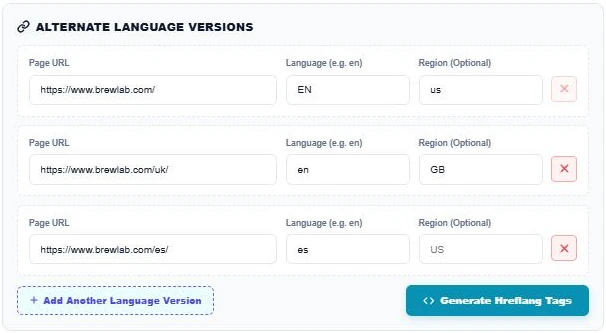
Under Alternate Language Versions, enter the page URL, language code and optional region for each version. Press Add Another Language Version for more rows and the red cross to remove one. Our example has a US English page, a UK English page and a Spanish page with no region.
Step 3: Generate and Copy the Tags
Press Generate Hreflang Tags. The output block lists the x-default line followed by en-US, en-GB and es, each with its own URL. Press Copy Code and paste the same block into the head of every page in the set.

Hreflang Rules You Must Follow
- Return links: if page A lists page B, page B must list page A. Missing return tags make Google ignore the pair.
- Self-reference: each page must include a tag pointing to itself.
- Absolute URLs: always use full https:// addresses.
- Indexable pages only: do not point hreflang at redirected, noindexed or canonicalised-away URLs.
- Valid codes: use GB for the United Kingdom, not UK, and never a region on its own.
Other Ways to Add Hreflang
Besides HTML link tags, you can add hreflang in your XML sitemap or in HTTP headers for non-HTML files such as PDFs. Pick one method per page set. HTML tags are the easiest for most WordPress and small sites.
Common Hreflang Mistakes
- Using en-UK instead of en-GB.
- Forgetting the self-referencing tag.
- Pointing every language to the home page instead of the matching translated page.
- Mixing hreflang with a canonical that points to a different language version.
More international and technical SEO tools: the URL Canonical Tag Checker, the XML Sitemap Validator and the Open Graph Twitter Card Preview.
Frequently Asked Questions
What is an hreflang tag?
It is a link tag in the page head that tells search engines which language and region a page is for, and where its other language versions are.
Is hreflang a ranking factor?
No. It does not boost rankings. It helps Google show the right language or country version to each searcher.
What does x-default mean?
It marks the fallback page for users whose language or region does not match any of your listed versions.
Should I use en-UK or en-GB?
Use en-GB. The ISO region code for the United Kingdom is GB.
Do I need to add the tags to every page version?
Yes. Paste the same full set into each version so every page links to all the others and to itself.
Is my data stored?
No. The hreflang tags generator runs in your browser and nothing is saved.