

Favicon Previewer – See Your Icon in Browser Tabs and Google Results in 2 Easy Steps
Favicon SERP Previewer
Use this favicon previewer: upload your website icon to instantly preview how it will appear in browser tabs and Google Search results.
 Free SEO & Web Utilities - VectraTools
Use this free favicon previewer to check how your site icon looks in a browser tab and in Google mobile search results before you upload it.
Quick answer
A favicon previewer shows your icon at the small sizes where people actually see it. Upload a PNG, ICO, JPG or SVG file (up to 2 MB), type your brand name, domain and page title, and the tool instantly draws a browser tab and a Google mobile result with your icon. Google recommends a square favicon that is a multiple of 48 px, such as 48 × 48 or 192 × 192, and browser tabs shrink it to about 16 × 16 px, so simple, high-contrast designs work best.
Table of Contents
A favicon is tiny, but it appears next to your site name in every Google mobile result, every browser tab and every bookmark. A logo that looks great on your homepage can turn into an unreadable blob at 16 pixels.
This favicon previewer lets you test icons without editing your site or waiting for Google to recrawl it. Swap files, compare versions and pick the one that stays clear at small sizes.
Google Favicon Requirements
| Rule | What to do |
|---|---|
| Shape | Square (1:1 aspect ratio) |
| Size | A multiple of 48 px, such as 48 × 48, 96 × 96 or 192 × 192 |
| Format | Any valid favicon format: ICO, PNG, SVG or a non-animated GIF |
| Location | A stable URL that Googlebot can crawl, linked from your homepage |
| Content | A visual of your brand, with nothing inappropriate |
Add it to the <head> of your homepage with a link tag such as <link rel="icon" href="/favicon.png" sizes="192x192">. Google may take days or weeks to show a new favicon in search results.
How to Use the Favicon Previewer
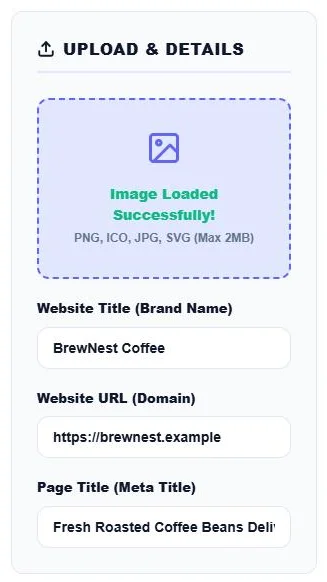
Step 1: Upload the Icon and Enter Your Details
Click Click to upload Favicon and choose a PNG, ICO, JPG or SVG file up to 2 MB. When you see Image Loaded Successfully!, fill in the Website Title (Brand Name), Website URL (Domain) and Page Title (Meta Title).
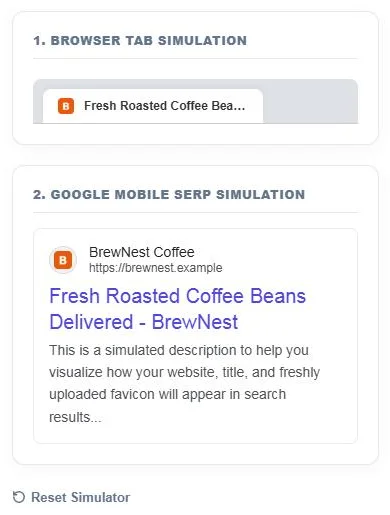
Step 2: Check the Tab and SERP Previews
The Browser Tab Simulation shows your icon beside the page title in a tab, and the Google Mobile SERP Simulation shows it next to your brand name and URL above the blue title link. Both update as you type. Click Reset Simulator to try another icon.
Design Tips for a Clear Favicon
- Use one letter or symbol: full logos and words are rarely readable at 16 × 16 px.
- Strong contrast: a bold shape on a solid background stands out in light and dark tabs.
- Fill the square: avoid thin borders and large empty margins that make the icon look tiny.
- Check dark mode: a transparent icon with dark lines can disappear in dark browser tabs.
- Keep it consistent: use the same colours as your logo so people recognise your brand.
Why Favicons Matter for SEO
A favicon is not a ranking factor, but on mobile it sits right next to your result. A clear, recognisable icon helps your listing stand out and can make people more likely to click on a familiar brand. A missing favicon shows a generic globe icon, which looks less trustworthy.
Favicon Sizes You May Need
| Size | Used for |
|---|---|
| 16 × 16, 32 × 32 | Browser tabs and bookmarks |
| 48 × 48 | Minimum size Google recommends for search |
| 180 × 180 | Apple touch icon on iPhone home screens |
| 192 × 192, 512 × 512 | Android home screen and web app manifest |
Privacy
The previewer reads your image with the browser’s FileReader API and draws it locally. Your icon is not uploaded to any server.
Frequently Asked Questions
What does a favicon previewer do?
It shows how an icon will look in a browser tab and in a Google mobile search result, so you can test it before adding it to your site.
What size should a favicon be for Google?
Square and a multiple of 48 px, such as 48 × 48 or 192 × 192. Larger square images are scaled down.
Which file types can I upload?
PNG, ICO, JPG and SVG files up to 2 MB.
Why does Google not show my new favicon?
Google needs to recrawl your homepage and icon file, which can take days or weeks. Make sure the icon is square, crawlable and linked in the homepage head.
Is my favicon uploaded anywhere?
No. The image is processed in your browser and never leaves your device.
Is the favicon previewer free?
Yes. It is free with no sign-up.