

YouTube Timestamp Link Generator – Share a Video at an Exact Time in 2 Easy Steps
YouTube Timestamp Link Generator
Instantly generate standard URLs, short links, and embed codes that start at your desired video timestamp.
Use this free YouTube timestamp link generator to share or embed a video so it starts exactly at the moment that matters.
Quick answer
A YouTube timestamp link adds a start time to the video URL. Watch and short links use t=, such as youtu.be/VIDEO_ID?t=1m5s, while embed codes use start= in seconds, such as embed/VIDEO_ID?start=65. Paste any YouTube link (watch, youtu.be, Shorts or embed), enter hours, minutes and seconds, and the tool gives you all three versions with copy buttons and a live preview.
Table of Contents
Sending someone a 40-minute video and telling them to “skip to around 12 minutes” rarely works. A timestamp link drops viewers straight into the right moment, whether it is a tutorial step, a quote in a podcast or a product demo.
This YouTube timestamp link generator builds the correct format for each use: a standard link for chats and emails, a short youtu.be link for social posts, and an embed code for blog posts.
Timestamp Formats Explained
| Use | Format | Example (1 min 5 s) |
|---|---|---|
| Standard watch link | watch?v=ID&t=XmYs | youtube.com/watch?v=ID&t=1m5s |
| Short link | youtu.be/ID?t=XmYs | youtu.be/ID?t=1m5s |
| Embed code | embed/ID?start=seconds | youtube.com/embed/ID?start=65 |
For embeds, the time must be in seconds: minutes × 60 + seconds, plus hours × 3,600. The generator does this conversion for you.
Supported YouTube URL Types
- Watch links: youtube.com/watch?v=…
- Short links: youtu.be/…
- Shorts: youtube.com/shorts/…
- Embed links: youtube.com/embed/…
All of them are converted to the same video ID, so you can paste whichever link you have.
How to Use the YouTube Timestamp Link Generator
Step 1: Paste the Video URL and Set the Time
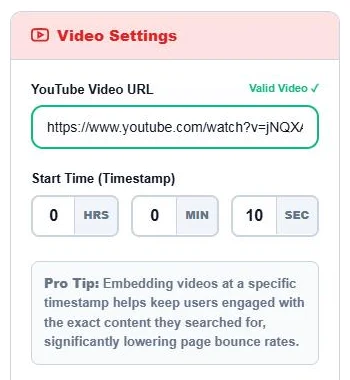
Paste a YouTube link into YouTube Video URL; a green Valid Video ✓ appears when it is recognised. Enter the Start Time in the HRS, MIN and SEC boxes.
Step 2: Copy the Link or Embed Code
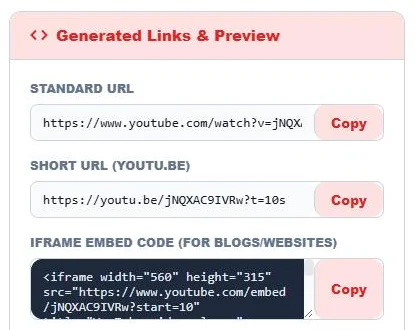
Under Generated Links & Preview, copy the Standard URL, the Short URL (youtu.be) or the Iframe Embed Code with its Copy button. The preview below plays the video from your chosen time so you can check it.
Where Timestamp Links Help
- Blog posts and tutorials: embed a video that opens at the exact step you are describing.
- Customer support: send the part of a help video that answers a question.
- Social media: share a highlight from a stream, podcast or webinar.
- Education: point students to the right part of a lecture.
- Reviews and research: cite the exact moment a claim is made.
Other Ways to Get a Timestamp Link
On a computer you can also pause the video, right-click the player and choose Copy video URL at current time, or tick Start at in YouTube’s Share box. This generator is faster when you already know the time, when you need an embed code, or when you are making many links.
Tips
- Make sure the start time is shorter than the video, or the player will simply jump to the end.
- Start a second or two before the key moment so viewers get context.
- Timestamps do not work on some live streams that are still in progress.
- The embed code is responsive-friendly if you wrap it in a container with an aspect-ratio rule.
Frequently Asked Questions
How do I link to a specific time in a YouTube video?
Add t= to the link, for example youtu.be/VIDEO_ID?t=90 or ?t=1m30s. This tool builds it for you from hours, minutes and seconds.
How do I embed a YouTube video at a start time?
Add ?start= with the time in seconds to the embed URL, such as embed/VIDEO_ID?start=90. Copy the Iframe Embed Code from the tool.
Does it work with YouTube Shorts links?
Yes. Paste a Shorts link and it is converted to the video ID for all three link types.
Why does my timestamp link start at the beginning?
The time may be missing from the link, longer than the video, or the app may have stripped it. Copy the link again from the tool.
Can I set an end time too?
This tool sets the start time. For embeds you can add &end= with seconds to the URL manually.
Is the YouTube timestamp link generator free?
Yes. It is free and needs no sign-up.