

Word Counter with Stop-Words Filter – Keyword Density and Reading Time in 2 Easy Steps
Word Counter & Stop-Words Filter
Analyze text limits, calculate reading time, and extract pure keyword density for perfect SEO optimization.
| Keyword | Count | Density |
|---|---|---|
| Waiting for input... | ||
Use this free word counter with a stop-words filter to count your text and see true keyword density for the words that actually matter.
Quick answer
Keyword density is how often a word appears compared with the total number of words: density = (word count ÷ total words) × 100. Paste your text, set a target word count if you have one, and keep Filter Stop-Words (SEO Mode) on to hide filler words such as “the”, “and” and “to” from the keyword table. Example: “cold” used 4 times in a 49-word paragraph has a density of 8.16%. The tool also shows characters, sentences and reading time at about 200 words per minute.
Table of Contents
A normal word counter tells you how long your text is. For SEO and editing you also want to know which words you repeat most, but in raw text the top spots are always taken by “the”, “and” and “to”.
This word counter removes stop words from the keyword table so your real topics rise to the top, while still counting every word in the totals. It is useful for blog posts, product descriptions, essays and meta descriptions.
What the Tool Measures
| Metric | How it is calculated |
|---|---|
| Total words | Every word in the text, including stop words |
| Characters (no spaces) | Letters, numbers and punctuation without spaces |
| Characters (with spaces) | The full length of the text |
| Sentences | Sentences ending in . ! or ? |
| Reading time | Total words ÷ about 200 words per minute |
| Keyword density | Times a word appears ÷ total words × 100 |
Worked Example
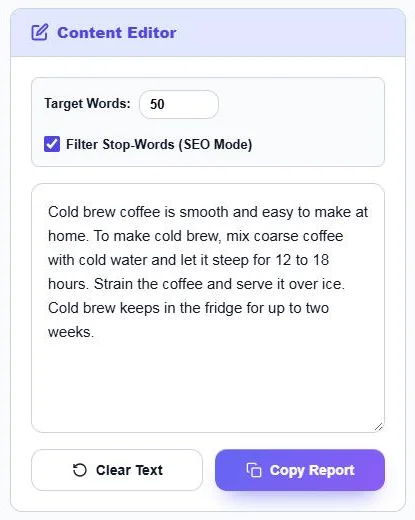
This 49-word paragraph about cold brew has 234 characters with spaces, 186 without, 4 sentences and a reading time of about 14 seconds. With the stop-words filter on, the top words are cold (4, 8.16%), brew (3, 6.12%), coffee (3, 6.12%) and make (2, 4.08%). With the filter off, “to” and “and” push into the top five even though they say nothing about the topic.
How to Use the Word Counter
Step 1: Set a Target and Paste Your Text
Optionally type a goal in Target Words, such as 1,000 for a blog post. Keep Filter Stop-Words (SEO Mode) ticked, then paste or type your text into the Content Editor. Everything updates as you type. Use Clear Text to start again or Copy Report to copy the results.
Step 2: Read the Counts and Keyword Density
Density Analytics shows the total words and how many remain to reach your target, characters with and without spaces, sentences and estimated reading time. Below, the Keyword / Count / Density table lists the most used words with their share of the text.

What Are Stop Words?
Stop words are very common words such as the, a, is, at, on, and, to and of. They are essential for grammar but tell you little about what a text is about, so keyword tools usually leave them out of frequency lists. Search engines do read them, because they change meaning: “flights to London” and “flights from London” are different searches.
Is There an Ideal Keyword Density?
No. Google has never published a target density and does not rank pages by a percentage. Use density as a check, not a goal:
- If your main keyword barely appears, the page may not clearly match the topic.
- If one word dominates the table, the text may read as repetitive or stuffed. Rewrite with synonyms and related terms.
- Short texts naturally show high percentages, as in the 49-word example above.
- Focus on covering the subtopics readers expect, and the right words will follow.
Common Word Count Targets
| Content type | Typical length |
|---|---|
| Meta description | About 150–160 characters |
| Product description | 150–400 words |
| Blog post | 1,000–2,000 words |
| In-depth guide | 2,000+ words |
| Essay (school) | As set by the assignment |
Length should match the search intent. A quick answer page does not need 2,000 words, while a full buying guide often does.
Frequently Asked Questions
How is keyword density calculated?
Divide the number of times a word appears by the total number of words and multiply by 100. 4 uses in 200 words is 2%.
What does the stop-words filter do?
It hides common filler words such as the, and and to from the keyword table, so meaningful words appear at the top. Total word counts still include every word.
What is a good keyword density for SEO?
There is no official ideal. Make sure the main topic is clearly mentioned and avoid repeating one word so often that the text reads unnaturally.
How is reading time estimated?
The tool divides your total words by an average reading speed of about 200 words per minute.
Can I set a word count goal?
Yes. Enter a number in Target Words and the tool shows how many words remain.
Is this word counter free?
Yes. It is free, works in your browser and your text is not uploaded.