

Schema Markup JSON-LD Validator – Test Structured Data in 3 Easy Steps
Schema Markup JSON-LD Validator
Paste code into this schema markup JSON-LD validator, or the full script tag, to instantly validate syntax, properties, and formatting.
Use this free schema markup JSON-LD validator to check structured data before it goes live. Paste raw JSON-LD or the full script tag, press Validate, and the tool checks the JSON syntax, the @context, every @type it finds and the key properties Google looks for, then gives you a clean, beautified copy of the code.
Quick answer
Valid JSON-LD must be correct JSON (no trailing commas, matching brackets, double quotes), include "@context": "https://schema.org" and a "@type". For rich results, each type also needs its key properties, for example a Product needs name, image and offers or reviews, and an Article needs headline, image, datePublished and author.
Table of Contents
Structured data helps search engines understand your page and can unlock rich results such as FAQ dropdowns, product prices and breadcrumbs. A single missing comma, though, makes the whole block invalid, and Google simply ignores it.
This schema markup JSON-LD validator catches those errors in your browser in a second, so you can fix them before publishing and before waiting for Search Console to report them.
What the JSON-LD Validator Checks
- Syntax: parses the code as strict JSON and shows the exact error if it fails.
- Script tag extraction: accepts a full script block and pulls out the JSON payload automatically.
- @context: confirms schema.org is declared at the root or in an array.
- @type detection: lists every type found, including nested ones like Offer, Person or Answer.
- Key properties: warns when common types miss properties needed for rich results.
- Beautified output: formats the code with clean indentation for easy copying.
Key Properties by Schema Type
| @type | Key properties checked |
|---|---|
| Product | name, image, offers or review or aggregateRating |
| Offer | price, priceCurrency |
| Article / BlogPosting / NewsArticle | headline, image, datePublished, author |
| FAQPage | mainEntity |
| Question / Answer | name, acceptedAnswer / text |
| LocalBusiness | name, address |
| Organization | name, url |
| BreadcrumbList / ListItem | itemListElement / position |
| Event | name, startDate, location |
| HowTo | name, step |
| Review / AggregateRating | author, reviewRating / ratingValue, reviewCount or ratingCount |
| VideoObject | name, thumbnailUrl, uploadDate |
How to Use the Schema Markup JSON-LD Validator
Step 1: Paste Your JSON-LD Code
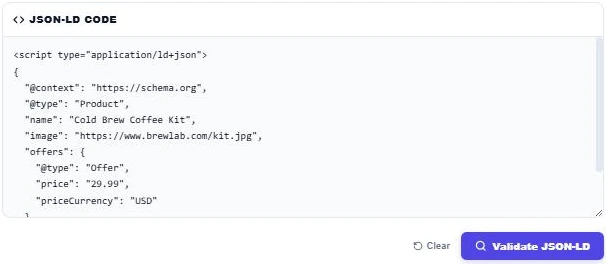
Copy the structured data from your page source or SEO plugin and paste it into JSON-LD Code. You can paste just the JSON object or the whole script tag with type application/ld+json. Our example is a Product with a nested Offer.
Step 2: Validate and Read the Report
Press Validate JSON-LD. The report shows VALID JSON syntax, the types Product and Offer, and 8 total properties. The audit confirms the script tag was extracted, the @context is set, and both Product and Offer include their key recommended properties.

Step 3: Fix Missing Properties and Copy Clean Code
Now test an Article with only a headline and an author. The JSON is still valid, but the audit shows a WARN: Article is missing image and datePublished. Add them, validate again, and press Copy JSON to take the beautified code.

Common JSON-LD Errors
- A trailing comma after the last item in an object or array.
- Single quotes instead of double quotes around keys and values.
- Smart quotes copied from a word processor.
- Missing closing brace or bracket.
- Prices written with a currency symbol, such as "$29.99" instead of "29.99" with priceCurrency "USD".
- Marking up content that is not visible on the page.
Valid Code vs Rich Result Eligibility
Passing this validator means your JSON-LD is well-formed and has the key fields. Google still decides whether to show a rich result based on its own guidelines, page quality and the type of query. Test important pages with Google’s Rich Results Test after publishing.
More technical SEO tools: the URL Canonical Tag Checker, the Open Graph Twitter Card Preview and the HTML Heading Tags Extractor.
Frequently Asked Questions
What is JSON-LD schema markup?
It is structured data written in JSON and placed in a script tag. It describes the page, such as a product, article or FAQ, using schema.org vocabulary.
Why is my JSON-LD invalid?
The most common causes are trailing commas, missing brackets, single or smart quotes and unescaped quotes inside text.
Does valid schema guarantee rich results?
No. Valid markup makes a page eligible, but Google decides when to show rich results.
Can I paste the full script tag?
Yes. The validator detects the script tag and extracts the JSON inside it.
Does the validator check @graph markup?
Yes. It walks through nested objects and arrays, including @graph, and checks every @type it finds.
Is my code uploaded?
No. The schema markup JSON-LD validator parses your code locally and nothing is sent or stored.