

HTML Heading Tags Extractor – Check H1 to H6 in 3 Easy Steps
HTML Heading Tags Extractor
Paste raw HTML into this HTML heading tags extractor to instantly extract, count, and structure H1 to H6 tags for content audits.
Use this free HTML heading tags extractor to pull every H1 to H6 heading out of a page and see its outline at a glance. Paste the HTML source, choose which levels to extract, and the tool builds an indented outline, counts each heading level and runs a structure check for multiple H1 tags and skipped levels.
Quick answer
A good heading structure has one H1 for the main topic, H2 tags for the main sections and H3 to H6 tags nested under them in order, without jumping levels (for example H3 straight to H5). Headings help screen reader users navigate and help search engines understand how a page is organised.
Table of Contents
Headings are the table of contents of a web page. When they are out of order, duplicated or missing, readers get lost and search engines get a weaker picture of what the page covers.
This HTML heading tags extractor reads your code with the browser’s DOM parser and shows the real outline, including headings that a theme or plugin added that you may not see in your editor.
What the Heading Extractor Shows
- Indented outline: each heading is listed in page order and indented by level.
- Total found: the number of headings that match the levels you ticked.
- Heading distribution: a count for each level from H1 to H6, with the H1 count shown in red if it is not exactly one.
- Structure check: warnings for missing or multiple H1 tags and for skipped levels, shown when all six levels are selected.
Heading Structure Rules
| Rule | Good example | Problem example |
|---|---|---|
| One H1 per page | H1: Cold Brew Coffee Guide | Two H1s: the title and "Subscribe" |
| H2 for main sections | H2: How to Make Cold Brew | Main sections styled as bold paragraphs |
| Nest without skipping | H2 → H3 → H4 | H3 → H5 with no H4 |
| Headings describe content | H3: Step 2: Steep for 12 Hours | H3 used only for bigger text |
| Keep them short | Under about 70 characters | Full sentences in every heading |
How to Use the HTML Heading Tags Extractor
Step 1: Select Tags and Paste HTML
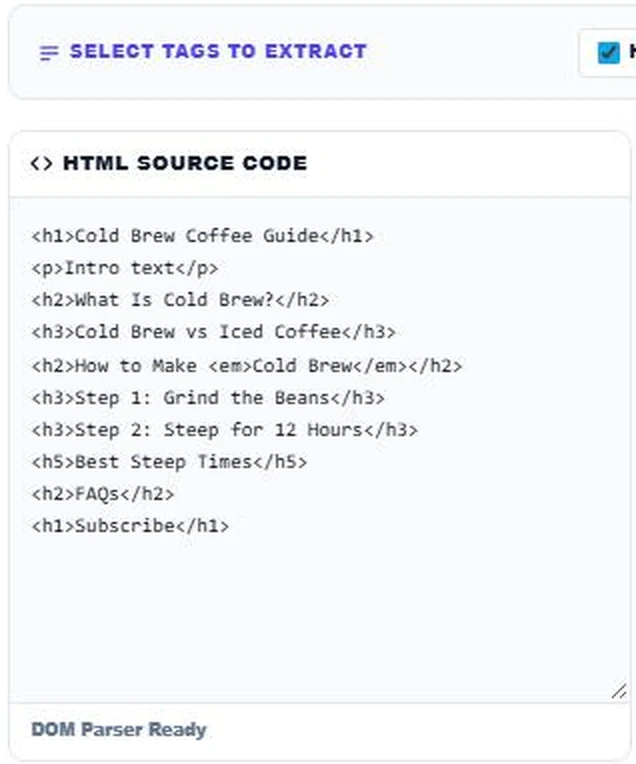
Leave all six boxes from H1 to H6 ticked for a full audit, or untick levels you do not need. Paste the page source into HTML Source Code. You can paste a full page or just the article body.
Step 2: Read the Outline and Structure Check
Press Extract Headings. The Extracted Outline shows the hierarchy with indentation. In our sample the structure check flags 2 H1 tags and a skipped level, where the H5 "Best Steep Times" comes straight after an H3. Total Found shows 9 headings.

Step 3: Review the Heading Distribution
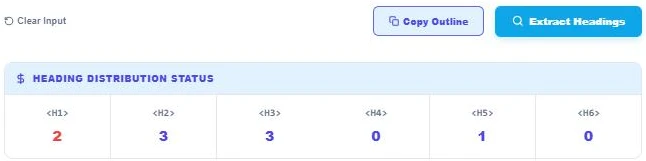
The Heading Distribution Status panel counts each level: 2 H1, 3 H2, 3 H3, 0 H4, 1 H5 and 0 H6. The red H1 count is a reminder to keep one H1. Fix the page, paste it again and press Copy Outline to save the clean structure for your content brief.
Why Headings Matter for SEO
Search engines use headings to understand the topics a page covers and how sections relate. Clear H2 and H3 headings can also be shown as jump links in search results and make it easier for Google to pull a section as a featured snippet.
Why Headings Matter for Accessibility
Screen reader users often jump from heading to heading to scan a page, much like sighted users skim bold titles. Skipped levels and decorative headings make that navigation confusing. A logical outline is part of meeting WCAG 1.3.1 (Info and Relationships).
Common Heading Mistakes
- Using the site logo or a sidebar widget title as an extra H1.
- Picking heading levels for their font size instead of their meaning.
- Adding headings to call-to-action boxes in the middle of the article.
- Writing headings that do not describe the section below them.
More on-page tools: the Image Alt Tag Checker, the On-Page SEO HTML Analyzer and the Keyword Density Analyzer.
Frequently Asked Questions
How many H1 tags should a page have?
One is best practice. It should describe the main topic of the page.
Is it bad to skip heading levels?
It is not a direct ranking penalty, but it makes the outline harder to follow for screen reader users and can confuse the structure. Go H2, H3, H4 in order.
Can I extract only H2 and H3 headings?
Yes. Untick the other levels before you press Extract Headings. The structure check runs only when all six levels are selected.
Does the extractor read headings inside nested HTML?
Yes. It parses the full DOM, so headings inside divs, sections and articles are all found in page order.
Why does my page show an extra H1?
Themes often wrap the logo or site title in an H1. Check the header template if the outline shows an H1 you did not write.
Is my HTML uploaded?
No. The HTML heading tags extractor parses your code locally and nothing is sent or stored.