

Pixel Art Maker Online – Draw 8-Bit Sprites and Icons, Export PNG
Pixel Art Maker Online
Draw 8-bit sprites and icons instantly. Use the pencil, eraser, and bucket fill tools to create art, then export as a crisp, transparent PNG.
Tools
Color Picker
Canvas Settings

Quick answer
Pick a grid size (16×16, 20×20, 32×32 or 64×64), choose a colour and click or drag on the canvas to place pixels. Use Erase to remove pixels and Fill to colour a whole area at once. Press Download PNG to save your pixel art as a 512×512 image with a transparent background. This pixel art maker online is free and needs no sign-up.
Pixel art is built one square at a time, which makes it one of the easiest kinds of digital art to start. You do not need a drawing tablet or expensive software. A mouse, a finger on a phone screen and a small grid are enough to make game sprites, emoji-style icons, avatars and retro logos.
This pixel art maker online gives you the three tools that matter most: a pencil, an eraser and a bucket fill. It works on desktop and touch screens, and it exports a sharp, scaled-up PNG that stays crisp instead of turning blurry.
Tools and Settings at a Glance
| Control | What it does |
|---|---|
| Draw | Colours a single pixel, or a line of pixels when you drag |
| Erase | Clears pixels back to transparent |
| Fill | Fills every connected pixel of the same colour, like a paint bucket |
| Color Picker | Any custom colour, plus ten quick swatches |
| Grid Resolution | 16×16, 20×20, 32×32 (default) or 64×64 |
| Show Grid Lines | Turns the guide lines on or off on screen |
| Download PNG | Saves a 512×512 PNG with a transparent background |
| Clear Canvas | Wipes the drawing after you confirm |
How to Use the Pixel Art Maker Online
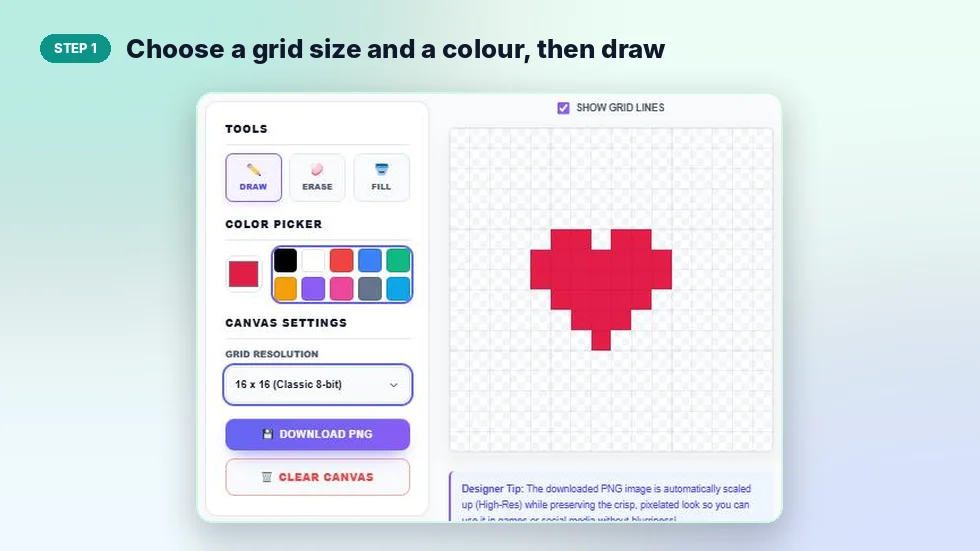
The canvas opens as a blank 32×32 grid with black selected. Here is a small heart drawn on a 16×16 grid.
Step 1: Choose a grid size and a colour, then draw
Set Grid Resolution first, because changing it later clears the canvas (the tool asks before it does). Pick a swatch or open the colour square for any shade. With Draw selected, click a square to fill it or hold and drag to paint several.
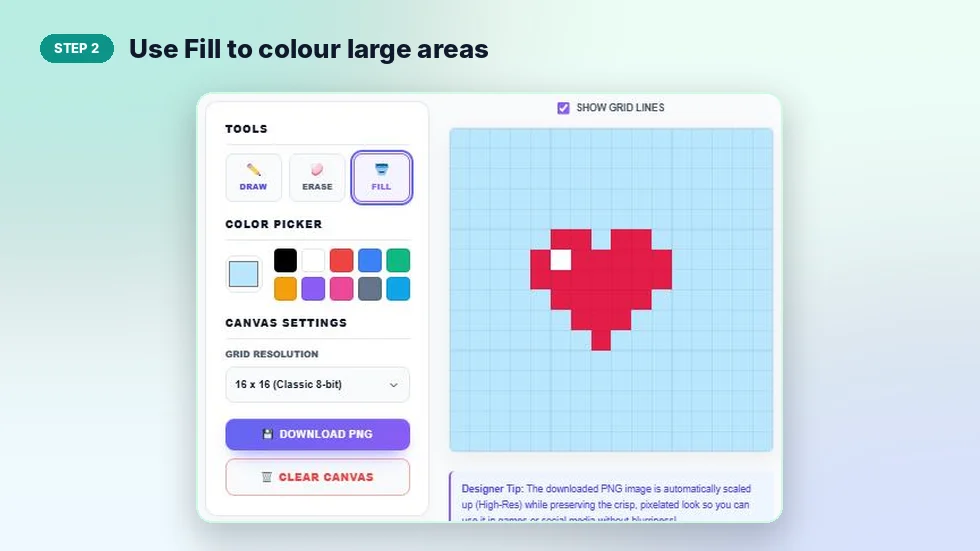
Step 2: Use Fill to colour large areas
Select Fill, pick a colour and click an empty area. Every connected square of the same colour changes at once. Here the whole background turned light blue in one click while the heart stayed red. Use Erase to fix any mistakes.
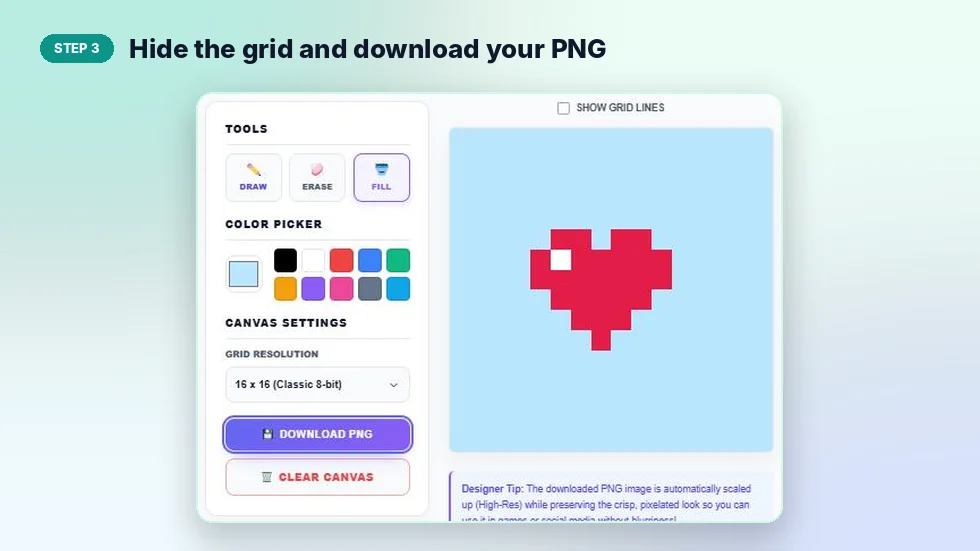
Step 3: Hide the grid and download your PNG
Untick Show Grid Lines to see the finished art without guides. Press Download PNG. The file is named with the grid size, for example vectratools-pixel-art-16x16.png, and grid lines are never included in the export.
Which Grid Size Should You Use?
| Grid | Pixels | Best for |
|---|---|---|
| 16×16 | 256 | Simple icons, favicons, beginner practice, classic 8-bit items |
| 20×20 | 400 | Slightly more detailed icons and emoji-style faces |
| 32×32 | 1,024 | Game characters, avatars and most sprites |
| 64×64 | 4,096 | Detailed portraits, scenes and larger artwork |
Smaller grids are faster to finish and force you to keep shapes simple, which is often what makes pixel art look good. Start with 16×16 if you are new.
Pixel Art Tips for Beginners
- Draw the outline first. A dark outline makes shapes easy to read, then fill the inside with the bucket.
- Use a small palette. Three to five colours per object keeps the style clean.
- Add one highlight. A single white or light pixel, like the one on the heart, makes an object look shiny and round.
- Avoid jagged lines. In curves, keep the steps even, such as 3-2-1 pixels, rather than random lengths.
- Check without the grid. Turning off grid lines shows how the art will really look.
About the PNG Export
Every download is 512×512 pixels, whatever grid size you use. Each square of your art is scaled up as a solid block, so edges stay sharp. Empty squares stay transparent, which means you can place the image on any background in a game engine, design app or website. Your drawing is not saved between visits, so download it before you close the page.
Frequently Asked Questions
Is this pixel art maker online free?
Yes. It is free, with no sign-up and no watermark on downloads.
What size is the downloaded image?
512×512 pixels in PNG format, with a transparent background where no pixels are drawn.
Does it work on phones and tablets?
Yes. You can tap and drag with your finger to draw on touch screens.
Can I change the grid size after I start drawing?
You can, but changing the grid clears the canvas. The tool asks you to confirm first.
Are grid lines included in the PNG?
No. Grid lines only appear on screen and are never exported.
Is my artwork saved?
No. Nothing is uploaded or stored, so download your PNG before leaving the page.