

Online Receipt Generator – Create a Free Printable PDF Receipt in 3 Easy Steps
FROM (SELLER)
TO (BUYER)
| Description | Qty | Rate | Amount |
|---|---|---|---|
| 0.00 |
Use this free online receipt generator to create a clean, professional receipt for a sale in under a minute. Add your business and customer details, list the items, set tax and discount, pick a currency, then print it, save it as a PDF or share it.
Quick answer
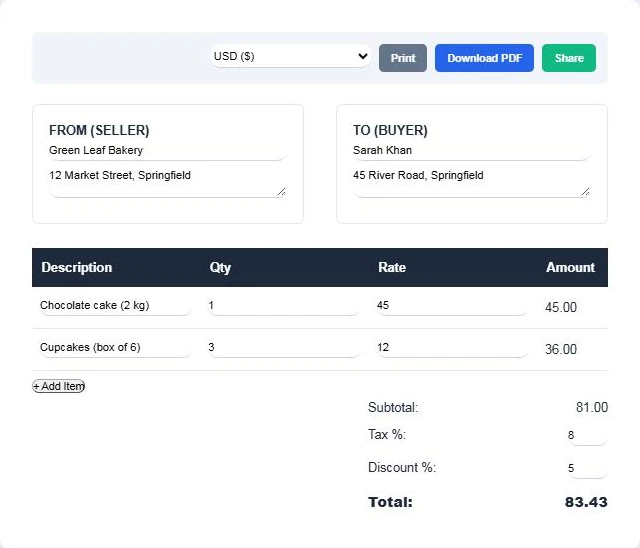
To make a receipt online, enter the seller name and address, the buyer name and address, then add each item with quantity and rate. The tool works out each line amount, the subtotal, tax and discount, and the final total. For example, one cake at 45 plus three boxes of cupcakes at 12 gives a subtotal of 81.00; with 8% tax and a 5% discount the total is 83.43. Press Download PDF to save it.
Table of Contents
Small businesses, freelancers, market stall owners, tutors and landlords often need to hand over a receipt without buying accounting software. A neat receipt also looks more professional than a handwritten note and is easier for customers to keep.
This online receipt generator runs in your browser, supports more than 80 currencies and needs no account.
What Is a Receipt?
A receipt is a written record that a payment has been made. It confirms what was sold, how much was paid and when. Customers use receipts for returns, warranty claims and expense reports, and businesses keep copies for bookkeeping and tax records.
A receipt is different from an invoice. An invoice asks for payment that is still due, while a receipt confirms that payment has already been received.
What to Include on a Receipt
- Your business name and address, and a tax number if your country requires one.
- The customer’s name and address, or at least their name.
- A clear description of each item or service.
- Quantity, unit price and line total for every item.
- Subtotal, tax, any discount and the final amount paid.
- The date of the sale and, ideally, the payment method.
How the Totals Are Calculated
- Line amount = quantity × rate
- Subtotal = sum of all line amounts
- Tax = subtotal × tax % ÷ 100
- Discount = subtotal × discount % ÷ 100
- Total = subtotal + tax − discount
Both tax and discount are worked out on the subtotal, so the order in which you enter them does not change the result.
How to Use the Online Receipt Generator
Step 1: Add Seller and Buyer Details
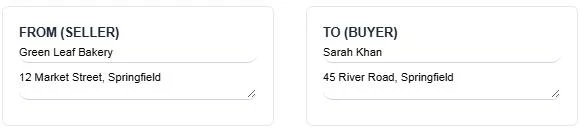
Type your business name and address in the From (Seller) box and the customer’s name and address in the To (Buyer) box. Choose your currency from the menu at the top.
Step 2: Add Items, Quantities and Prices
Fill in the first line with the item description, quantity and rate. Click + Add Item for each extra line. The amount column updates as you type; here a 45.00 cake and three 12.00 cupcake boxes give 81.00.

Step 3: Set Tax and Discount, Then Download
Enter a tax percentage and a discount percentage if they apply. With 8% tax and 5% off, the total becomes 83.43. Then press Print, Download PDF or Share to send the receipt to your customer.
Who Uses an Online Receipt Generator?
- Freelancers confirming payment for design, writing or development work.
- Small shops and home bakers handing over a printed or emailed receipt.
- Tutors, coaches and trainers recording session fees.
- Landlords confirming rent received from tenants.
- Event organisers and clubs recording membership or ticket payments.
Good Practice for Receipts
- Issue receipts only for real payments, with accurate amounts and dates.
- Number your receipts in order so they are easy to find later.
- Keep a copy of every receipt for your own records and tax filing.
- Check your local rules on what a valid tax receipt must show.
Freelancers can work out tax on a bill with the Freelancer Invoice Tax Calculator or log time with the Billable Hours Tracker. To work out tax on a price first, try the Reverse GST Calculator.
Frequently Asked Questions
Is the online receipt generator free?
Yes. It is free to use, with no sign-up and no watermark.
Can I download the receipt as a PDF?
Yes. Press Download PDF to save the receipt to your device, or use Print to send it to a printer or save as PDF from the print dialog.
Which currencies are supported?
More than 80, including USD, EUR, GBP, PKR, INR, AED, SAR, CAD and AUD. Pick one from the currency menu before downloading.
How are tax and discount calculated?
Both are percentages of the subtotal. Tax is added and the discount is subtracted to give the total.
What is the difference between a receipt and an invoice?
An invoice requests payment that is still due. A receipt confirms that the payment has already been made.
Is my information stored?
No. Everything you type stays in your browser and is not saved on a server.