

Sales Markdown Liquidation Calculator – Clearance Price & Profit in 3 Easy Steps
Markdown & Liquidation Calculator
Use this sales markdown liquidation calculator to find the exact clearance price, total revenue, and your final profit or loss.
Use this free sales markdown liquidation calculator to see what a clearance discount really does to your numbers. Enter your cost price, original selling price, quantity and discount, and the tool shows the new sale price, total revenue, cost of goods, gross margin and your final profit or loss.
Quick answer
Sale price = original price × (1 − discount %). Profit = (sale price − cost price) × quantity. You start losing money once the discount passes (price − cost) ÷ price. For stock that cost $20 and sells for $50, a 40% markdown gives a $30 price and $2,000 profit on 200 units, while a 70% markdown drops the price to $15 and causes a $1,000 loss.
Table of Contents
Every retailer ends up with slow-moving stock: last season’s clothes, discontinued models, overstocked gadgets. Marking them down frees cash and shelf space, but a discount that is too deep can turn a clearance sale into a loss.
This sales markdown liquidation calculator shows the result before you change a single price tag. It runs in your browser and does not store your data.
What Is a Markdown in Retail?
A markdown is a permanent price reduction from the original selling price, usually to clear inventory. It differs from a markup, which is the amount added to cost to set the original price. A short promotion is often called a discount; a permanent cut to move old stock is a markdown or clearance price.
Liquidation is the extreme end of a markdown: selling remaining stock quickly, often near or below cost, to recover whatever cash you can.
Sales Markdown Liquidation Calculator Formulas
- Discount per unit = original price × discount % ÷ 100
- Clearance price = original price − discount per unit
- Total revenue = clearance price × quantity
- Total cost of goods = cost price × quantity
- Profit or loss = total revenue − total cost of goods
- Gross margin = profit ÷ revenue × 100
- Break-even discount = (original price − cost price) ÷ original price × 100
How to Use the Markdown Calculator
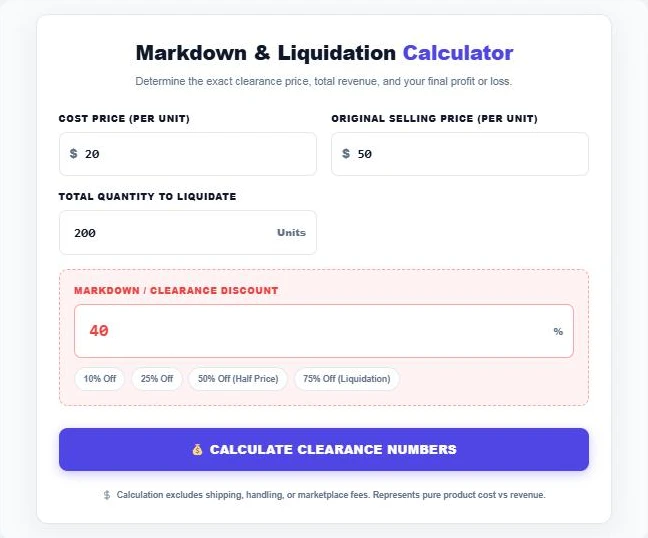
The example below clears 200 units that cost $20 each and normally sell for $50.
Step 1: Enter Cost, Price, Quantity and Discount
Type your cost price per unit, the original selling price and the number of units to clear. Enter a discount percentage or tap one of the quick buttons for 10%, 25%, 50% or 75% off. Here the markdown is 40%.
Step 2: Review the Clearance Profit
Press Calculate Clearance Numbers. The new sale price is $30, revenue is $6,000 against a cost of $4,000, and you still make $2,000 profit with a 33.33% gross margin.

Step 3: Test a Deeper Liquidation Discount
Raise the discount to see where the sale turns red. At 70% off, the price drops to $15, below the $20 cost. Revenue falls to $3,000, and the sale loses $1,000. For this product the break-even point is a 60% markdown.

Markdown Profit Table
Using the same $20 cost, $50 price and 200 units:
| Discount | Sale price | Revenue | Profit / loss | Gross margin |
|---|---|---|---|---|
| 0% | $50 | $10,000 | +$6,000 | 60.0% |
| 25% | $37.50 | $7,500 | +$3,500 | 46.7% |
| 40% | $30 | $6,000 | +$2,000 | 33.3% |
| 50% | $25 | $5,000 | +$1,000 | 20.0% |
| 60% | $20 | $4,000 | $0 | 0.0% |
| 75% | $12.50 | $2,500 | −$1,500 | −60.0% |
When Is Selling Below Cost Worth It?
A loss on paper is not always a bad decision. The cost of goods is already spent; what matters is the cash you can recover now compared with keeping the stock.
- Storage, warehouse fees and insurance keep adding up while stock sits unsold.
- Seasonal and fashion items lose value quickly, so waiting usually means a deeper discount later.
- Cash from clearance can buy faster-selling stock with a better margin.
- Marketplace fees, shipping and returns are not included here, so leave a buffer when you set the final discount.
Markup vs Markdown: A Worked Example
Markup and markdown are easy to mix up because both are percentages, but they use different bases. Markup is measured against cost; markdown is measured against the selling price.
- An item costs $20 and sells for $50. The markup is ($50 − $20) ÷ $20 = 150%.
- The gross margin at full price is ($50 − $20) ÷ $50 = 60%.
- A 60% markdown takes the price back to $20, exactly the cost. That is why the break-even discount always equals your full-price gross margin.
This is the quickest sanity check before any sale: if your margin is 45%, a 50% markdown will lose money on every unit, and the sales markdown liquidation calculator will show the loss in red.
Common Markdown Mistakes
- Ignoring the cost of holding stock. A small loss today can be cheaper than months of storage fees.
- Waiting too long. Seasonal products lose demand fast, so late markdowns often have to be much deeper.
- Forgetting fees. Marketplace commissions of 10% to 15% can turn a thin clearance profit into a loss.
- Marking down everything at once. Best sellers rarely need a discount; focus on the slow movers.
- Training customers to wait. Constant sales teach shoppers never to pay full price. Keep clearance events planned and limited.
Run each scenario through the sales markdown liquidation calculator before you commit, then compare the cash you recover with the cost of keeping the stock for another month or season.
Tips for Planning Markdowns
- Start with a modest first markdown, such as 20% to 30%, and deepen it in stages.
- Work out your break-even discount before announcing any sale.
- Bundle slow items with best sellers instead of cutting their price on their own.
- Track sell-through rate after each markdown to see whether the discount is working.
Planning ad spend to push the clearance? Check your return with the ROAS Calculator and estimate extra sales from better conversion with the CRO Calculator.
Frequently Asked Questions
How do I calculate a markdown price?
Multiply the original price by (1 − discount ÷ 100). A $50 item with a 40% markdown sells for $50 × 0.6 = $30.
What is the difference between markup and markdown?
Markup is the amount added to cost to set a selling price. Markdown is a reduction from that selling price to clear stock.
How do I find my break-even discount?
Subtract cost from the original price and divide by the original price. With a $20 cost and $50 price, (50 − 20) ÷ 50 = 60%, so any markdown above 60% loses money.
Does the calculator include fees and shipping?
No. It compares product cost with sale revenue only. Subtract marketplace fees, payment fees and shipping yourself for a full picture.
What is a good markdown percentage?
Many retailers start at 20% to 30% and go deeper in steps. The right figure depends on your margin, how fast the item is losing value and the cost of holding it.
Is my data stored?
No. The markdown calculator runs entirely in your browser and nothing is sent to a server.