

CRO Calculator – Estimate Conversion Rate Revenue Uplift in 3 Easy Steps
CRO Revenue Estimator
Use this CRO calculator to estimate your conversion rate optimization potential. See how a small increase in your conversion rate impacts your bottom line.
Use this free CRO calculator to see how much extra revenue a higher conversion rate would bring in. Enter your monthly traffic, conversions and average order value, set a target conversion rate, and the tool shows your current revenue, new revenue and the monthly uplift.
Quick answer
Conversion rate = conversions ÷ visitors × 100. Revenue = conversions × average order value (AOV). To estimate the gain from conversion rate optimization, multiply your visitors by the target rate, multiply that by AOV, and subtract current revenue. For example, 25,000 visitors at 1.6% with a $65 AOV earn $26,000; lifting the rate to 2.2% earns $35,750, an extra $9,750 a month.
Table of Contents
Buying more traffic is expensive. Getting more of the visitors you already have to buy, sign up or call is usually cheaper. The hard part is putting a number on it, so you can decide whether a redesign, a faster checkout or a round of A/B tests is worth the time and money.
This CRO calculator turns that question into a dollar figure in seconds. It runs in your browser, and none of your numbers are saved.
What Is Conversion Rate Optimization (CRO)?
Conversion rate optimization is the process of increasing the share of website visitors who complete a goal. The goal could be a purchase, a lead form, a free trial or a phone call. CRO work covers things like clearer headlines, fewer form fields, faster pages, better product photos, trust signals and testing different versions of a page against each other.
Because revenue grows in line with conversion rate when traffic stays the same, even a small lift can matter. Going from 2% to 2.5% is only half a percentage point, but it is a 25% increase in sales from the same visitors.
CRO Calculator Formulas
- Current conversion rate = conversions ÷ visitors × 100
- Current revenue = conversions × AOV
- New conversions = visitors × target conversion rate ÷ 100
- New revenue = new conversions × AOV
- Revenue uplift = new revenue − current revenue
- Relative lift = (target rate − current rate) ÷ current rate × 100
The calculator keeps traffic and AOV fixed, so the uplift comes only from the change in conversion rate. That makes it easy to see the value of CRO on its own.
How to Use the CRO Calculator
The screenshots use an online store with 25,000 monthly visitors, 400 orders and a $65 average order value.
Step 1: Enter Your Current Performance
Type your monthly visitors, monthly conversions and average order value. Take these from Google Analytics, Shopify or your CRM for the same 30-day period. The tool shows your current conversion rate straight away; here it is 1.60%.

Step 2: Set a Target Conversion Rate
Enter the rate you want to reach in the Target Conversion Rate box. At 2.2%, the store would get 550 orders instead of 400. Revenue rises from $26,000 to $35,750, a monthly uplift of $9,750, or about $117,000 over a year.

Step 3: Compare With Industry Benchmarks
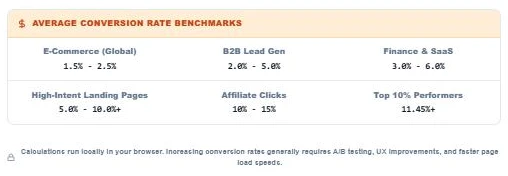
Check the benchmark table under the calculator to see whether your target is realistic. A store at 1.6% aiming for 2.2% sits within the usual e-commerce range. Aiming for 8% on a general store page would not be realistic, so set targets in small steps.
CRO Uplift Examples
Here is how the same store’s revenue changes at different conversion rates, with 25,000 visitors and a $65 AOV:
| Conversion rate | Orders | Monthly revenue | Uplift vs 1.6% |
|---|---|---|---|
| 1.6% | 400 | $26,000 | – |
| 2.0% | 500 | $32,500 | +$6,500 |
| 2.2% | 550 | $35,750 | +$9,750 |
| 2.5% | 625 | $40,625 | +$14,625 |
| 3.0% | 750 | $48,750 | +$22,750 |
Practical Ways to Raise Your Conversion Rate
- Speed up the page. Slow pages lose visitors before they see the offer, especially on mobile.
- Cut form fields. Ask only for what you need to complete the sale or lead.
- Make the main button obvious. One clear call to action works better than several competing ones.
- Show trust signals. Reviews, return policies, secure checkout badges and real contact details reduce doubt.
- Remove surprise costs. Show shipping and fees early instead of at the last step.
- Test, do not guess. Run A/B tests and check that the winner is statistically significant before rolling it out.
To check whether an A/B test result is real, run the numbers through our Chi-Square Calculator. To see whether your ad spend pays back after the lift, use the ROAS Calculator.
Limits of a CRO Estimate
The calculator assumes traffic and order value stay the same. In practice, a change that lifts conversions can lower AOV (for example, a discount), and seasonal swings can hide or exaggerate a lift. Use the result as a planning figure, then track real numbers for at least a few weeks after each change.
Frequently Asked Questions
What does a CRO calculator do?
It estimates how much extra revenue you would earn by raising your conversion rate, using your traffic, current conversions, average order value and a target conversion rate.
How do I calculate conversion rate?
Divide the number of conversions by the number of visitors and multiply by 100. For example, 400 orders from 25,000 visitors is a 1.6% conversion rate.
What is a good conversion rate?
It depends on the industry and the type of page. Many e-commerce stores convert between about 1.5% and 2.5%, while focused landing pages and lead forms often convert higher. Compare yourself with your own past results first.
Should I use sessions or users as visitors?
Either works as long as you stay consistent. Use the same metric and the same date range for visitors and conversions.
Does the calculator include profit?
It shows revenue, not profit. To see profit, multiply the uplift by your gross margin. A $9,750 uplift at a 40% margin is about $3,900 in extra gross profit.
Is my data saved?
No. All calculations happen in your browser and nothing is sent to a server.