

JSON Formatter Online – Beautify and Validate in 3 Easy Steps
Online JSON Formatter & Validator
Use this JSON formatter online to beautify, minify and validate JSON instantly, with clear error messages and size stats
Use this free JSON formatter online to beautify messy JSON, minify it for production and check that it is valid. Paste your JSON and the tool shows a neatly indented version, flags errors with the line and column, and reports the character count, number of keys and payload size.
Quick answer
Paste JSON into the input box and press Beautify to format it with indentation, or Minify to remove all spaces and line breaks. A green bar means the JSON is valid. A red bar shows the error and where it is, for example “line 4 column 1” for a trailing comma. Copy Output or Download .json saves the result.
Table of Contents
JSON (JavaScript Object Notation) is the standard format for APIs, config files and data exports. Machines are happy with a single long line, but people need line breaks and indentation to read it. One missing quote or extra comma also breaks the whole file, so a quick validator saves a lot of debugging time.
This JSON formatter online runs entirely in your browser, so API keys, customer data and private configs never leave your device.
What the JSON Formatter Does
- Beautify: adds line breaks and 4-space indentation for easy reading.
- Minify: strips spaces and line breaks to make files smaller.
- Validate: uses the browser’s strict JSON parser and shows the exact error position.
- Stats: character count, total object keys (including nested keys) and payload size in KB.
- Copy and download: copy the output or save it as a .json file.
How to Use the JSON Formatter Online
Step 1: Paste Your JSON and Beautify It
Paste your JSON into Input Raw JSON String and press Beautify Data Space. A one-line object with a name, a skills array, a nested address and a true/false flag becomes an indented tree. The green bar confirms it is valid, and the stats show 97 characters, 6 keys and 0.095 KB.

Step 2: Minify JSON for Production
Press Minify Code Inline to turn the formatted JSON back into one compact line. Use this for API payloads, environment variables and files where size matters. Then press Copy Output or Download .json.

Step 3: Find and Fix JSON Errors
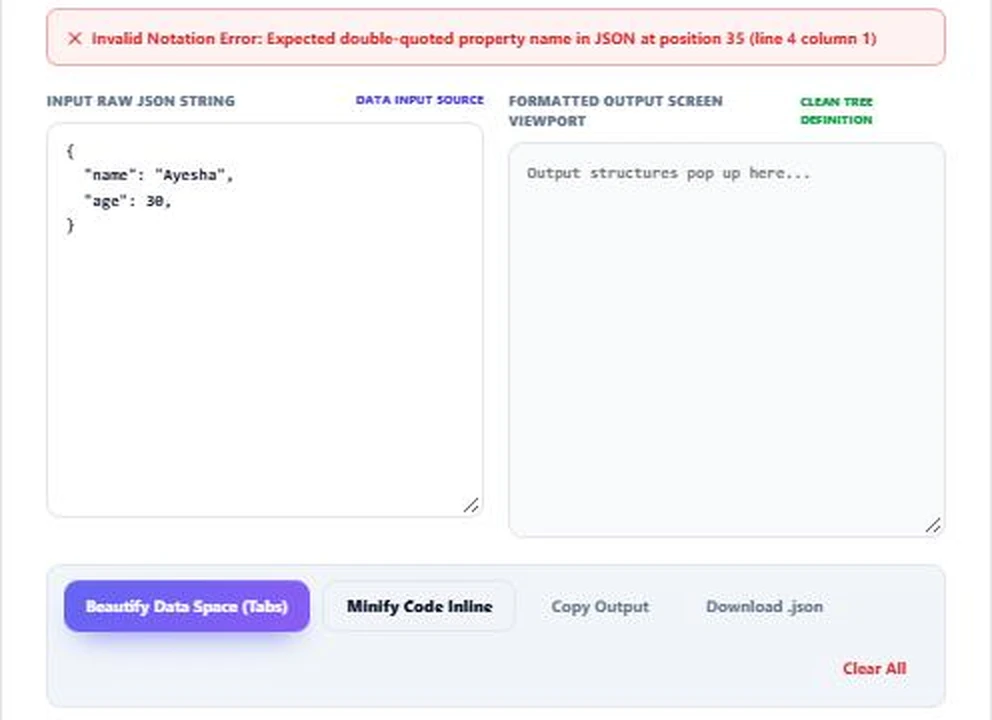
Invalid JSON turns the bar red. Here a trailing comma after "age": 30 gives Expected double-quoted property name in JSON at position 35 (line 4 column 1). The output box clears so you never copy stale data. Remove the comma and beautify again.
Common JSON Errors and Fixes
| Error | Example | Fix |
|---|---|---|
| Trailing comma | {"a": 1,} | Remove the last comma |
| Single quotes | {'a': 1} | Use double quotes: {"a": 1} |
| Unquoted key | {a: 1} | Quote every key: {"a": 1} |
| Comments | {"a": 1 // note} | Remove comments; JSON does not allow them |
| Missing bracket | {"a": [1, 2} | Close every [ and { |
| Invalid value | {"a": undefined} | Use null, a number, string, true or false |
Beautify vs Minify
Beautified JSON is for people: code reviews, documentation and debugging. Minified JSON is for machines: it can be noticeably smaller, which saves bandwidth on busy APIs. The data is identical either way, only the whitespace changes.
Tips for Working With JSON
- Validate API responses before blaming your code; a malformed payload is a common cause of bugs.
- Keep key names consistent, such as camelCase or snake_case throughout.
- Large numbers above 253 lose precision in JavaScript; send them as strings.
- Never paste secrets into online tools that send data to a server. This one does not.
JSON Formatter Online for API Debugging
When an API call fails, copy the raw response from your browser’s network tab and paste it into the JSON formatter online. If the bar turns red, the server sent broken JSON and the problem is on the API side. If it is green, beautify it and check that the fields and nesting match what your code expects.
For request bodies, build the JSON here first, confirm it is valid, then minify it before pasting it into your HTTP client or script.
Related tools: the Schema Markup JSON-LD Validator, the URL Encoder and Decoder and the Base32 Encoder and Decoder.
Frequently Asked Questions
How do I format JSON online?
Paste it into the input box and press Beautify. The formatted JSON appears on the right.
How do I check if JSON is valid?
Paste it in. A green bar means valid; a red bar shows the error and its line and column.
What does minify JSON mean?
It removes spaces and line breaks so the file is smaller, without changing the data.
Why is my JSON invalid?
Common causes are trailing commas, single quotes, unquoted keys and comments.
Is my JSON sent to a server?
No. Everything is processed in your browser.
How are keys counted?
The tool counts every object key, including nested ones. Array items are not counted as keys.