

Base32 Encoder Decoder – RFC 4648 Text Encoding in 3 Easy Steps
Base32 Encoder & Decoder
Use this Base32 encoder decoder to convert standard text to Base32 or decode Base32 back to readable text securely.
Use this free Base32 encoder decoder to turn text into RFC 4648 Base32 or decode Base32 back into readable text. Type in either box and the other updates instantly. The decoder accepts upper or lower case and missing padding, and flags any string that contains characters outside the Base32 alphabet.
Quick answer
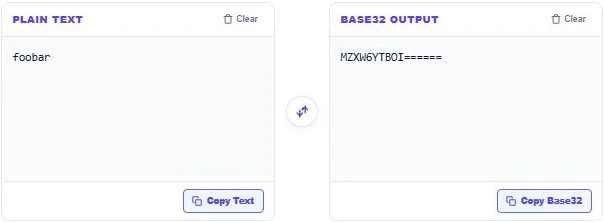
Base32 turns data into the 32 characters A–Z and 2–7, with = signs as padding. Every 5 bytes become 8 characters, so the output is about 60% longer than the input. For example, "foobar" encodes to MZXW6YTBOI====== and "hi" to NBUQ====. Base32 is an encoding, not encryption, so anyone can decode it.
Table of Contents
Base32 is used where text must survive systems that are case-insensitive or confuse similar characters. It shows up in two-factor authentication secret keys, DNS records, onion addresses and some file names.
This Base32 encoder decoder follows the standard RFC 4648 alphabet and handles UTF-8, so accented letters and emoji encode correctly.
How Base32 Encoding Works
- The text is converted to UTF-8 bytes.
- The bytes are split into groups of 5 bits.
- Each 5-bit group (0–31) is mapped to one character: A–Z for 0–25 and 2–7 for 26–31.
- The output is padded with = so its length is a multiple of 8.
Base32 Examples
| Text | Base32 | Base64 (for comparison) |
|---|---|---|
| f | MY====== | Zg== |
| hi | NBUQ==== | aGk= |
| foobar | MZXW6YTBOI====== | Zm9vYmFy |
| café | MNQWNQ5J | Y2Fmw6k= |
| Hello, VectraTools! | JBSWY3DPFQQFMZLDORZGCVDPN5WHGII= | SGVsbG8sIFZlY3RyYVRvb2xzIQ== |
How to Use the Base32 Encoder Decoder
Step 1: Encode Plain Text to Base32
Type or paste text into Plain Text. "Hello, VectraTools!" becomes JBSWY3DPFQQFMZLDORZGCVDPN5WHGII= in the Base32 Output box. Press Copy Base32 to copy it.

Step 2: Decode Base32 Back to Text
Paste a Base32 string into Base32 Output to decode it. MZXW6YTBOI====== returns foobar. Lower-case input and missing = padding also work. If a string contains 0, 1, 8, 9 or symbols, the tool shows an invalid Base32 warning.
Step 3: Check the RFC 4648 Alphabet
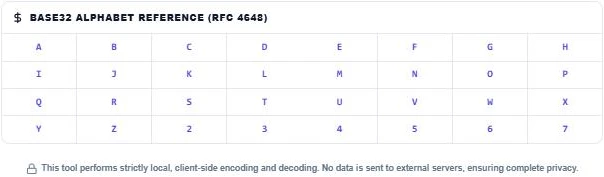
The Base32 Alphabet Reference shows all 32 characters in order, A to Z then 2 to 7. Use it to spot typos in a 2FA key, such as the digit 0 typed instead of the letter O. Press Clear to reset either box.
Base32 vs Base64
| Base32 | Base64 | |
|---|---|---|
| Characters | A–Z, 2–7 | A–Z, a–z, 0–9, + and / |
| Case-sensitive | No | Yes |
| Size increase | About 60% | About 33% |
| Typical use | 2FA secrets, DNS, file names | Email attachments, data URIs, APIs |
Base32 avoids 0, 1, 8 and 9, which are easy to confuse with O, I, B and g when typed by hand. That is why authenticator apps use it for secret keys.
Common Uses of Base32
- Two-factor authentication (TOTP) secret keys.
- Tor onion service addresses.
- DNSSEC NSEC3 records.
- Case-insensitive file systems and URLs.
- Human-readable codes that must be typed manually.
Base32 Output Length
Base32 writes 5 bytes as 8 characters. To estimate the length, divide the byte count by 5, round up and multiply by 8. A 20-byte value, the size of many authenticator secrets, becomes exactly 32 Base32 characters with no padding. A 16-byte value becomes 26 characters plus 6 padding signs.
Tips for Working With 2FA Secret Keys
- Keys are often shown in groups of four with spaces. Remove the spaces before decoding.
- Authenticator apps accept the key without padding, so you can leave off the = signs.
- Never paste a real production 2FA secret into a site you do not trust. This tool runs locally, but treat secrets with care.
- If a QR code will not scan, typing the Base32 key manually is the usual fallback.
Troubleshooting Decoding Errors
An invalid string message almost always means a character outside the alphabet has slipped in. Common culprits are the digits 0, 1, 8 and 9, lowercase letters copied with hidden spaces, or a dash from a grouped key. Remove them and the Base32 encoder decoder will read the rest.
More encoding tools: the URL Encoder Decoder, the Binary Coded Decimal Converter and the IDN Punycode Decoder.
Frequently Asked Questions
What is Base32 encoding?
It is a way to write binary data using 32 characters, A–Z and 2–7, defined in RFC 4648.
Is Base32 encryption?
No. It is only an encoding. Anyone can decode it, so do not use it to protect secrets.
Why does Base32 output end with = signs?
The = signs are padding, added so the output length is a multiple of 8 characters.
Can I decode Base32 without padding?
Yes. The decoder accepts strings with or without = padding, in upper or lower case.
Why is my 2FA key not decoding?
Check for characters outside A–Z and 2–7, such as 0, 1 or 8, and remove spaces or dashes.
Is my data uploaded?
No. The Base32 encoder decoder runs in your browser and nothing is stored.