

URL Path Segment Encoder Decoder – Percent-Encode in 3 Easy Steps
URL Path Segment Encoder & Decoder
Use this URL path segment encoder decoder to safely encode special characters for URI components and API parameters, or decode them back to plain text.
Use this free URL path segment encoder decoder to percent-encode text so it can sit safely inside a URL path or query parameter, or to decode an encoded string back into readable text. Type in either box and the other side updates instantly, with a clear warning if the encoded input is malformed.
Quick answer
URL encoding (percent-encoding) replaces unsafe characters with a % sign and two hex digits: a space becomes %20, & becomes %26, / becomes %2F and é becomes %C3%A9. Encode any value you put inside a single path segment or query parameter, and decode it to read what a URL really contains.
Table of Contents
URLs can only carry a limited set of characters. Spaces, ampersands, question marks, slashes and non-English letters all have to be encoded, or the browser and server will read them as part of the URL structure instead of as data.
This URL path segment encoder decoder uses strict component encoding, the safest choice when you build links, API calls or UTM parameters by hand.
How Percent-Encoding Works
- Each unsafe character is turned into its UTF-8 bytes.
- Each byte is written as % followed by two hexadecimal digits.
- Letters, digits and - _ . ~ are left as they are.
- Everything else, including ! ' ( ) and *, is encoded for maximum safety.
Common Percent-Encoded Characters
| Character | Encoded | Why it is encoded |
|---|---|---|
| Space | %20 | Not allowed in URLs |
| ! | %21 | Reserved sub-delimiter |
| # | %23 | Starts the fragment |
| % | %25 | Starts an escape sequence |
| & | %26 | Separates query parameters |
| ' | %27 | Reserved sub-delimiter |
| + | %2B | Means space in some query strings |
| / | %2F | Separates path segments |
| : | %3A | Separates scheme and port |
| = | %3D | Separates key and value |
| ? | %3F | Starts the query string |
| @ | %40 | Separates user info |
| é | %C3%A9 | Non-ASCII letter (2 UTF-8 bytes) |
How to Use the URL Path Segment Encoder Decoder
Step 1: Encode Plain Text
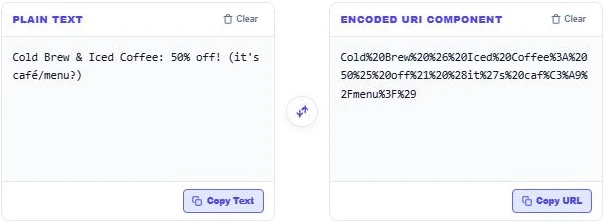
Type or paste text into Plain Text. Our example, "Cold Brew & Iced Coffee: 50% off! (it’s café/menu?)", becomes a safe string in Encoded URI Component, with spaces as %20, the ampersand as %26, the slash as %2F and é as %C3%A9.
Step 2: Decode an Encoded URL Value
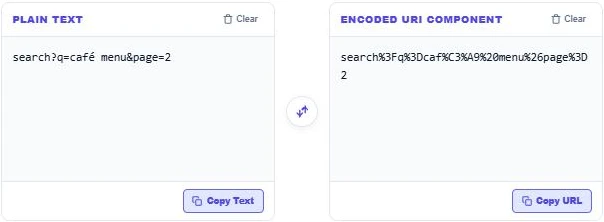
Paste an encoded value into the right box to read it. search%3Fq%3Dcaf%C3%A9%20menu%26page%3D2 decodes to search?q=café menu&page=2. If the input has a broken escape, such as a % without two hex digits, the box shows a malformed input warning instead of garbage.
Step 3: Check the Reserved Characters Table
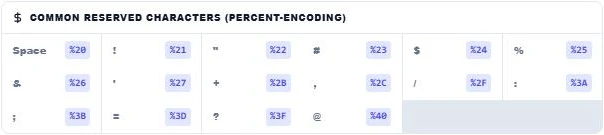
The Common Reserved Characters panel lists the percent code for each special character. Use Copy URL or Copy Text to grab a result, the swap button to move text between boxes, and Clear to reset.
Encode a Segment, Not the Whole URL
Encode only the piece of data you insert, such as a search term or a file name. If you encode a full URL, the :// and slashes are encoded too and the link stops working. For example, build https://example.com/search?q= and then append the encoded term café menu as caf%C3%A9%20menu.
When You Need URL Encoding
- Adding search terms or user input to a query string.
- Passing a full URL as a parameter, such as a redirect or share link.
- Building API requests by hand.
- Creating UTM tags with spaces or special characters.
- Reading tracking links and redirect URLs to see their real destination.
%20 vs + for Spaces
In URL paths a space must be %20. In HTML form submissions (application/x-www-form-urlencoded) a space is often written as +. This tool always uses %20, which works in both paths and query strings.
More developer tools: the UTM Tracking Link Builder, the Base32 Encoder Decoder and the IDN Punycode Decoder.
Frequently Asked Questions
What is URL encoding?
It replaces characters that are not allowed or have special meaning in URLs with a % and two hex digits, such as %20 for a space.
What does %20 mean in a URL?
%20 is an encoded space character.
Why does é become %C3%A9?
Non-English characters are first turned into UTF-8 bytes. é uses two bytes, C3 and A9, so it becomes %C3%A9.
Should I encode a whole URL?
No. Encode only the values you insert into a path segment or query parameter, or the URL structure will break.
Why do I get a malformed input error?
The encoded text has a % that is not followed by a valid two-digit hex code, or the bytes do not form valid UTF-8.
Is my text stored?
No. The URL path segment encoder decoder runs in your browser and nothing is saved.