

GDPR Compliance Checklist – 11 Checks for Your Website
GDPR Compliance Checklist
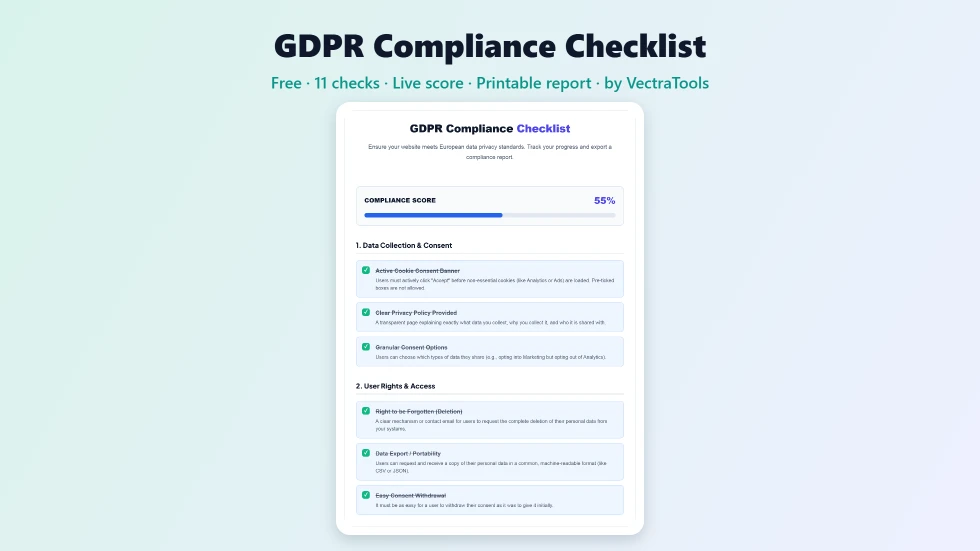
Use this free GDPR compliance checklist to see how close your website is to meeting EU data privacy rules. Track your progress and export a compliance report.
Quick answer
To use this GDPR compliance checklist, read each of the 11 requirements, grouped into consent, user rights, security and accountability, and tick the ones your website already meets. The compliance score updates as you go, and your ticks are remembered in this browser. When you finish, press Save / Print Compliance Report to keep a copy. Use the unticked items as your to-do list.
The EU General Data Protection Regulation (GDPR) applies to any website that collects personal data from people in the European Union, wherever the business is based. The rules can feel overwhelming, so this free GDPR compliance checklist breaks the most important website requirements into 11 clear checks with a live score.
I wrote it for site owners, bloggers, freelancers and small agencies who want a practical starting point. It is not legal advice, and full compliance depends on your business, but it quickly shows the gaps most websites have, from cookie banners to processor agreements.
GDPR Compliance Checklist Features
| Feature | How it works |
|---|---|
| 11 key checks | Covers consent, user rights, security and accountability |
| Four sections | Data Collection & Consent, User Rights & Access, Security, and Accountability |
| Plain explanations | Each item explains what it means in simple language |
| Live compliance score | A percentage and progress bar update with every tick |
| Remembers progress | Your ticks are saved in this browser so you can come back later |
| Printable report | Save or print your checklist as a compliance report |
| One-click reset | Clear all ticks to audit another website |
| Private | Nothing you tick is sent to a server |
How to Use the GDPR Compliance Checklist
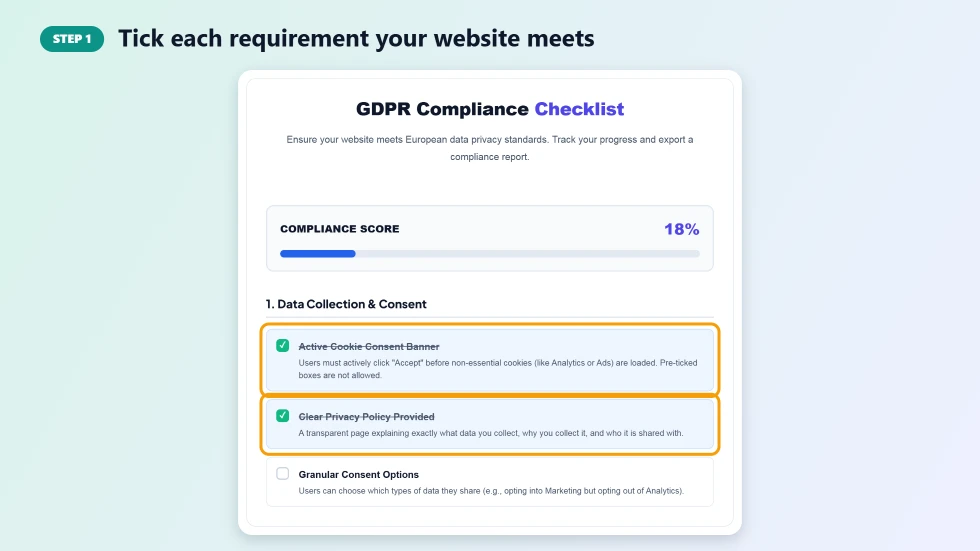
Step 1: Tick each requirement your website meets
Work through each section and tick the requirements your website already meets, such as an active cookie consent banner or a clear privacy policy. Read the short description under each item; if you are unsure, leave it unticked and check with your developer or legal adviser.
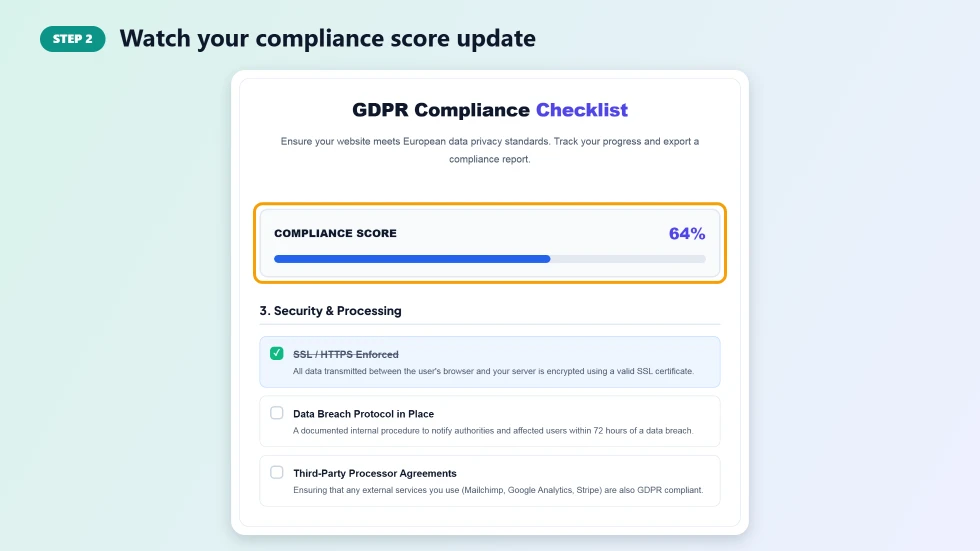
Step 2: Watch your compliance score update
The Compliance Score at the top shows the share of checks you have ticked as a percentage, with a progress bar. A low score is normal for a first audit and simply shows where to focus. Your ticks are saved in your browser, so you can close the page and continue later.
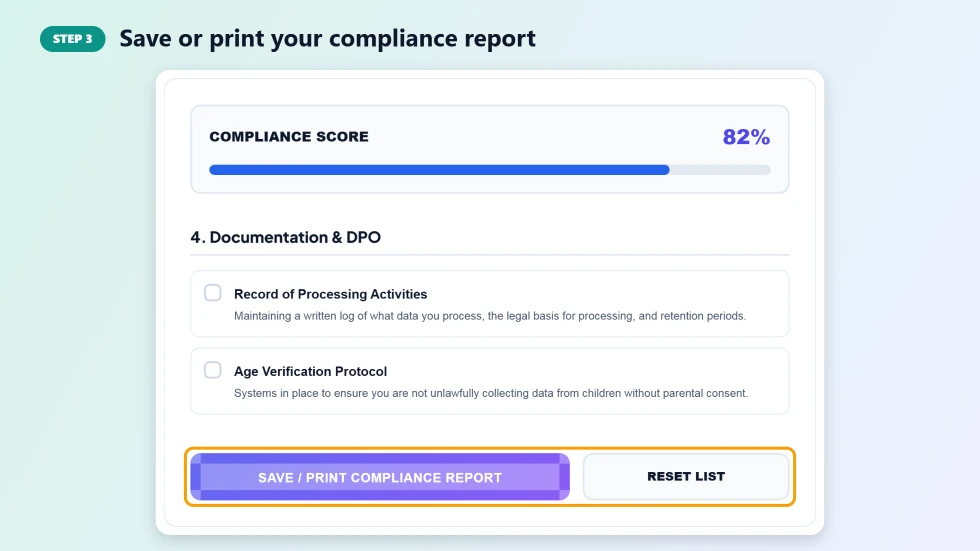
Step 3: Save or print your compliance report
Press Save / Print Compliance Report to print the checklist or save it as a PDF from your browser's print dialog. Share it with your team or client as an action list. Press Reset List to start a fresh audit for another site.
What the GDPR Compliance Checklist Covers
- Consent: an active cookie banner with no pre-ticked boxes, granular choices and a clear privacy policy.
- User rights: ways to delete data, export it in a portable format and withdraw consent easily.
- Security: HTTPS everywhere and a plan for reporting data breaches within 72 hours.
- Accountability: data processing agreements with third parties, a record of processing activities and age checks for children's data.
Common GDPR Mistakes on Websites
- Loading Google Analytics or ad pixels before the visitor clicks Accept.
- Cookie banners with only an Accept button and no real way to refuse.
- Privacy policies copied from another site that do not match what you actually collect.
- Contact forms that keep data forever with no deletion process.
- No signed data processing agreement with email, hosting or CRM providers.
Important Note
This GDPR compliance checklist is a practical self-assessment, not legal advice. GDPR requirements depend on the data you handle, your country and your industry, and other laws such as the UK GDPR or ePrivacy rules may also apply. For a complete review, speak with a qualified data protection professional.
Frequently Asked Questions
Is this GDPR compliance checklist free?
Yes. It is free to use with no sign-up, and you can audit as many websites as you like.
Does GDPR apply to websites outside Europe?
Yes, if the website offers goods or services to people in the EU or tracks their behaviour, such as with analytics cookies, GDPR can apply wherever the business is based.
Will a 100% score make my website GDPR compliant?
Not on its own. The checklist covers the most important website requirements, but full compliance also depends on your internal processes, contracts and the data you handle.
Is my progress saved?
Yes. Your ticks are stored in your own browser, so they are still there when you return on the same device. Nothing is sent to a server.
How do I save the report as a PDF?
Press Save / Print Compliance Report and choose Save as PDF in your browser's print dialog.
What is the deadline for reporting a data breach?
Under GDPR, a personal data breach that poses a risk to people must normally be reported to the supervisory authority within 72 hours of becoming aware of it.