

Credit Card Test Numbers – Sandbox Cards for Successful, Declined and 3D Secure Payments
Test Card Numbers
Sandbox card numbers for checkout testing. Pick a card, copy it, and use any future expiry date.
Selected card
Visa
Payment succeeds.
These numbers only work in a payment gateway's test or sandbox mode. They cannot buy anything and are declined on live checkouts. Never test with a real card.

Quick answer
Credit card test numbers are dummy card numbers that payment gateways accept only in test or sandbox mode. The most used one is the Visa card 4242 4242 4242 4242 with any future expiry date (such as 12/34) and any 3-digit CVC (4 digits for American Express). Other numbers trigger a specific result, such as 4000 0000 0000 9995 for insufficient funds. They never charge real money and are declined on live checkouts.
When you build or update a checkout, you need to see what happens when a payment goes through, gets declined or asks for 3D Secure. Using a real card for this is risky and can trigger fraud checks. Credit card test numbers solve that: they look like real cards, pass the same format checks, and tell the sandbox which result to return.
This page collects 34 credit card test numbers in one searchable list. The numbers follow Stripe's testing documentation, plus the classic 4111 1111 1111 1111 Visa number that many other gateways accept in their sandboxes. Click any card to see the expected result, its Luhn status and the decline code, then copy it in one click.
Credit Card Test Numbers Tool Features
| Feature | How it works |
|---|---|
| 34 test cards | 18 successful cards, 10 declined cards and 6 3D Secure cards |
| Brands covered | Visa, Mastercard, American Express, Discover, Diners Club, JCB and UnionPay |
| Result filters | All, Successful, Declined and 3D Secure tabs, plus a brand menu |
| Search | Type part of a number, a brand or a result such as "stolen" or "cvc" |
| Card preview | Shows the formatted number, expiry 12/34 and the right CVC length; turns red for declines and blue for 3D Secure |
| Luhn check | Runs the Luhn checksum on the selected number and shows Passes or Fails |
| Result code | Shows the code you should expect back, such as insufficient_funds or incorrect_cvc |
| One-click copy | Copy only the number, or the number, expiry and CVC together |
How to Use the Credit Card Test Numbers Tool
The credit card test numbers tool opens with the Visa card 4242 4242 4242 4242 selected. The example below finds the insufficient funds card and copies its full details.
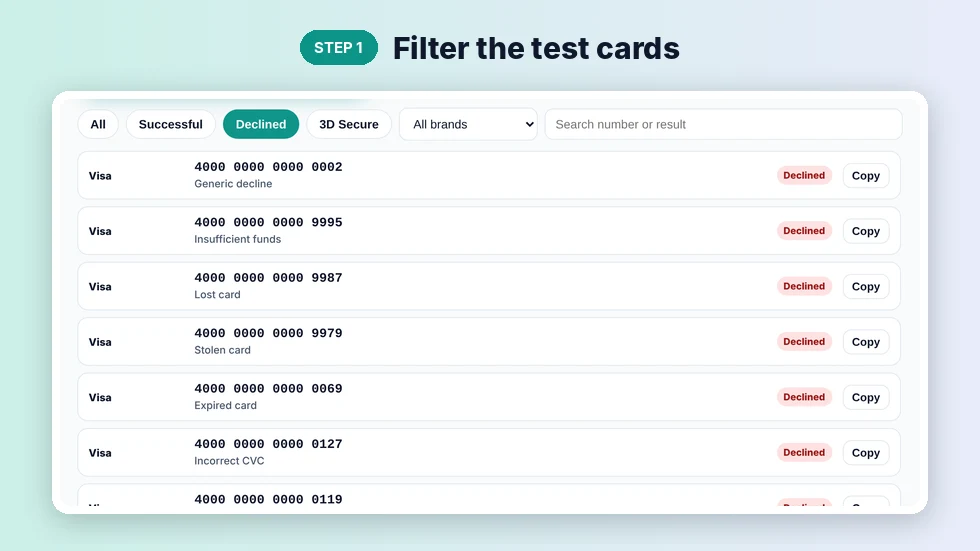
Step 1: Filter the test cards
Pick a tab to show only Successful, Declined or 3D Secure cards. Use the All brands menu to narrow the list to one network, or type in the search box. In the example, the Declined tab lists 10 cards, starting with the generic decline card 4000 0000 0000 0002.
Step 2: Select a card to see its result
Click a row and the card preview updates. The panel shows the brand, the expected result, whether the number passes the Luhn check, its length and the result code. Selecting 4000 0000 0000 9995 turns the card red and shows the insufficient_funds code, which is what your error handling should catch.

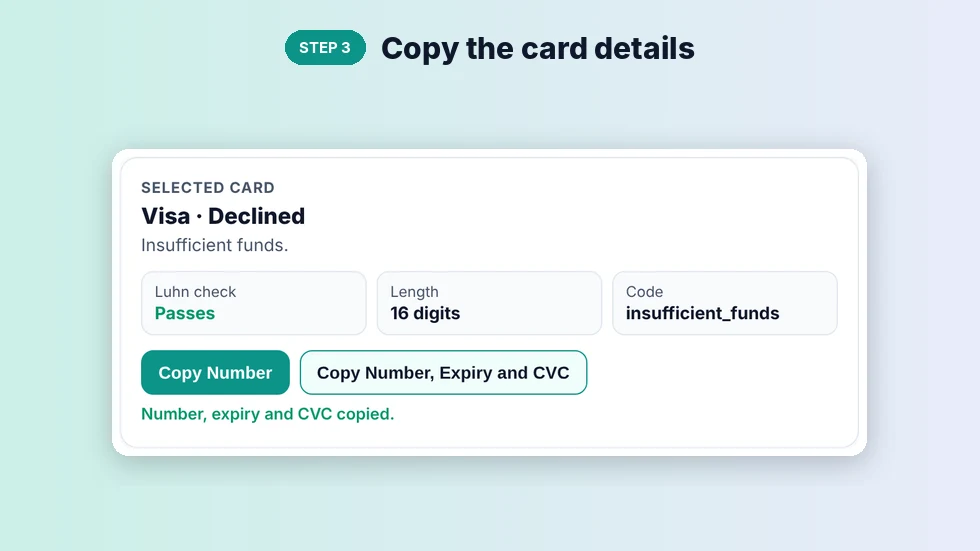
Step 3: Copy the card details
Press Copy Number to copy just the digits, or Copy Number, Expiry and CVC to copy all three lines at once. You can also press Copy on any row in the list. Paste the details into your sandbox checkout form and submit the payment.
Most Used Credit Card Test Numbers by Brand
| Brand | Test number | CVC |
|---|---|---|
| Visa | 4242 4242 4242 4242 | Any 3 digits |
| Visa (classic) | 4111 1111 1111 1111 | Any 3 digits |
| Mastercard | 5555 5555 5555 4444 | Any 3 digits |
| American Express | 3782 822463 10005 | Any 4 digits |
| Discover | 6011 1111 1111 1117 | Any 3 digits |
| Diners Club | 3056 9300 0902 0004 | Any 3 digits |
| JCB | 3566 0020 2036 0505 | Any 3 digits |
| UnionPay | 6200 0000 0000 0005 | Any 3 digits |
Use any expiry date in the future, such as 12/34. A past date, a month above 12 or a 2-digit CVC is rejected as invalid card data, which is a quick way to test your form validation.
Credit Card Test Numbers for Declined Payments
| Scenario | Test number | Result code |
|---|---|---|
| Generic decline | 4000 0000 0000 0002 | generic_decline |
| Insufficient funds | 4000 0000 0000 9995 | insufficient_funds |
| Lost card | 4000 0000 0000 9987 | lost_card |
| Stolen card | 4000 0000 0000 9979 | stolen_card |
| Expired card | 4000 0000 0000 0069 | expired_card |
| Incorrect CVC | 4000 0000 0000 0127 | incorrect_cvc |
| Processing error | 4000 0000 0000 0119 | processing_error |
| Incorrect number | 4242 4242 4242 4241 | incorrect_number |
The incorrect number card is the only one in the list that fails the Luhn check. It is built that way so you can test how your form handles a mistyped card number before it reaches the gateway.
3D Secure Credit Card Test Numbers
3D Secure adds an extra check, such as a code or a banking app approval, before a payment completes. Use 4000 0000 0000 3220 when authentication is required and succeeds, 4000 0084 0000 1629 when it is required but the card is then declined, and 4000 0027 6000 3184 when every payment must be authenticated. 4000 0000 3220 0000 completes 3D Secure without showing a challenge.
Tips for Testing Payments Safely
- Make sure your gateway is in test or sandbox mode and you are using test API keys. Live keys reject all credit card test numbers.
- Run credit card test numbers for at least one successful card, one decline and one 3D Secure card before you launch a checkout.
- Check that your error messages match the result code, for example "Your card has insufficient funds" for insufficient_funds.
- Never use a real card number in a test environment, and never store real card numbers in your code or logs.
- Results for the special decline and 3D Secure numbers are defined by Stripe. Other gateways publish their own lists, so check your provider's sandbox documentation for exact behaviour.
This credit card test numbers tool runs entirely in your browser and does not send or store anything. If you want to check whether any card number has a valid format, the credit card validator and the Luhn algorithm checker are useful next steps.
Frequently Asked Questions
What is the most common credit card test number?
4242 4242 4242 4242, a Visa test card. Use any future expiry date and any 3-digit CVC.
Can I buy anything with credit card test numbers?
No. They only work in a gateway's test or sandbox mode and are declined on live payments.
What expiry date and CVC should I use?
Any future date, such as 12/34, and any 3 digits for the CVC. American Express test cards use a 4-digit CVC.
How do I test a declined payment?
Use a decline card such as 4000 0000 0000 0002 for a generic decline or 4000 0000 0000 9995 for insufficient funds.
Do these numbers pass the Luhn check?
Yes, all except 4242 4242 4242 4241, which fails on purpose to simulate a mistyped number.
Do these cards work with PayPal, Braintree or Razorpay?
The classic 4111 1111 1111 1111 Visa number is accepted by many sandboxes, but each gateway has its own list. The decline and 3D Secure numbers here follow Stripe's rules.