

Fake Address Generator – Random Test Addresses for 20 Countries in 3 Easy Steps
Fake Address Generator
Use this free fake address generator to create random, realistic-looking street addresses for 20 countries, including the USA, India, Pakistan, Japan, Germany, Canada and Australia. Pick a country, press Generate Address, and copy the result for form testing, mock data, design layouts or training material.
Quick answer
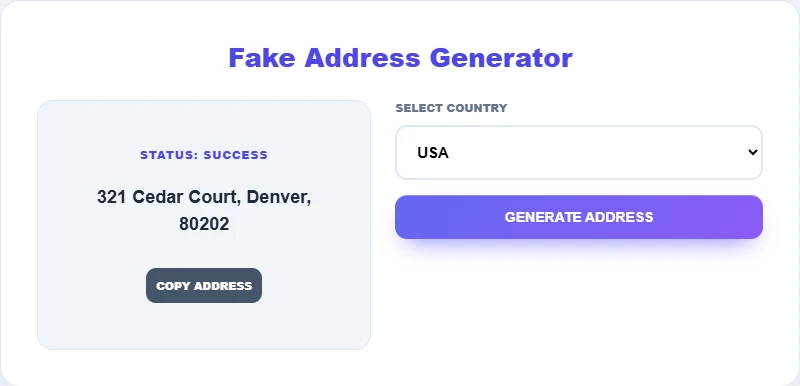
A fake address generator combines a random house number, a common street or area name, a real city and a postal code in that country’s usual format. For example, a US address might read "321 Cedar Court, Denver, 80202" and a Japanese one "3-4-5 Namba, Osaka, 542-0076". The addresses are for testing and display only; they are not linked to any real person.
Table of Contents
Developers, QA testers and designers need addresses all the time: to check checkout forms, to fill sample databases, to see how a label or invoice layout handles long lines, or to demo software without exposing customer data. Typing "123 Test Street" over and over does not show how real data behaves.
This fake address generator gives you a properly formatted address for each supported country in a couple of seconds. It runs in your browser and nothing is stored.
What Is a Fake Address Generator?
It is a tool that builds placeholder addresses from lists of common street names, real cities and valid-looking postal code patterns. Each result follows the local format, such as house number before street name in the US, or block-and-building numbering in Japan, so it looks natural in forms and mockups.
Supported Countries
| Region | Countries |
|---|---|
| South Asia | India, Pakistan, Bangladesh |
| Americas | USA, Canada, Mexico, Brazil |
| Europe | Germany, Russia, Turkey |
| East and Southeast Asia | Japan, Vietnam, Philippines |
| Middle East and Africa | Egypt, Iran, Nigeria, Ethiopia, Tanzania, DR Congo |
| Oceania | Australia |
Address Formats by Country
| Country | Typical format | Example from the tool |
|---|---|---|
| USA | Number, street, city, ZIP code | 321 Cedar Court, Denver, 80202 |
| Japan | Block-building-unit, district, city, postal code | 3-4-5 Namba, Osaka, 542-0076 |
| India | House or flat, sector or area, city, PIN code | House 3, Sector 21, Chandigarh, 160022 |
| Pakistan | House, colony or block, city, postal code | House 18, Shah Faisal Colony, Multan, 60000 |
How to Use the Fake Address Generator
Step 1: Select a Country
Open the Select Country menu and choose one of the 20 supported countries.

Step 2: Generate an Address
Press Generate Address. After a short moment the status changes to Success and a new address appears in the left panel. Press the button again for a different one.
Step 3: Copy It or Try Another Country
Click Copy Address to paste it into your form, spreadsheet or design file. Switch countries to compare formats; Japan, for example, uses numbered blocks such as 3-4-5 instead of street numbers.

Common Uses for Fake Addresses
- Form and checkout testing: check validation, autocomplete and how long addresses wrap.
- Sample databases: seed development and staging systems with realistic data.
- UI and print layouts: preview shipping labels, invoices and profile pages.
- Localisation work: see how your app handles different address orders and postal code styles.
- Training and demos: show CRM or logistics software without real customer details.
Use Fake Addresses Responsibly
Generated addresses are for testing and creative work. Do not use them to mislead businesses, avoid deliveries or payments, register accounts that need a genuine address, or pretend to live somewhere you do not. Some generated combinations may match a real location by chance, so never send real mail or visitors to them.
Tips for Better Test Data
- Generate several addresses per country to catch edge cases such as long city names.
- Pair addresses with names from a fake identity tool for complete test profiles.
- Keep test data clearly labelled so it is never mixed with real customer records.
- Check postal code validation rules for each country in your own system.
Need full test profiles? Use the Fake Identity Generator for names, phone numbers and emails. To format exported lists, try the CSV Formatter.
Frequently Asked Questions
Is the fake address generator free?
Yes. It is free, needs no sign-up and runs in your browser.
Are the generated addresses real?
They combine real city names and realistic postal code patterns with random house numbers and street names. They are not tied to any person and are meant for testing only.
Which countries are supported?
Twenty, including the USA, India, Pakistan, Bangladesh, Japan, Germany, Canada, Australia, Mexico, Brazil, Nigeria and Egypt.
Can I use a fake address to sign up for services?
No. Services that ask for an address usually need a genuine one, and giving false details can break their terms or the law. Use generated addresses only in test systems.
How do I copy the address?
Press Copy Address under the result and paste it wherever you need it.
Is any data saved?
No. Addresses are created in your browser and nothing is stored or sent.